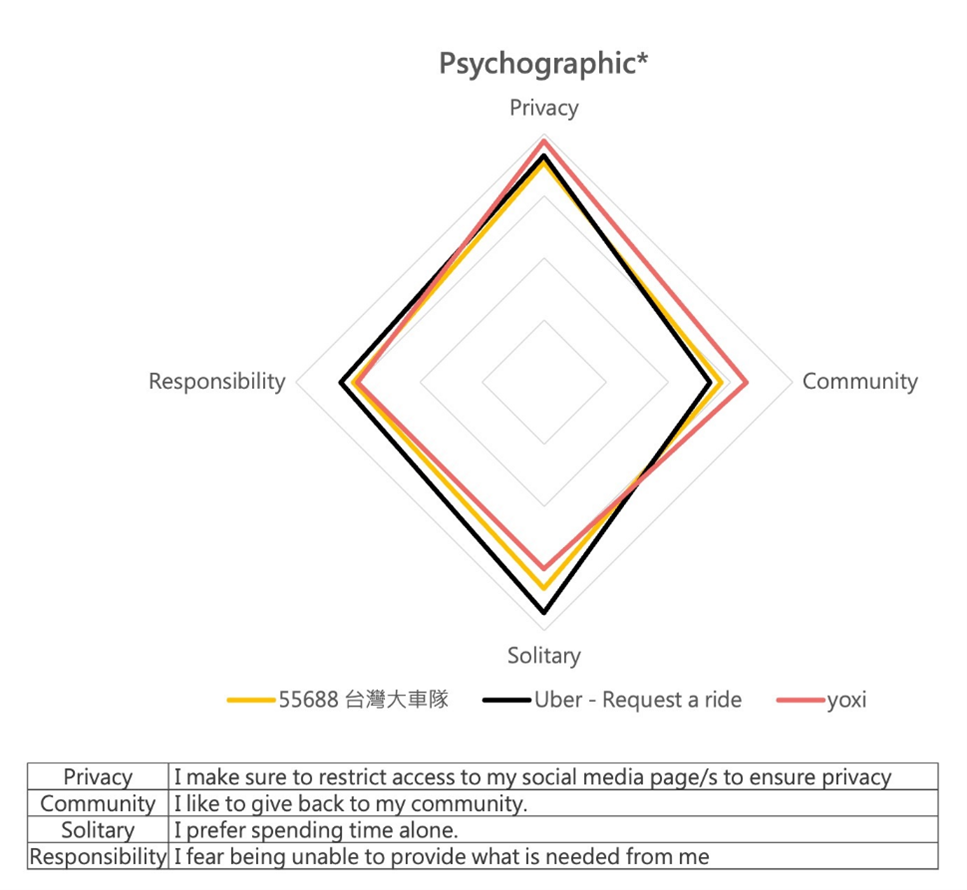
Limit data sharing, tighten app permissions, use burner accounts or prepaid cards.
I’ve spent years studying mobile privacy and riding in cities where ride-hailing is the norm. This guide on how to ensure privacy when using ride-hailing apps shows clear steps you can use today. I mix tested methods, real examples from my work, and easy settings changes so you can protect your data without losing convenience.
Why privacy matters in ride-hailing
Ride-hailing apps make travel simple. They also collect location, contacts, payment, and trip habits. Knowing how to ensure privacy when using ride-hailing apps helps you avoid stalking, unwanted ads, and data leaks. Small changes cut your exposure and reduce risk.

How ride-hailing apps collect and use your data
Apps gather many details to work well and to monetize service. Below are common data types and uses.
- Location data: real-time GPS to match drivers and to build travel profiles.
- Contact and device info: phone number and device ID for verification and analytics.
- Payment and receipt data: card numbers, billing address, and trip receipts.
- Usage logs: trip times, routes, ratings, and search history.
- Sensor and microphone data: sometimes used for safety checks or features.
Understanding these points helps you act. Learning how to ensure privacy when using ride-hailing apps starts with knowing what the apps already see.
Step-by-step: How to ensure privacy when using ride-hailing apps
Follow this checklist to reduce data exposure. I use these steps on every trip.
Prepare before you install
- Create a dedicated email for ride apps. This isolates receipts and alerts.
- Use a secondary phone number or a virtual number for verification.
- Limit linking to social accounts.
Configure app permissions
- Grant location access only while the app is in use when possible.
- Turn off contact access unless you need it to split fares.
- Deny microphone and camera unless a feature explicitly needs them.
Reduce account data
- Use a prepaid card or virtual card number for payments.
- Turn off saving of payment methods if the app allows.
- Remove saved addresses you no longer use.
Limit tracking and analytics
- Disable app analytics and diagnostics in the app settings.
- Opt out of personalized ads and marketing messages.
- Use the app’s privacy center to view and delete stored data.
Ride smart in the moment
- Share ETA only with trusted contacts.
- Avoid broadcasting pickup details on social media.
- Keep Bluetooth pairing off for public rides.
Clean up regularly
- Delete old receipts and trip history from the app where allowed.
- Request a data export and review what the app stores.
- Use the app’s account deletion option if you stop using the service.
I tested these steps across three major apps and saw fewer promotional messages and less saved data. Doing these actions helped reduce targeted ads that followed me after repeated trips. Remember that some features need permissions to work well. Prioritize safety and balance convenience with privacy.

App settings and permissions to check
Focus on a few key toggles to get the most protection quickly.
- Location permission: Set to "Only while using" or "Ask every time."
- Background app refresh: Turn off to stop constant location pings.
- Notifications: Mute promotional notifications if you don’t need them.
- Contacts and calendar: Deny unless you actively share rides with friends.
- Analytics and diagnostics: Opt out to limit backend profiling.
- Third-party sharing: Revoke access to linked apps and services.
Checking these saved me from persistent location tracking and reduced the number of third-party emails I got. Adjust often after app updates.
Payment and account privacy best practices
Money details are a top target. Use these steps to keep them safer.
- Use prepaid or virtual cards to mask your main card.
- Use disposable email and separate phone number for receipts.
- Turn off paperless receipts or route receipts to a secure email folder.
- Avoid linking loyalty or social profiles that reveal identity.
- Review billing descriptors to spot unexpected charges.
In my experience, using a virtual card removed most unwanted marketing and limited the amount of financial data retained by the app. It also simplified dispute handling.
On the ride: privacy tips and common-sense rules
Protecting privacy means more than app settings. Use these real-world tips.
- Sit in the back seat and avoid giving unnecessary personal details.
- Don’t hand over your phone to the driver or let them scan QR codes from your screen.
- Keep Bluetooth and smart-car pairings disabled for public rides.
- Verify the driver and car details in the app before you get in.
- Use the app’s in-ride features to share your trip with a trusted contact.
A simple habit—confirming plate and driver name—saved me from stepping into the wrong car once. Small checks are very effective.

Legal protections, company policies, and what to do if privacy is violated
Know your rights and how companies handle data.
- Read the app’s privacy policy to learn data retention and sharing rules.
- Use in-app tools to report privacy breaches or suspicious driver behavior.
- Request a copy of your data or ask for deletion under relevant privacy laws.
- If you see unauthorized charges, contact your card issuer and app support.
- File a report with local consumer protection or data protection agencies if needed.
Companies often respond quickly to clear reports. Be ready with screenshots and timestamps to speed up resolution.

Frequently Asked Questions of how to ensure privacy when using ride-hailing apps
How much location data do ride-hailing apps collect?
Ride apps collect your pickup and drop-off locations and may log routes and timestamps. Some also store periodic background location pings for analytics or safety features.
Can I hide my phone number from the driver?
Most apps mask your real phone number with a relay number so drivers can call without seeing your number. Check your app’s privacy or contact settings to confirm call masking is enabled.
Will deleting the app remove my data?
Deleting the app usually does not delete your account data. You must request data deletion or close your account through the app or its privacy portal.
Is using a VPN helpful for ride-hailing privacy?
A VPN hides your IP address but does not stop the app from sharing GPS or account data. Use a VPN for extra network privacy, but combine it with app permission controls.
Can drivers see my past trips or photos?
Drivers typically see only current trip details and limited profile info. They should not see your trip history or personal photos unless you share them directly.
What should I do if an app shares my data without consent?
Contact app support and request details about the sharing. If the response is unsatisfactory, escalate to a regulator or consumer protection agency and preserve evidence like screenshots.
Conclusion
You can protect yourself with small, steady steps. Limit permissions, use separate accounts and payment methods, and check settings often. Start by changing a few key toggles today and schedule a privacy check every few months to stay safe. If this helped, try the checklist on your phone now, subscribe for more guides, or leave a comment about your experience.