Are you wondering if you can use your Nanit baby monitor without paying for a subscription? You’re not alone.
Many parents want to know what features they can access for free and whether skipping the subscription means missing out on important monitoring tools. The good news is, you don’t have to sign up for a subscription to get reliable, real-time video and audio of your little one.
But what exactly comes with the free version, and when might you want to consider upgrading? Keep reading to discover how Nanit works without a subscription and what you can expect to get right out of the box. This way, you’ll know if the basic setup covers all your needs or if a subscription is worth it for your peace of mind.
Nanit Without Subscription
The Nanit baby monitor works even without a subscription plan. You get basic features that help keep an eye on your baby. Many parents find these features enough for daily use. The subscription adds extra insights but is not required to monitor your child.
Using Nanit without a subscription still allows live video and sound. You can receive real-time alerts for movement and noise. The app supports two-way audio, so you can talk to your baby. Temperature and humidity tracking also work without extra costs.
Basic Features Available Without Subscription
Live HD video streaming is accessible anytime from your phone. Motion and sound notifications alert you instantly. Breathing motion monitoring works without a subscription. You can play white noise or nature sounds through the app. Two users can access the monitor with adjustable permissions.
Limitations Without Nanit Insights
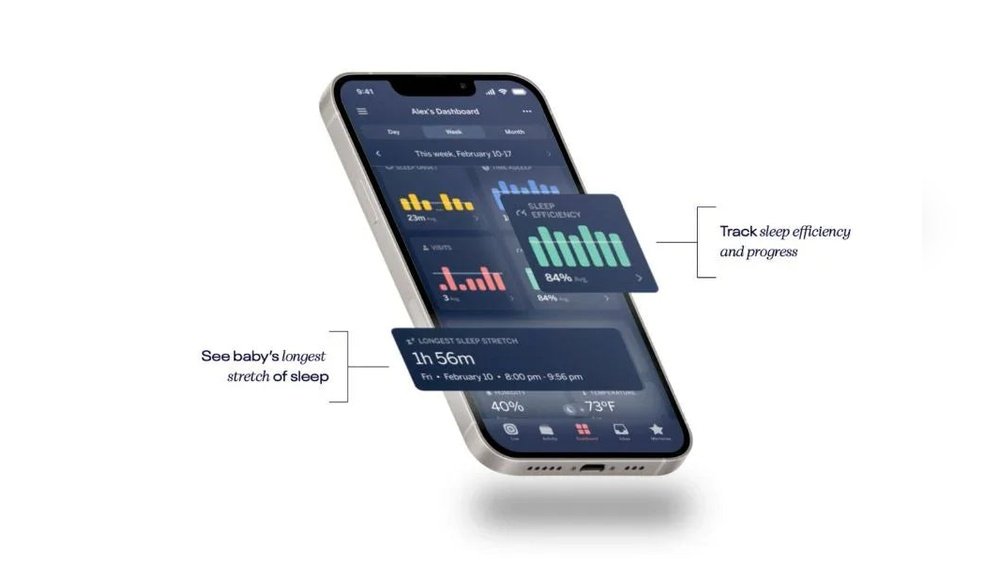
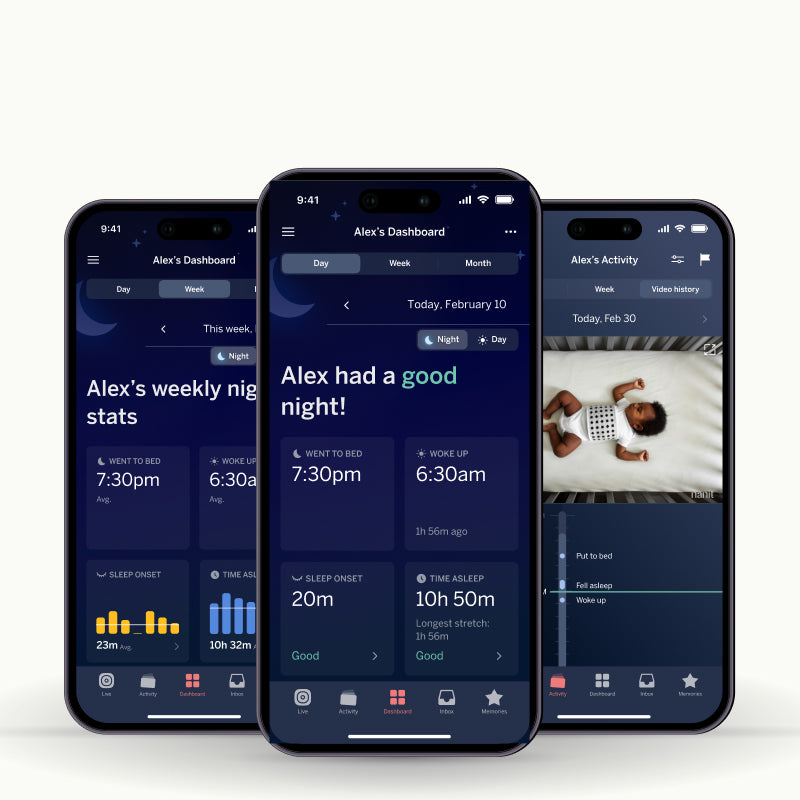
Without the subscription, detailed sleep reports are not available. You miss out on personalized sleep coaching tips. Historical video recordings are limited or unavailable. Advanced analytics on baby’s sleep patterns require Nanit Insights. The core monitoring functions remain active without these extras.
How To Use Nanit Without Subscription
Download the Nanit app and set up the camera on your Wi-Fi. Connect your phone to the same network during initial setup. Skip the subscription offer to use basic monitoring features. Use the app to watch live video and get alerts. Manage sound, temperature, and user permissions easily.
Free Features Available
The Nanit baby monitor offers useful features even without a subscription. These free features cover essential baby monitoring needs. They help parents keep an eye on their baby with ease and comfort. Using Nanit without a subscription still gives access to many helpful tools.
Parents can watch live video and hear real-time sounds. The app sends notifications for motion and sound detected. It also allows two-way audio communication. This means parents can talk to their baby through the monitor.
Live Video Streaming
Watch your baby anytime from anywhere using the Nanit app. The live video stream is clear and easy to access. No subscription is needed for this feature. Parents can check on their baby without delay.
Nanit sends instant notifications when sound or motion is detected. These alerts help parents respond quickly. The alerts work even without a subscription. They keep parents aware of their baby’s activity.
Two-way Audio
Talk to your baby through the monitor using two-way audio. This feature is available for free. It allows soothing your baby from another room. Parents can hear and be heard easily.
Environmental Monitoring
Track room temperature and humidity to keep the nursery comfortable. Nanit provides this data without extra cost. Maintaining the right environment helps your baby sleep better.
Background Audio And Sounds
Listen to your baby with background audio anytime. Nanit also offers white noise and nature sounds. These sounds help calm and soothe your baby. Use them without a subscription.
Live View Access
Live View Access lets you watch your baby in real time through the Nanit app. You can use this feature without a subscription. Basic monitoring features like sound alerts and two-way audio remain available for free.
Live View Access Without Subscription
The Nanit baby monitor offers live view access even without a subscription. You can watch your baby in real time from anywhere using the Nanit app. This feature works on smartphones, tablets, and other devices.
Live view lets you check your baby’s crib anytime. It streams HD video so you see clear images. This helps you feel connected and reassured without extra costs.
Features Included In Free Live View
Even without subscribing, you get important features with live view access. Real-time sound and motion alerts notify you if your baby moves or makes noise. You can also use two-way audio to talk or soothe your child remotely.
Temperature and humidity tracking help maintain a comfortable crib environment. Background audio lets you listen quietly without video, saving battery and data. These functions make the free live view helpful for everyday use.
Limitations Of Free Live View
The free live view has some limits compared to the subscription. It does not include detailed sleep insights or video history playback. You cannot review past recordings or get personalized sleep guidance.
Live view works only while you are connected to the internet. If your internet is down, live streaming will pause. Still, for basic monitoring, the free live view covers key needs well.
Sound And Motion Alerts
Sound and motion alerts help you stay aware of your baby’s activity. These alerts notify you instantly if your baby moves or makes noise. This feature gives peace of mind, especially during sleep time.
Using Nanit without a subscription still allows access to real-time sound and motion alerts. You get notifications on your phone whenever the camera detects movement or sound. This ensures you never miss important moments.
How Sound Alerts Work Without Subscription
Sound alerts notify you if your baby cries or makes any noise. The camera listens continuously and sends an alert to your phone. This feature works even without a paid plan. It helps parents respond quickly to their baby’s needs.
How Motion Alerts Function Without Subscription
Motion alerts detect when your baby moves in the crib. The camera senses any movement and sends an instant notification. This works on the basic Nanit app without extra fees. It helps you watch over your baby from anywhere.
Limitations Of Alerts Without Subscription
Without a subscription, you receive live alerts but miss some advanced features. For example, you cannot access detailed sleep insights or history. Alerts are real-time only, with no stored data or summaries. Still, basic alerts cover essential monitoring needs well.
Breathing Motion Monitoring
Breathing Motion Monitoring is a key feature of the Nanit baby monitor. It tracks your baby’s breathing patterns without any wearables. The camera uses advanced technology to detect the rise and fall of your baby’s chest. This helps parents feel more secure about their baby’s safety during sleep.
This feature works by using a special algorithm to analyze motion. It alerts parents if the breathing motion stops or changes significantly. Breathing Motion Monitoring runs continuously and quietly in the background. It does not require physical contact with the baby, ensuring comfort and ease.
Breathing Motion Monitoring Without Subscription
You can use the Breathing Motion Monitoring feature without a subscription. Nanit allows access to this function as part of its basic free features. Parents can see the breathing status in real time through the app. This helps monitor the baby’s safety without extra costs.
Limitations Without Subscription
Some detailed breathing insights and historical data need a subscription. Without it, you only get live alerts and the current breathing status. The free version does not store past breathing patterns or trends. This means less data for long-term monitoring and analysis.
How To Access Breathing Motion Monitoring
Set up your Nanit camera and connect it to the app. The breathing motion icon will appear on the live video screen. It shows a green check when breathing is normal. If breathing stops, the icon changes and sends an alert immediately.
Credit: www.nanit.com
Temperature And Humidity Tracking
Temperature and humidity tracking is a key feature of the Nanit baby monitor. It helps parents keep the nursery environment safe and comfortable for their baby. Knowing the room’s conditions can prevent issues caused by too much heat, cold, or moisture.
This feature works by using built-in sensors in the Nanit camera. These sensors measure the air temperature and humidity levels continuously. The data appears in the Nanit app for easy monitoring.
Temperature And Humidity Tracking Without Subscription
You can use Nanit’s temperature and humidity tracking without a subscription. The basic app version shows real-time room conditions at no extra cost. This allows parents to check the nursery environment anytime.
The feature runs automatically with the camera on the same Wi-Fi. No need to pay for extra services to access this useful data.
How Temperature And Humidity Data Helps
Watching temperature and humidity helps parents avoid risks like overheating or dry air. Babies need a stable room temperature, usually between 68 and 72 degrees Fahrenheit. Humidity should stay between 30% and 50% to keep the air healthy.
Adjusting room conditions based on Nanit’s data improves baby comfort and sleep. It also reduces chances of colds, dry skin, or allergies.
Limitations Without Subscription
Without a subscription, you get real-time temperature and humidity readings only. Historical data and trends require an Insights membership. These advanced reports help spot patterns over days or weeks.
Still, the basic tracking feature is enough for most parents to keep the nursery safe and cozy.
Two-way Audio And Sounds
Two-way audio and sounds are key features in baby monitors like Nanit. They let you hear your baby and speak back through the camera. This helps parents stay close, even from a distance.
Nanit offers clear sound quality for both listening and talking. You can soothe your baby with your voice or white noise sounds. These sounds help calm the baby and improve sleep.
Using Two-way Audio Without A Subscription
You can use two-way audio on Nanit without a subscription. The feature works through the Nanit app at no extra cost. This means you hear your baby and talk to them anytime.
Access is simple and included in the basic setup. No monthly fees are needed to use the two-way talk function.
Sound Options Available In Free Mode
Nanit provides white noise and nature sounds without a subscription. These sounds help babies relax and fall asleep faster. You can control sound volume and select from a few calming options.
These sounds play directly from the camera, letting you comfort the baby remotely.
Limitations Without Subscription
Some advanced sound features need a subscription. For example, detailed sleep reports and sound history are limited. The free version focuses on live audio and basic sound playback.
This still covers essential needs for real-time monitoring and soothing your baby.

Credit: www.nanit.com
Using Nanit On Public Wi-fi
Using your Nanit baby monitor on public Wi-Fi can be helpful when traveling or away from home. Public Wi-Fi networks are common in places like hotels, cafes, and airports. Connecting Nanit to these networks allows you to watch your baby remotely. Still, public Wi-Fi has some risks that you should consider. Protecting your privacy and data is important for any device connected to public internet.
How To Connect Nanit To Public Wi-fi
First, find the public Wi-Fi network and connect your phone. Open the Nanit app and follow the usual setup steps. Sometimes, public Wi-Fi requires logging in through a browser page. Nanit may not connect directly to these login pages. A good trick is to use your phone’s hotspot feature. Connect Nanit to your phone’s hotspot instead of the public Wi-Fi. This method keeps your connection stable and secure.
Security Concerns On Public Wi-fi
Public Wi-Fi networks can be less secure than home networks. Others on the network might try to access your data. Nanit streams video and audio, which could be intercepted if the network is unsafe. Avoid using public Wi-Fi for Nanit without extra protections. Using a VPN on your phone or hotspot can help keep your data safe. Always check that your Nanit app and camera use encrypted connections.
Limitations Of Using Nanit On Public Networks
Public Wi-Fi can be slow or unstable. This may cause video lag or disconnections. Some networks block the ports Nanit needs to work properly. Hotel and cafe Wi-Fi often have limits on device connections. If your Nanit disconnects often, try switching to a mobile hotspot. Keep in mind that streaming video uses a lot of data. Make sure your mobile plan supports this use to avoid extra charges.
Offline And Local Network Use
The Nanit baby monitor works even without an active subscription. One key feature is its ability to operate on a local network. This means the camera and your device connect through the same Wi-Fi. You can watch live video and hear sounds without the internet.
This local connection helps keep your data private. It also reduces delays in video streaming. Nanit does not store footage in the cloud without a subscription. Instead, it sends data directly between the camera and your phone or tablet.
Connecting Nanit On Your Local Wi-fi Network
Set up the Nanit camera on your home Wi-Fi. Make sure your smartphone or tablet uses the same network. This setup allows the app to connect directly to the camera. You can view live video and listen to sounds in real time.
The camera will not need internet to stream video locally. This keeps your baby’s feed secure inside your home. It also saves your internet data usage.
Using Nanit Without Internet Access
You can use Nanit without an internet connection at home. The camera and your device communicate over Wi-Fi only. This means you can monitor your baby even during internet outages.
Remote viewing from outside your home requires internet. But for local use, no subscription or cloud connection is needed. Nanit still delivers live video, motion alerts, and two-way audio within your local network.
Limitations Of Offline Use
Without a subscription, some advanced features are not available. Nanit will not save video clips to the cloud. You cannot access recorded footage from outside your home network.
Also, notifications may be limited to local alerts. The system relies on your Wi-Fi connection to send updates. If your Wi-Fi is down, the camera cannot communicate with your phone.

Credit: www.nanit.com
Recording And Video Storage
Recording and video storage are key features of the Nanit baby monitor. They help parents keep an eye on their baby anytime. Understanding how these features work without a subscription can guide your choice.
Nanit records video when it detects movement or sound near the crib. This means it does not record all the time. It saves important moments automatically. This helps save storage space and battery life.
Recording Without A Subscription
You can use Nanit to record videos without a subscription. It records short clips when it senses motion or sound. These clips show up in the app for you to watch later. The free service does not offer full continuous recording.
Live video streaming is available without a subscription. You can watch your baby in real time from your phone. This is helpful for quick checks anytime or anywhere.
Video Storage Options
Without a subscription, video clips save only on your device. Nanit does not store videos in the cloud for free users. This means you must download important clips to keep them safe.
Subscription users get cloud storage for longer video history. Without it, you have limited access to past recordings. You can still save key moments manually to your phone.
Benefits And Limitations
Using Nanit without a subscription gives basic recording and live view. It covers most needs for daily monitoring. The main limit is less video history and no cloud backup.
This setup suits parents who want simple, real-time baby monitoring. For extended video storage and detailed reports, a subscription is required.
Frequently Asked Questions
What Do You Get With Nanit Free?
Nanit free offers live HD video, real-time sound and motion alerts, breathing motion monitoring, temperature and humidity tracking, two-way audio, white noise, and supports two users with adjustable permissions.
How To Get Nanit To Work In Hotel?
Connect your Android phone to hotel WiFi and enable its mobile hotspot. Then, link both your regular phone and Nanit to this hotspot. Pair Nanit as usual, then disconnect your regular phone from the hotspot. This setup allows Nanit to work smoothly in a hotel.
Can Nanit Work Offline?
Nanit works offline only if your device connects to the same Wi-Fi network as the camera. Otherwise, it needs internet.
Is Nanit Always Recording?
Nanit records only when it detects motion or sound in the crib. It does not record continuously. You can save meaningful moments automatically.
Can You Use Nanit Without A Subscription?
Yes, Nanit works without a subscription with live video, sound, and motion alerts.
What Features Are Free On Nanit Without Subscription?
Free features include live HD video, two-way audio, breathing monitoring, and notifications.
Does Nanit Record Videos Without A Subscription?
Nanit records only when motion or sound is detected, even without a subscription.
Can I Access Nanit Live View Remotely Without Subscription?
Yes, remote live view is available without a subscription via the Nanit app.
Are Sleep Insights Available Without A Nanit Subscription?
Basic sleep tracking is free, but detailed sleep insights require a subscription.
How Many Users Can Access Nanit Without A Subscription?
Up to two users can access the Nanit camera without subscribing.
Conclusion
Nanit works well without a subscription for basic monitoring. You get live video, sound alerts, and breathing motion tracking. The app lets two users access the camera with simple controls. Some advanced features need a subscription, but essentials remain free.
Using Nanit without paying still helps keep your baby safe. This option suits parents wanting core functions without extra costs. Choose what fits your needs and budget best.





