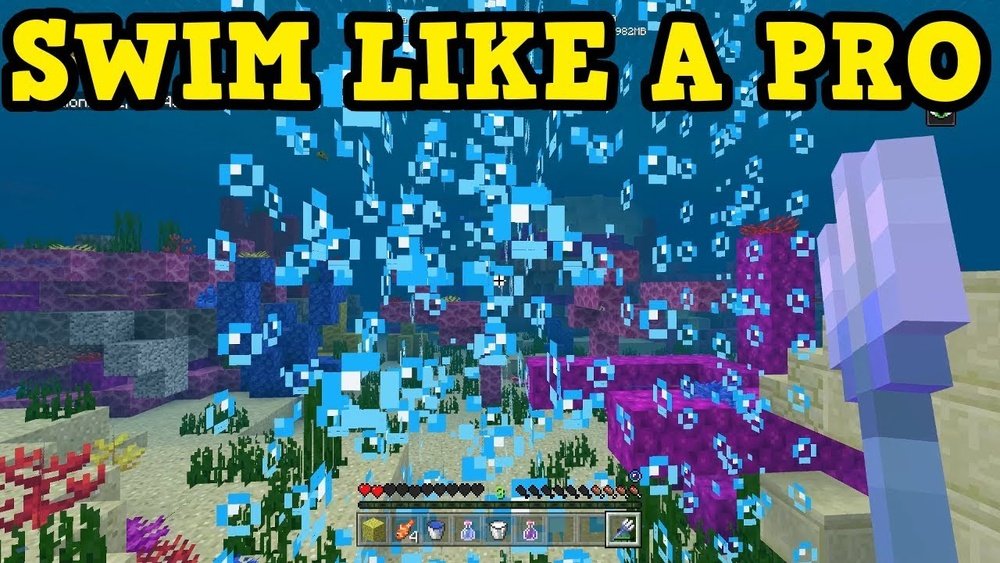
Swimming in Minecraft is more than just moving through water. For many players, water can feel confusing and even dangerous, especially for beginners. But once you learn how to swim and master underwater movement, you unlock a new side of the game—full of adventure, hidden treasures, and unique challenges.
Swimming lets you explore the ocean, gather rare resources, and even escape from enemies. Whether you’re just starting or want to get better at underwater travel, understanding the swimming system in Minecraft will make your gameplay more fun and less frustrating.
This guide will show you everything about how to swim in Minecraft—from basic controls to advanced movement, important mechanics, and pro tips you won’t find in most tutorials. We’ll cover both Java and Bedrock editions, explain the differences, and highlight common mistakes beginners make. If you want to dive into underwater ruins, build impressive bases, or simply survive, this article will help you feel confident in any Minecraft water situation.
Why Swimming Matters In Minecraft
You might ask: why spend time learning how to swim in Minecraft? The answer is simple—water is everywhere in the game. Rivers, lakes, and oceans cover large parts of every world. Some important structures, like shipwrecks and ocean monuments, are only found underwater. You need to swim to collect special items such as kelp, coral, or sponges. Also, many adventures—like escaping from drowned mobs or searching for buried treasure—require good swimming skills.
Swimming is not just about survival. It also helps you build faster and travel efficiently. For example, you can create ice boat highways under the sea, or make hidden underwater bases that other players can’t find easily. If you want to win in multiplayer or explore everything Minecraft offers, knowing how to swim well is essential.
Basic Swimming Controls And Mechanics
Swimming in Minecraft is not hard, but the controls can feel different depending on your platform. Here’s how to start swimming and what happens when you enter water.
Entering Water
To start swimming, simply walk or jump into any water source that is at least two blocks deep. If you are in shallow water (one block deep), your character will just walk or wade slowly. True swimming starts when you are fully submerged.
Swimming Controls: Java Vs Bedrock
Swimming controls change a bit depending on which version of Minecraft you play. Here’s a quick comparison:
| Action | Java Edition | Bedrock Edition |
|---|---|---|
| Swim Forward | Hold W (Sprint Key in Water) | Hold Forward (Sprint Button in Water) |
| Swim Up | Hold Spacebar | Hold Jump Button |
| Swim Down | Hold Left Shift | Hold Sneak Button |
| Dive into Swim | Sprint while in water | Sprint while in water |
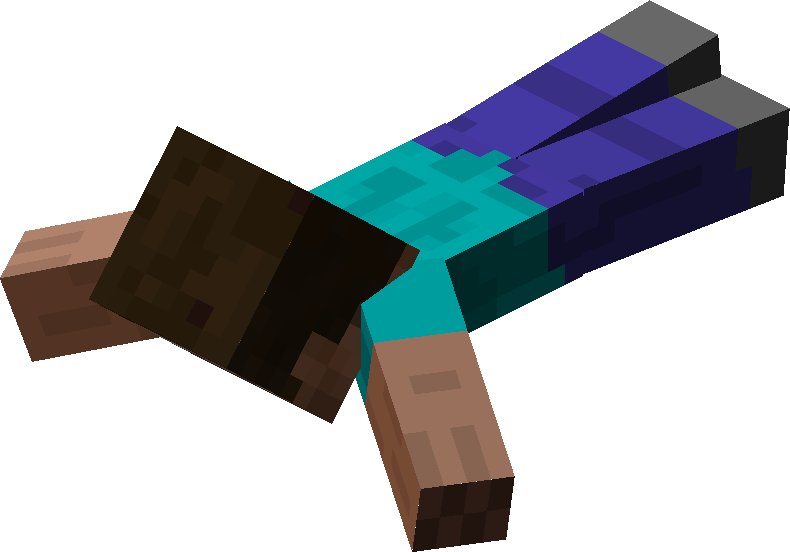
To start swimming (instead of just floating), you need to sprint while in water. In Java, double-tap the forward key (W) or hold the sprint key (usually Ctrl). In Bedrock, press the sprint button while moving in water. You’ll notice your character’s body becomes horizontal, and you move much faster.
Basic Swimming Actions
- Swim Forward: Hold the sprint key and forward.
- Swim Up: Hold the jump key to move upwards.
- Swim Down: Hold the sneak key to dive deeper.
- Exit Water: Move toward a block at the edge, and press jump to climb out.
Breath Meter And Drowning
When underwater, you’ll see a row of bubbles above your health bar. This is your breath meter. If you run out of bubbles, your character starts taking damage and can eventually drown. Surface for air or use special items to avoid this.
Beginner insight: Many new players forget to watch their breath meter, especially when focused on exploring. Make it a habit to check often, and always plan your route to the surface.
Advanced Swimming: Diving, Sprinting, And Underwater Movement
Once you know the basics, you can practice more advanced movements. Swimming is not just about holding forward; using the controls smartly will help you move faster, avoid dangers, and explore better.
Diving And Sprint-swimming
To dive, look down and hold the forward and sprint keys. Your character will angle downward and move under the surface quickly. This is useful for escaping attacks or reaching underwater structures.
Sprint-swimming is much faster than normal. You can use sprint-swimming to:
- Escape from hostile mobs like drowned or guardians
- Move quickly through long underwater tunnels
- Race other players in multiplayer
Turning And Maneuvering
When swimming, your turning speed is slower than on land. Practice turning your camera smoothly and planning your direction before you reach obstacles. If you hit a solid block, you’ll stop and stand up in the water.
Pro tip: When exploring tight underwater spaces, tap the sneak (shift) key to slow down and avoid crashing into blocks.
Transitioning Between Land And Water
It’s easy to get stuck when moving between land and water. Jump onto slabs or stairs at the edge to climb out quickly. If you want to enter water fast, sprint and jump in—this lets you dive smoothly.
Non-obvious insight: You can use trapdoors as a diving board. Place a trapdoor at water level, open it, and walk into the water. Your character will automatically start swimming.
Underwater Survival: Oxygen, Light, And Dangers
Staying alive underwater is a big part of swimming in Minecraft. Unlike land, you have to worry about running out of air, seeing in the dark, and fighting off special mobs.
Managing Oxygen
Your breath meter lasts for about 15 seconds underwater. Here’s how to avoid drowning:
- Surface Regularly: Plan your path so you can come up for air.
- Air Pockets: Sometimes, blocks like doors, signs, or trapdoors can create air pockets underwater. Stand in these to refill your breath.
- Bubble Columns: Look for bubble streams (from soul sand or magma blocks). These send you up or down and also refill your air when you enter them.
Special Items For Breathing
You can stay underwater longer using certain items:
- Turtle Shell Helmet: Lets you breathe for 10 extra seconds.
- Potion of Water Breathing: Lets you breathe underwater for 3 or 8 minutes.
- Conduit: A special block that gives you unlimited underwater breathing within its range.
Helpful example: If you want to build an underwater base, use water breathing potions or a conduit. This makes construction much easier.
Lighting Underwater
Water blocks most light, so it’s hard to see. Use sea lanterns, glowstone, or jack o’lanterns for bright underwater light. Torches won’t work underwater, but you can place them quickly on a block to create a brief air pocket and light source.
Underwater Enemies
The main hostile mobs you’ll face are:
- Drowned: Zombie-like creatures, sometimes with tridents.
- Guardians: Found near ocean monuments.
- Elder Guardians: Boss mobs in monuments.
Bring good armor and weapons, and avoid fighting without enough air.
Common Beginner Mistake
Many new players try to fight mobs underwater with regular swords. Tridents, bows with the Riptide enchantment, or Depth Strider boots work much better.
Swimming Gear And Enchantments
To swim effectively, special gear can make a huge difference. Certain enchantments and items boost your speed, let you breathe longer, or help you see better.
Best Gear For Swimming
- Leather Boots: Prevent you from sinking in powder snow, but not useful underwater.
- Turtle Shell: Gives you the Water Breathing effect for 10 extra seconds.
- Trident: A weapon that works well underwater, especially with the Riptide enchantment.
Useful Enchantments
Some enchantments are made for underwater movement:
- Depth Strider (Boots): Makes you swim faster. At level III, you move almost as fast in water as on land.
- Respiration (Helmet): Extends your breath meter.
- Aqua Affinity (Helmet): Lets you mine blocks underwater at normal speed.
- Riptide (Trident): Throws you forward in water or rain for fast travel.
Here’s how different enchantments help:
| Enchantment | Item | Main Benefit |
|---|---|---|
| Depth Strider | Boots | Swim faster |
| Respiration | Helmet | More air underwater |
| Aqua Affinity | Helmet | Faster mining |
| Riptide | Trident | Dash through water/rain |
Insider advice: Many players forget that Depth Strider and Frost Walker can’t go together on the same boots. Choose the one you need for your adventure.
Exploring Underwater Structures
Minecraft’s oceans hide many secrets and structures. Good swimming skills let you discover and loot them safely.
Shipwrecks
These look like broken ships and often contain chests with loot. They can be partly or fully underwater. Watch your air and bring doors or potions to avoid drowning while searching for treasure.
Ocean Ruins
Scattered on the sea floor, these small stone buildings have hidden chests. Drowned mobs sometimes spawn here. Break sand or gravel to find loot.
Ocean Monuments
Large prismarine temples guarded by guardians and elder guardians. Inside, you’ll find rare blocks like sponges and prismarine, plus gold blocks hidden in the core. Bring potions, good gear, and plan your attack.
Buried Treasure
Maps found in shipwrecks often lead to buried treasure on beaches or underwater. Dig carefully, and always bring a shovel.
Beginner insight: Mark your way back to the surface with torches or blocks, so you don’t get lost deep underwater.

Credit: minecraft.wiki
Building And Mining Underwater
Swimming is not just for exploring. Many players build bases, farms, or mines underwater. This has its own challenges.
Building Underwater
Placing blocks underwater is slower, unless you use Aqua Affinity. To clear water, use sponges, sand, or gravel to fill spaces, then remove them. Sponges can be dried in a furnace and reused.
Pro tip: Use doors, signs, or ladders to make air pockets while building. This lets you breathe and work without rushing.
Mining Underwater
Mining is slower without Aqua Affinity. Respiration enchantment helps you stay longer. Always bring blocks to create air pockets, and light your tunnels with sea lanterns.
Farming Underwater
You can plant kelp, seagrass, and even build underwater mob farms. Use bone meal to grow seagrass. Underwater farms are safe from most mobs.
Speedrunning And Multiplayer Swimming Techniques
Swimming can help you save time and compete better in multiplayer games.
Speedrunning Tricks
- Use Dolphin’s Grace (swimming near dolphins) to move incredibly fast.
- Combine Depth Strider boots and Riptide trident for top speed.
- Plan your water crossings to minimize time spent in slow areas.
Multiplayer Pvp
- Use water as an escape route.
- Knockback in water is less, so fights can last longer.
- Hide underwater with potions or turtle shells.
Non-obvious tip: In Bedrock Edition, tridents with Riptide can let you fly during thunderstorms—useful for fast escapes!
Common Swimming Mistakes And How To Avoid Them
Many players make simple mistakes that make swimming harder or more dangerous.
- Forgetting to Watch the Breath Meter: Always check your air bubbles.
- Panicking Underwater: Stay calm, look for air, and don’t click randomly.
- Using Wrong Tools: Bring the right gear, like Aqua Affinity and Respiration helmets.
- Fighting Without Planning: Don’t fight guardians or drowned without strong armor and weapons.
- Not Marking Exits: Always know how to get back to the surface or your base.
Swimming With Mobs: Dolphins, Turtles, And Fish
Not all underwater creatures are dangerous. Some can help you swim faster or find treasure.
Dolphins
Swimming near dolphins gives you Dolphin’s Grace, a speed boost. Feed dolphins raw fish, and they may lead you to shipwrecks or ruins.
Turtles
Turtles are passive, but you can breed them for scutes, which you need to craft a turtle shell helmet.
Fish
Fish like cod, salmon, and pufferfish add life to oceans. Pufferfish can poison you if you touch them, so be careful.
Insight: Many beginners ignore dolphins, but their speed boost is huge for exploring large oceans.
Swimming In Different Game Modes
Swimming works a bit differently in Creative, Survival, and Adventure modes.
- Creative: You can fly and move freely underwater with unlimited air.
- Survival/Adventure: You must watch your breath and health.
- Spectator: You move through blocks and water with no limits.
Tip: Practice swimming in Creative mode to learn movement before risking survival mode.
Updates And Changes To Swimming In Minecraft
Swimming changed a lot in Minecraft’s Update Aquatic (1.13). Before that, underwater movement was slow and awkward. Now, swimming is faster, more flexible, and feels smoother.
New features since Update Aquatic:
- Sprint-swimming with horizontal body position
- Swimming through 1-block gaps
- New mobs like dolphins, drowned, and turtles
- More structures and items for underwater use
Stay updated with the latest changes by reading the official Minecraft changelogs at the Minecraft Wiki.
Fun Swimming Challenges And Mini-games
Swimming is not just a tool—it can be part of Minecraft fun. Try these challenges:
- Underwater Maze: Build a maze underwater and race friends.
- Speed Swim Races: Use dolphins and Depth Strider to see who’s fastest.
- Build an Underwater Base: Challenge yourself to survive and build only under the sea.
- Treasure Hunt: Hide chests underwater for friends to find.
These games help you practice swimming skills in a fun way.
Swimming: Java Vs Bedrock Edition Differences
There are a few differences in swimming between Java and Bedrock:
| Feature | Java Edition | Bedrock Edition |
|---|---|---|
| Swim Animation | Smoother | Sometimes less fluid |
| Riptide Movement | Only in water/rain | Also during thunderstorms (flight) |
| Bubble Columns | Work with soul sand/magma | Work the same, but may look different |
| Control Sensitivity | Keyboard/mouse adjustable | Touch/console controls vary |
Try both editions if you can, and see which style fits you best.
Credit: minecraft.fandom.com
Practical Tips For Mastering Swimming
To become a real swimming pro in Minecraft, remember these final tips:
- Always Carry Extra Doors or Signs: For emergency air pockets.
- Enchant Early: Respiration and Depth Strider make a huge difference.
- Practice in Creative: Learn movement without risk.
- Use Dolphins: For fast ocean travel.
- Don’t Ignore Potions: Water Breathing and Night Vision are essential for long dives.
- Build Bubble Columns: For fast travel between your underwater base and the surface.
- Bring Extra Food: Swimming drains hunger faster, especially when sprinting.
Non-obvious insight: You can fit through 1-block gaps while swimming. Use this to create secret entrances that mobs can’t follow.
Frequently Asked Questions
How Do You Swim Faster In Minecraft?
Use the sprint key while in water to start fast swimming. Equip Depth Strider boots, swim near dolphins for Dolphin’s Grace, and use Riptide tridents for extra speed.
How Do You Breathe Underwater For A Long Time?
Wear a turtle shell helmet, drink a Potion of Water Breathing, use a conduit for unlimited air, or make air pockets with doors/signs. Respiration enchantment also extends your breath meter.
Can You Build Underwater Without Drowning?
Yes. Use air pockets (doors, signs), bring potions, and wear gear with the Respiration enchantment. Sponges help clear water for bigger builds.
What’s The Difference Between Swimming In Java And Bedrock Editions?
Java has slightly smoother animations and keyboard controls. Bedrock lets you use Riptide to fly during thunderstorms. Controls also vary on console and mobile.
What Gear Should I Use For Underwater Exploring?
Bring Respiration and Aqua Affinity helmets, Depth Strider boots, a trident (with Riptide), potions of Water Breathing, and extra doors or signs for air.
Swimming in Minecraft is a skill that opens new adventures and possibilities. With practice, good gear, and smart strategies, you’ll move through oceans and rivers with confidence. So dive in and explore a whole new world beneath the surface!

Credit: www.youtube.com





