To delete a model-driven app in PowerApps, remove the app from the maker portal or delete its solution.
I’ve built and cleaned up many Power Platform environments, so I’ll walk you through how to delete model driven apps PowerApps with clear, safe steps. This guide covers definitions, permissions, a checklist, step-by-step removal, recovery options, real-world tips, and troubleshooting so you can remove apps without breaking processes or losing data.

What is a model-driven app in PowerApps?
A model-driven app is a data-first Power Platform app that uses Dataverse tables, business logic, and views. These apps focus on forms, views, and processes and often sit inside solutions. Knowing what a model-driven app contains helps when you learn how to delete model driven apps powerapps safely.

When and why to delete model-driven apps PowerApps
You delete apps to remove clutter, reduce maintenance, or retire legacy processes. Deleting unused model-driven apps PowerApps can reduce support overhead and lower license confusion. Always check dependencies first to avoid unexpected breaks.
Pre-deletion checklist
Before you delete a model-driven app, confirm these items:
- Verify who uses the app and when.
- Check for active business rules, flows, or plugins tied to the app.
- Export the app or solution as a backup.
- Review environment backups and retention policies.
- Confirm you have the proper role to delete the app.
I once deleted an app without exporting the solution. I had to rebuild parts later. Back up first. This tip will save you hours when you learn how to delete model driven apps powerapps.
Step-by-step: How to delete model driven apps PowerApps
Follow these steps to remove a model-driven app. These instructions assume you have the required permissions.
- Open the Power Apps maker portal at make.powerapps.com and sign in.
- Choose the correct environment from the top-right environment selector.
- Select Apps from the left menu and find the model-driven app.
- Click the app’s ellipsis (More commands) and choose Delete. Confirm the prompt.
- If the app is inside a solution, open Solutions, select the solution, find the app, and remove it from the solution or delete the solution if appropriate.
- Check for dependent components like flows, forms, and dashboards and remove or reassign them.
- Verify the app is gone from the Apps list and test dependent processes.
If a delete option is greyed out, dependencies or permissions are likely blocking it. Learning how to delete model driven apps powerapps often means checking solutions and dependencies first.

Deleting an app vs deleting a solution
Deleting a standalone app removes that app definition only. Deleting a solution can remove multiple components at once. Choose carefully when you learn how to delete model driven apps powerapps because deleting a solution can remove related tables, views, and logic if they are unmanaged. Prefer exporting a managed solution for safe removal in production.

Recovering deleted model-driven apps PowerApps
Recovery options depend on what you deleted and your backup approach.
- If you exported a solution, re-import the exported file to restore the app.
- If you have environment backups, restore the environment or restore specific components from backup.
- If you deleted only the app record and not underlying components, recreate the app from the solution or re-add the app.
I recommend keeping regular solution exports. That practice made recovery quick for a project where an app was removed by mistake while learning how to delete model driven apps powerapps.
Permissions and limitations
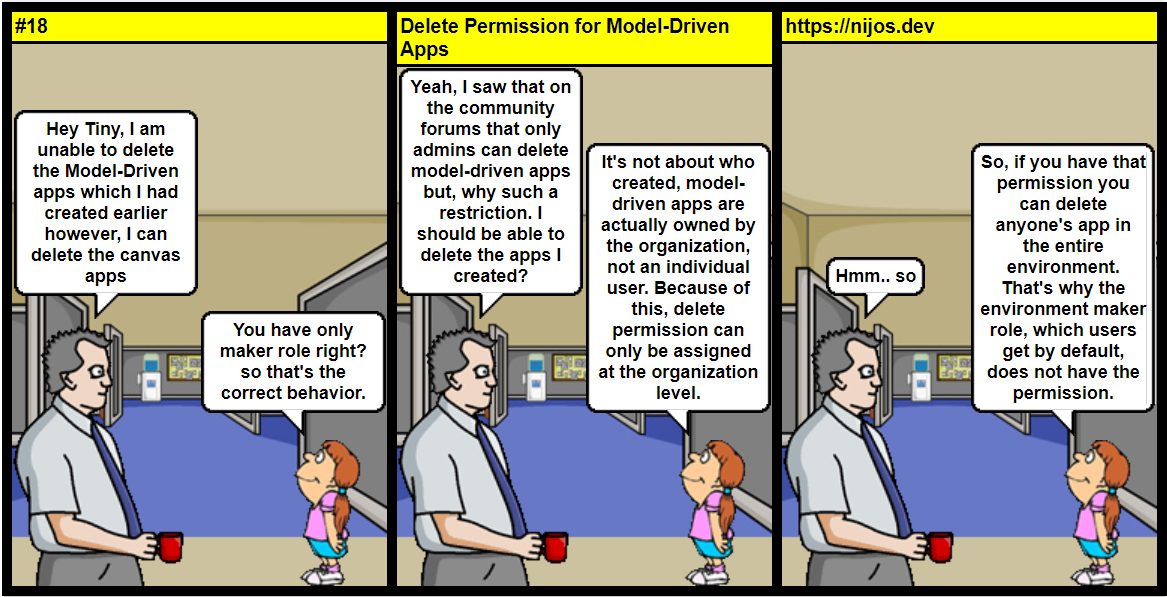
You need proper roles and privileges to delete model-driven apps PowerApps.
- Environment Admin and System Administrator roles typically allow deletion.
- Environment Maker can delete apps they own in many cases.
- Solution layer restrictions can prevent deletion of managed components.
If a component is managed, you may need to remove the managed solution or contact the solution publisher. Understanding permissions prevents common blocks when you attempt how to delete model driven apps powerapps.
Best practices and mistakes to avoid
Follow these practices to reduce risk:
- Export and store a backup before deleting.
- Communicate with users and stakeholders.
- Review and document dependencies.
- Use managed solutions for production lifecycle control.
Avoid deleting apps without notifying users. Once, I skipped stakeholder review and broke a weekly report. That taught me to add a short approval step before I delete model driven apps powerapps.
Troubleshooting common issues
Common problems and quick fixes:
- App won’t delete: Check for dependent flows, plugins, or other components and remove dependencies first.
- Greyed-out delete: Confirm your role and the solution’s managed/unmanaged status.
- Data still accessible: Deleting an app does not delete Dataverse tables. Clean data separately if needed.
PAA-style questions:
Can I delete an app that users still open? If users open it, deletion can cause interruptions. Inform them and schedule downtime.
Will deleting an app remove its data? Deleting the app typically does not delete Dataverse table data. Remove tables explicitly if you need to delete data.
Frequently Asked Questions of how to delete model driven apps powerapps
How do I delete a model-driven app from the maker portal?
Open make.powerapps.com, pick the environment, go to Apps, find the model-driven app, click More commands, and choose Delete. Confirm the deletion to remove the app.
Can I delete an app if it is part of a managed solution?
You cannot delete managed components directly. Remove the managing solution or contact its publisher. Export and re-import a customized unmanaged solution if needed.
Will deleting the app delete the Dataverse data?
Deleting the app does not typically delete Dataverse table data. To remove data, delete or clean tables explicitly and review retention policies.
What if delete is greyed out or blocked?
Check your user role, environment permissions, and component dependencies. Managed solutions and dependencies often block deletion.
How can I restore an accidentally deleted model-driven app?
Restore from an exported solution or environment backup. If you don’t have backups, recreate the app from the solution or re-import saved components.
Do I need admin rights to delete an app?
You usually need Environment Admin, System Administrator, or sufficient environment privileges. Environment Maker may delete apps they own in some setups.
Conclusion
Removing a model-driven app is simple when you follow a checklist, confirm permissions, export backups, and remove dependencies first. Take it slow, back up your work, and communicate with users to avoid surprises. If you found this guide helpful, export a solution now, try a test deletion in a sandbox, and share your experience or questions below.