You can only run a few official Apple apps on Android; full iOS apps won’t natively work.
I’ve spent years testing cross-platform apps, emulators, and remote solutions, so I know what works and what doesn’t when learning how to get apple apps on android. This guide explains which Apple apps are available on Android, safe workarounds for iOS-only features, step-by-step setup for official apps, and honest tips from real testing. Read on to learn practical, secure ways to access Apple services on your Android phone and when it’s simply not possible.
Can you run Apple apps on Android?
Short answer: most iOS apps can’t run on Android.
iOS apps are built with Apple frameworks and packaged as .ipa files. Android uses APKs and different system libraries. That fundamental difference means you can’t simply install iPhone apps on Android like you would a different Android app.
Why this matters:
- iOS apps rely on Apple-only APIs.
- App store rules and licensing limit official ports.
- Hardware and system calls differ between iOS and Android.
You can, however, use official Apple apps that Apple released for Android, use web versions, or stream an app from a Mac. These are the practical ways to get Apple functionality on Android.

Ways to get Apple apps or Apple features on Android
Use official Apple apps on Google Play:
- Apple Music: full app for Android with streaming and library sync.
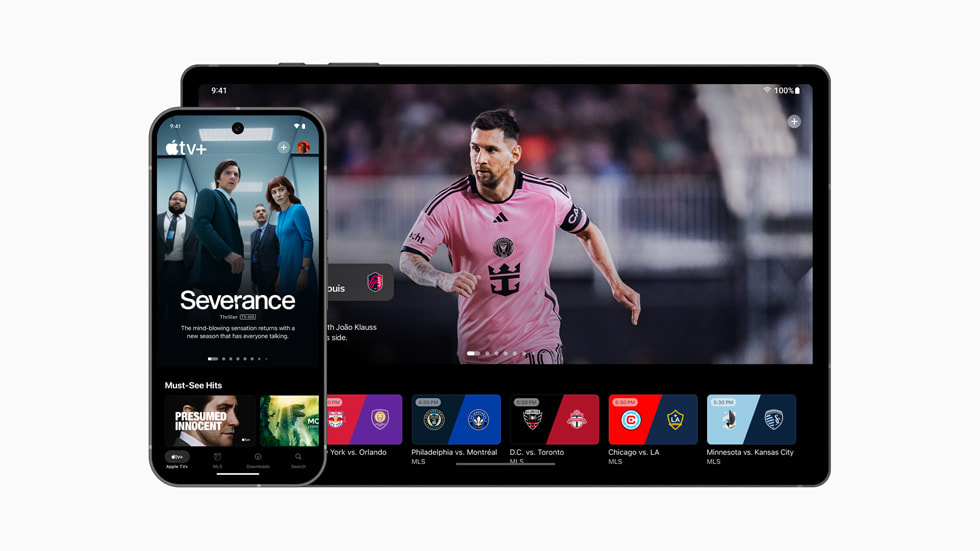
- Apple TV: watch shows and movies you purchased or rent.
- Apple Support: available to access help resources and chat support.
- Move to iOS: helps transfer data from Android to an iPhone during setup.
Use web versions:
- iCloud web lets you access Mail, Contacts, Calendar, Notes, and Find My via a browser.
- Apple services like account management and subscriptions can often be managed online.
Remote or streaming solutions:
- Remote desktop into a Mac or use a cloud Mac service to run iOS apps indirectly.
- App-streaming setups let you interact with an app hosted elsewhere.
Experimental projects and emulators:
- Some community emulators claim to run iOS apps on Android, but they are unreliable and risky.
- Emulators often lag, break app compatibility, and raise legal and security questions.
In practical terms, the safest route for most people is to use official Android apps, web access, or a remote Mac when needed.
Step-by-step: How to get official Apple apps on Android
Apple Music
- Open the Google Play Store on your Android device.
- Search for Apple Music and install the app.
- Sign in with your Apple ID or start a trial.
- Enable permissions for storage and media controls for a smooth experience.
Apple TV
- Install Apple TV from the Play Store.
- Sign in with your Apple ID to access purchases and subscriptions.
- Use Chromecast or a supported device to cast to a TV if needed.
Move to iOS (if switching to iPhone)
- During iPhone setup, choose Move Data from Android.
- On Android, install Move to iOS and follow on-screen codes and prompts.
- Transfer messages, photos, contacts, accounts, and more.
iCloud and web access
- Open a secure browser on Android.
- Go to iCloud.com and sign in.
- Use web apps for Mail, Contacts, Calendar, and Notes.
These steps cover how to get Apple apps on Android using official channels. They keep your account secure and minimize risk.

Workarounds to access iOS-only apps on Android
Use a Mac as a bridge
- Apps like AirMessage or other server-based solutions let you access iMessage through a Mac you own. You run a server app on the Mac and a client on Android. It’s practical if you already own a Mac.
Cloud Mac or virtual macOS
- Rent a cloud Mac to run iOS simulators or Macs remotely. Log in from Android and use the Mac’s apps over remote desktop. This adds latency and cost but can solve specific needs.
Streaming an app from your iPhone
- Use remote control or screen-sharing tools to stream your iPhone screen to Android. It’s clunky for daily use but works for occasional access.
Considerations
- These workarounds need reliable internet and can be slow.
- They often require extra hardware, subscriptions, or technical setup.
- They may not give a native feel or full performance.
These approaches explain additional paths for users who truly need iOS-only features on Android devices.

Security, legal, and performance considerations
Security risks
- Downloading unofficial APKs or emulator packages from unknown sites can inject malware.
- Using third-party servers for messaging or iCloud access risks data interception.
Legal and policy limits
- Running or redistributing iOS apps outside Apple’s rules may breach developer or Apple terms.
- Emulators and modded clients can violate app licenses.
Performance trade-offs
- Emulation and streaming usually add latency and reduce graphics quality.
- Some features tied to Apple hardware won’t work correctly via remote access.
Best practices
- Only use official apps or trusted web portals when possible.
- Avoid apk sites and unverified emulators.
- Use strong passwords and two-factor authentication on your Apple ID.
I always weigh convenience against risk. In my tests, official Android apps and web access gave the best balance of safety and performance.

Personal experience and practical tips
I’ve tested Apple Music and Apple TV on several Android phones. Both felt native and stable after granting the right permissions. Here are tips I learned the hard way:
- Use the Play Store for apps. Sideloading led to broken updates for me.
- Keep two-factor authentication on for your Apple ID. It saved me from unauthorized access once.
- If you need iMessage, set up a Mac server only if you trust the network and the software. I saw lag and occasional disconnects in early setups.
- For switching phones, Move to iOS worked best when both devices were on strong Wi-Fi. In one transfer, slow Wi-Fi caused a partial sync that I fixed by retrying.
These real-world notes help you avoid common pitfalls when learning how to get apple apps on android.

Alternatives: Android apps that match Apple app features
If a full Apple app isn’t available, try comparable Android apps or services:
- For music: Spotify, YouTube Music, or Amazon Music.
- For video: Netflix, Hulu, or Plex.
- For photos and backup: Google Photos or Microsoft OneDrive.
- For messaging: WhatsApp, Telegram, or Signal as cross-platform iMessage alternatives.
- For podcasts: Pocket Casts, Google Podcasts, or Spotify.
Choosing good cross-platform alternatives often gives a smoother experience than chasing an iOS-only app.

Frequently Asked Questions of how to get apple apps on android
Can I install iPhone apps directly on Android?
No. iPhone apps are built for iOS and packaged differently. You must use official Android versions, web apps, or remote solutions to access Apple apps.
Which Apple apps are available on Android?
Apple Music, Apple TV, Apple Support, and Move to iOS are available. Many core Apple apps like iMessage and FaceTime are not officially on Android.
Is it safe to use third-party emulators to run iOS apps on Android?
It is risky. Third-party emulators often lack updates, can be insecure, and may violate app terms. Stick to official apps or trusted web access when possible.
Can I use iMessage on Android?
Not natively. You can use server-based tools that route iMessage through a Mac you own, but these require technical setup and carry security and reliability risks.
How can I access my iCloud data on Android?
Use iCloud.com in a secure browser to access Mail, Contacts, Calendar, Notes, and Find My features. You can also sync some data to other services that have Android apps.
Is streaming an iOS app from a Mac a good long-term solution?
It’s a workable short-term solution for occasional use. For daily needs it can be slow and fragile; native Android apps remain the smoother choice.
Will developers ever make all Apple apps for Android?
Unlikely. Apple tightly controls key services and frameworks. Some cross-platform apps exist, but many Apple-only apps stay exclusive due to strategic and technical reasons.
Conclusion
Most Apple apps won’t run natively on Android, but you can access several Apple services through official Android apps, web portals, and secure remote methods. Prioritize security by using official channels and avoid risky emulators or unknown APKs. If you need an iOS-only feature, consider streaming from a Mac or using a cloud Mac with care.
Takeaway: use official Apple apps on the Play Store when available, rely on web access for iCloud, and only use remote bridging for niche needs. Try one method today—install Apple Music or open iCloud.com on your phone—and see how it fits your workflow. Leave a comment about what Apple feature you most want on Android or subscribe for more tips.