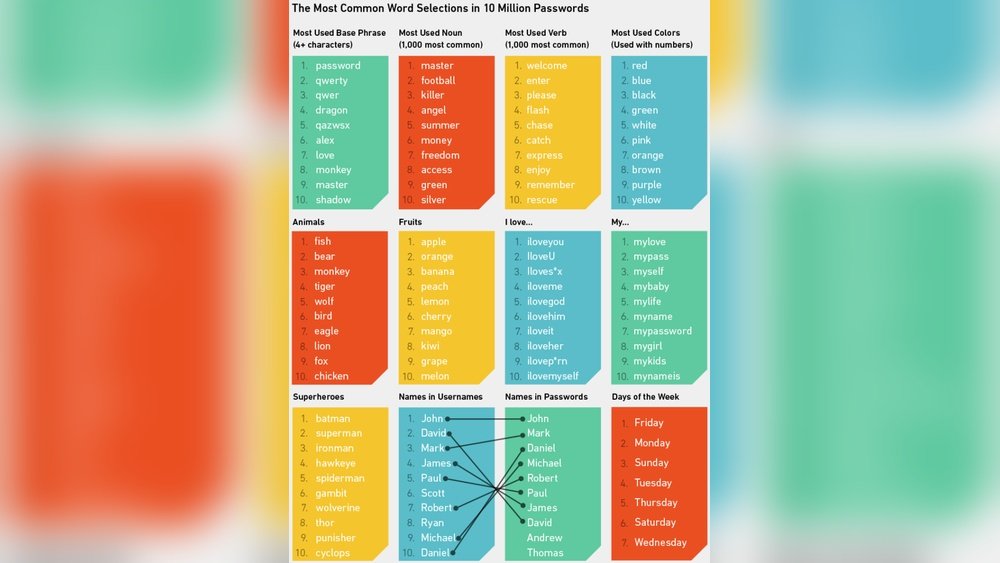
Your passwords are the first line of defense against hackers and cyber threats. But are your current passwords really keeping you safe?
If you’re tired of struggling to come up with passwords that are both strong and easy to remember, you’re not alone. You’ll discover smart password ideas that protect your accounts without the headache. From simple tricks to create unique passphrases to tips on mixing characters effectively, you’ll learn how to build passwords no one can crack.
Ready to take control of your online security? Keep reading and transform your password habits today.
Why Strong Passwords Matter
Strong passwords protect your online accounts from hackers and thieves. They keep personal information safe and prevent unauthorized access. Weak passwords are easy to guess or crack, putting your data at risk.
Creating strong passwords is the first step to secure your digital life. A strong password slows down cyber attacks and makes hacking very difficult. It adds an important layer of defense for your sensitive information.
What Makes A Password Strong?
A strong password has at least 12 characters. It uses a mix of uppercase, lowercase, numbers, and symbols. Avoid common words or simple patterns like “1234” or “password”. This variety makes passwords harder to break.
Risks Of Weak Passwords
Weak passwords allow hackers to access your email, bank, and social media accounts. They can steal money, identity, or private messages. Weak passwords can cause major problems in your personal and work life.
How Strong Passwords Protect You
Strong passwords block most hacking attempts. They prevent unauthorized users from breaking into your accounts. This keeps your private data safe and reduces the chance of identity theft.
Tips For Creating Strong Passwords
Use passphrases by combining four or more random words. Mix letters, numbers, and symbols in unpredictable ways. Avoid using birthdays, names, or common phrases. Use unique passwords for each account.
Creating Memorable Passphrases
Creating memorable passphrases helps protect your online accounts. Unlike short passwords, passphrases use several words together. This makes them easier to remember and harder to guess. Strong passphrases improve your security without causing frustration.
Using simple steps can help you craft passphrases that stick in your mind. These passphrases should be unique and not related to your personal details. A good passphrase blends length and complexity with ease of recall.
Choose Four Or More Random Words
Pick four or more unrelated words. For example, “apple,” “river,” “blue,” and “jump.” Combine them into a phrase like “AppleRiverBlueJump.” It’s easy to remember but difficult to crack. Avoid common phrases or quotes others might guess.
Mix Uppercase, Lowercase, Numbers, And Symbols
Add variety by changing some letters to uppercase. Insert numbers or symbols between words or letters. For example, “Apple!River3BlueJump.” This mix strengthens the passphrase. Make sure it still feels natural to you.
Avoid Personal Information
Do not use names, birthdays, or pet names. These details can be guessed or found online. Use unrelated words and characters. This prevents hackers from breaking your passphrase easily.
Use Different Passphrases For Each Account
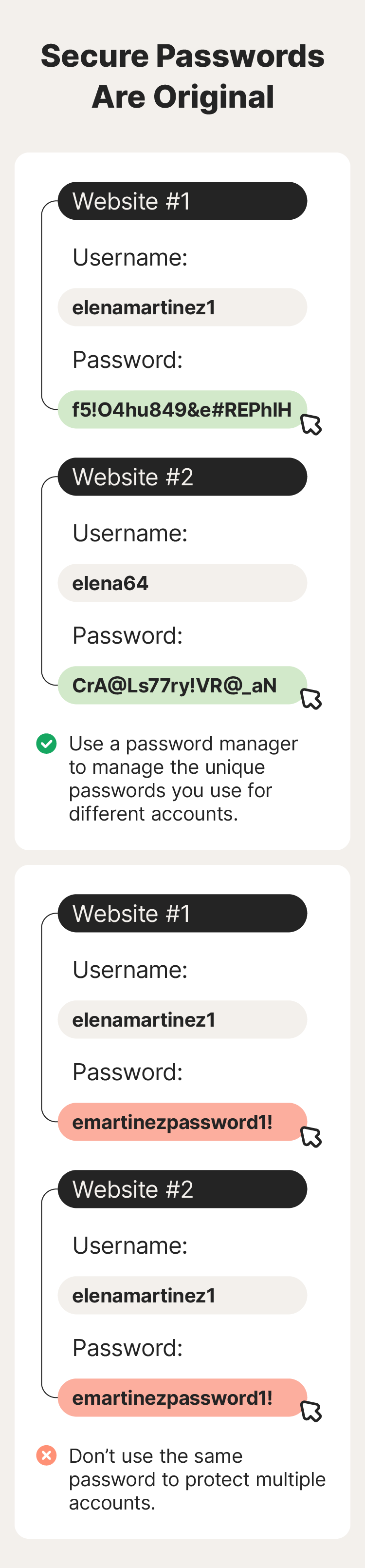
Create unique passphrases for every site. Using the same one everywhere increases risk. If one account is hacked, others stay safe. A password manager can help store and organize them securely.
Mixing Characters Effectively
Mixing characters effectively is key to building strong passwords. It increases complexity and makes guessing much harder. Using different types of characters creates layers of security.
Passwords with varied characters resist hacking attempts better. Simple or repetitive passwords are easy targets. Mixing letters, numbers, and symbols adds unpredictability.
Using Uppercase And Lowercase Letters
Combine uppercase and lowercase letters for variety. For example, “PaSsWoRd” is stronger than “password.” This mix confuses automated guessing tools. Avoid predictable patterns like capitalizing only the first letter.
Including Numbers In Passwords
Numbers add another dimension to passwords. Replace some letters with digits or add random numbers inside. For instance, “P4ssw0rd” is stronger than “password.” Avoid sequences like “1234” or your birth year.
Adding Symbols For Extra Security
Symbols such as !, @, , and $ boost password strength. Insert them randomly within your password. Avoid common substitutions like “@” for “a” only. Diverse symbol placement increases difficulty for hackers.
Creating Unpredictable Character Combinations
Randomize characters instead of following obvious patterns. Avoid dictionary words or simple sequences. Mix letters, numbers, and symbols without a clear order. This unpredictability prevents easy cracking.
Avoiding Personal Information
Using personal information in passwords makes them easy to guess. Hackers can find birthdays, names, or addresses online. These details weaken your password security. Avoid using anything related to you or your family.
Strong passwords need to be unpredictable and hard to connect to your identity. This step protects you from common hacking methods. Keep personal data out of your password to stay safer.
Avoid Names And Birthdays
Names of family, friends, or pets are risky to use. Birthdates or anniversaries are easy targets for cybercriminals. These details can be found on social media or public records. Using them makes your password vulnerable.
Skip Addresses And Phone Numbers
Addresses and phone numbers are often shared online. They are simple to guess for someone who knows you. Including these in passwords reduces their strength significantly. Choose random characters instead of location info.
Do Not Use Favorite Things
Favorite sports teams, colors, or hobbies are common password choices. Hackers try popular words linked to you first. Avoid words related to your likes or habits. Pick unrelated words or numbers for better security.
Stay Away From Common Words
Simple words or keyboard patterns are easy to crack. Words like “password” or “123456” are unsafe. Avoid sequences or repetitive characters. Use a mix of letters, numbers, and symbols for complexity.
Using Unique Passwords For Each Account
Using unique passwords for each account is a vital step in keeping your online information safe. A single password used across many sites makes it easy for hackers to access all your accounts if one is compromised. Unique passwords reduce this risk by limiting access to only one account at a time.
Creating a different password for every site might seem hard. Yet, it is one of the best ways to protect your personal data. Each password acts as a separate key, so breaking one does not open all your doors.
Why Use Unique Passwords?
Unique passwords stop hackers from moving between accounts. If one password is stolen, others remain secure. This lowers the chance of identity theft and financial loss.
How To Create Unique Passwords
Start with a base phrase that is easy to remember. Add numbers and symbols to make it strong. Change parts of the phrase for each account to keep passwords unique.
Tools To Manage Unique Passwords
Password managers help store many passwords safely. They create and remember strong passwords for you. This tool makes using unique passwords simple and stress-free.
Benefits Of Password Managers
Password managers help protect your online accounts easily. They store all your passwords in one safe place. This makes managing many accounts simple and secure.
Using a password manager reduces the risk of forgetting passwords. It also helps create strong, unique passwords for every login. This improves overall online security without extra effort.
What Is A Password Manager?
A password manager is a tool that saves and organizes passwords. It keeps your passwords encrypted and locked behind one master password. You only need to remember this one password to access all others.
How Password Managers Improve Security
Password managers generate strong passwords that are hard to guess. They avoid using common or repeated passwords across sites. This lowers the chance of hacking or unauthorized access.
Saves Time And Effort
Typing passwords manually is slow and error-prone. Password managers fill in login details automatically. This saves time and prevents frustration from typing mistakes.
Protects Against Phishing Attacks
Password managers recognize real websites and block fake ones. They prevent you from entering passwords on fraudulent sites. This helps keep your accounts safe from scams.
Easy To Use On Multiple Devices
Password managers sync passwords across phones, tablets, and computers. This gives you access to your logins anywhere. It ensures your passwords are always up to date and available.
Common Password Pitfalls To Avoid
Many people struggle with creating passwords that are both strong and easy to remember. Mistakes in password creation can lead to security risks. Avoiding common password pitfalls helps protect your accounts from hackers. Here are some frequent errors to watch out for.
Using Simple And Common Passwords
Passwords like “123456” or “password” are easy to guess. These are often the first attempts by cybercriminals. Avoid using sequences or simple words that appear in dictionaries. Strong passwords must be unique and complex.
Including Personal Information
Names, birthdays, and pet names are easy for others to find. Social media makes this information public. Avoid using any personal details in your passwords. Hackers use this info to crack passwords quickly.
Reusing Passwords Across Accounts
Using the same password for multiple sites increases risk. If one account is hacked, all others become vulnerable. Each account needs a different, strong password. This limits damage if a password leaks.
Short Passwords Without Enough Characters
Short passwords are easier to break using guessing tools. Aim for at least 12 characters or more. Longer passwords increase the time and effort needed to crack them. Use a mix of letters, numbers, and symbols.
Relying On Predictable Patterns
Patterns like “qwerty” or repeating characters are weak choices. Avoid obvious keyboard patterns or repeated letters. Randomness improves password strength. Use a password manager to create and save complex passwords.

Credit: wpengine.com
Examples Of Strong Passwords
Strong passwords protect your online accounts from hackers. They are hard to guess and include many types of characters. Using strong passwords lowers the risk of identity theft and data loss.
Below are examples to inspire you. These passwords combine letters, numbers, and symbols. They avoid common words and personal details. Each example shows how to build a secure password.
Using Passphrases
Create a phrase using four or more random words. For example, BlueTiger7Jump!Sky is easy to remember but hard to crack. Passphrases are longer and safer than single words.
Mixing Characters
Combine uppercase, lowercase, numbers, and symbols. For instance, G7mRp9s!Lq uses different types of characters. This variety makes passwords strong and difficult to guess.
Do not include names, birthdays, or addresses. A password like Sunshine2023! is weak because it has a common word and a year. Use random combinations instead.
Using Unique Passwords
Create a different password for each account. For example, Red$Fish4Lake for email and 7MoonStarPath for banking. Unique passwords stop hackers from accessing many accounts.
Using A Password Manager
Password managers generate and store strong passwords for you. They create random, complex passwords like v@9Lp3Wz!Xq and remember them safely. This tool helps manage many strong passwords easily.
Updating Passwords Regularly
Updating passwords regularly is vital for online safety. Old passwords can be hacked or leaked. Changing them often reduces risks. It keeps accounts more secure from cyber threats.
Many people reuse passwords or keep them too long. This habit makes it easier for hackers to access multiple accounts. Updating passwords breaks this pattern and protects personal information. It also stops unauthorized access after a data breach.
How Often Should You Update Passwords?
Experts suggest changing passwords every three to six months. Some accounts may need more frequent updates, like banking or email. Set reminders to update passwords on time. Regular changes keep your security strong.
Signs It’s Time To Change Your Password
Unusual account activity is a clear warning. Alerts from websites about breaches also mean change now. If you suspect someone else knows your password, update it immediately. Don’t wait for a problem to grow.
Tips For Updating Passwords Safely
Create new passwords that are unique and hard to guess. Avoid using old passwords or simple patterns. Use a mix of letters, numbers, and symbols. Consider a password manager to keep track easily. Keep each password different for every site.
Credit: uk.norton.com
Tips For Remembering Complex Codes
Remembering complex passwords can feel like a challenge. Strong passwords often mix letters, numbers, and symbols. This mix helps keep accounts safe. Here are simple tips to help you remember these tough codes.
Use Passphrases
Create a phrase with four or more random words. For example, “blue apple jump river.” This is easier to remember than random letters. It is also strong and unique.
Make It Personal But Not Obvious
Think of a sentence you know well. Use the first letter of each word. Add numbers or symbols to make it harder. Avoid using names or birthdays.
Use Patterns On Your Keyboard
Choose a pattern like a shape on your keyboard. Combine this with letters and numbers. It creates a complex password that is easier to recall.
Write It Down Securely
Write your passwords in a notebook kept in a safe place. Do not store passwords in obvious spots. This method helps if you forget your passwords.
Use A Password Manager
Password managers store and fill in your passwords for you. They keep all your codes safe in one place. This tool reduces the need to remember every password.

Credit: www.researchgate.net
Frequently Asked Questions
What Are Some Good Password Ideas?
Use a mix of uppercase, lowercase, numbers, and symbols. Create passphrases with random words. Avoid personal info and reuse. Use a password manager for unique, strong passwords.
What Are The Top 10 Passwords?
The top 10 passwords are: 123456, password, 123456789, 12345, 12345678, qwerty, 1234567, 111111, 123123, and abc123. Avoid these to keep accounts secure.
What Are Examples Of Passwords?
Examples of passwords include strong combinations like “T!ger$2024” or passphrases such as “BlueCar$Jump7Star. ” Avoid simple ones like “1234” or “password. ” Use unique, complex mixes of letters, numbers, and symbols for better security.
What Are The Top 7 Passwords?
The top 7 passwords are: 123456, password, 123456789, 12345, 12345678, qwerty, and 1234567. Avoid using these.
What Makes A Password Strong And Secure?
A strong password uses a mix of letters, numbers, and symbols with no personal info.
How Can I Create Easy-to-remember Passwords?
Use passphrases made of four or more random, unrelated words.
Why Avoid Using Personal Information In Passwords?
Personal info is easy to guess or find, making your password weak.
What Is The Benefit Of Using Unique Passwords?
Unique passwords prevent multiple accounts from being hacked if one password leaks.
How Do Password Managers Help With Password Security?
They generate, store, and autofill strong passwords safely for all your accounts.
Are Common Passwords Like “1234” Safe To Use?
No, common passwords are very easy to guess and often targeted by hackers.
Conclusion
Strong passwords protect your personal and online data. Use a mix of letters, numbers, and symbols. Avoid easy-to-guess words and personal details. Create different passwords for each account you have. Consider using a password manager to keep track safely. Regularly update your passwords to stay secure.
Good password habits help prevent hacking and theft. Stay careful and keep your accounts safe every day.





