
Looking for a fresh way to capture your ideas, organize your tasks, or manage your projects? If OneNote isn’t quite hitting the mark for you, it’s time to explore some powerful alternatives that can better fit your style and needs.
Whether you want something simple and fast, highly customizable, or great for handwritten notes, there’s an option out there designed just for you. You’ll discover top OneNote alternatives that can boost your productivity and help keep your thoughts perfectly organized.
Keep reading—you might find the perfect tool that feels like it was made just for you.
Evernote Features
Evernote remains a popular choice among OneNote alternatives for its straightforward and reliable features. It helps users collect, organize, and find notes easily. Whether typing text, saving web clips, or attaching files, Evernote keeps everything in one place. Its cross-platform support means you can access your notes on phones, tablets, or computers without hassle.
Evernote’s features focus on simplicity and efficiency. The app supports rich text formatting, so your notes can look neat and clear. Tagging and notebooks help keep information sorted logically. Search functions work well, even inside images and PDFs, making it easy to locate details quickly.
Note Taking And Organization
Evernote lets you create notes in various formats like text, audio, and images. You can organize notes into notebooks and add tags for better sorting. This system helps manage large collections of notes without confusion. Users can also clip web pages directly into Evernote for later reference.
Sync Across Devices
Evernote syncs your notes instantly across all your devices. Whether you use Windows, Mac, Android, or iOS, your notes stay updated. This feature ensures you have access to important information anytime, anywhere. Offline access is also available for premium users.
Search And Text Recognition
Evernote’s search tool finds notes quickly by scanning text inside images and PDFs. This feature saves time by locating handwritten or scanned content. It supports keyword searches and can filter results by tags or notebook. This makes finding specific information easy and fast.
Collaboration And Sharing
Sharing notes with colleagues or friends is simple in Evernote. You can invite others to view or edit notes and notebooks. This supports teamwork and group projects efficiently. Comments and updates keep everyone on the same page without extra communication tools.
Notion Capabilities
Notion stands out as a versatile tool that blends note-taking, task management, and database functions. It suits individuals and teams aiming for an organized workspace that adapts to many needs. Its flexible design allows users to create custom pages and structures without coding skills.
This adaptability makes Notion more than just a note app. It acts as a hub for projects, documents, and workflows, all in one place.
Customizable Pages And Templates
Notion offers a wide variety of templates for notes, projects, and databases. Users can start with a template or build pages from scratch. Each page supports rich content like text, images, videos, and links. Drag-and-drop editing makes customization easy and fast.
Integrated Task Management
Task lists and to-dos blend seamlessly with notes. Assign deadlines, set reminders, and track progress within the same workspace. This eliminates the need for separate apps for notes and tasks. Teams can also assign tasks to members and monitor updates in real time.
Database And Table Features
Notion includes powerful database options that organize information in tables, boards, lists, and calendars. Users can filter, sort, and link databases for deeper insights. This helps manage projects, inventories, or content calendars efficiently without leaving the app.
Collaboration And Sharing
Sharing pages with others is simple and secure. Users can control access levels, from full editing rights to view-only. Comments and mentions keep communication clear and focused. Real-time updates ensure everyone stays aligned on shared projects.
Cross-platform Accessibility
Notion works on Windows, Mac, iOS, and Android. It syncs data across devices automatically, so notes and tasks are always up to date. Offline mode lets users continue working without internet access, syncing changes later.
Apple Notes Benefits
Apple Notes offers a simple way to organize and sync notes across Apple devices. It fits well for users seeking a clean, easy alternative to OneNote. Quick access and seamless integration make it handy for everyday note-taking.
Seamless Integration With Apple Devices
Apple Notes works smoothly on iPhone, iPad, and Mac. It syncs your notes across all devices automatically. You do not need to copy or move files manually. This makes it easy to access your notes anytime.
Simple And User-friendly Interface
The interface is clean and easy to use. It does not overwhelm users with too many options. You can start writing notes quickly without a learning curve. This suits users who want straightforward note-taking.
Supports Rich Media And Attachments
You can add photos, sketches, and web links inside notes. The app also allows scanning documents directly into your notes. This helps keep all related information together in one place.
Strong Security And Privacy
Apple Notes offers password protection for sensitive notes. It uses encryption to keep your data safe. Privacy is important, especially for personal or work-related information.
Collaboration And Sharing Features
Share notes easily with other Apple users. You can work together on checklists or ideas in real time. This feature supports teamwork without needing extra apps.
Free To Use With No Extra Cost
Apple Notes comes free with all Apple devices. There are no subscription fees or in-app purchases. This makes it a cost-effective choice for note-taking.

Credit: www.youtube.com
Google Keep Uses
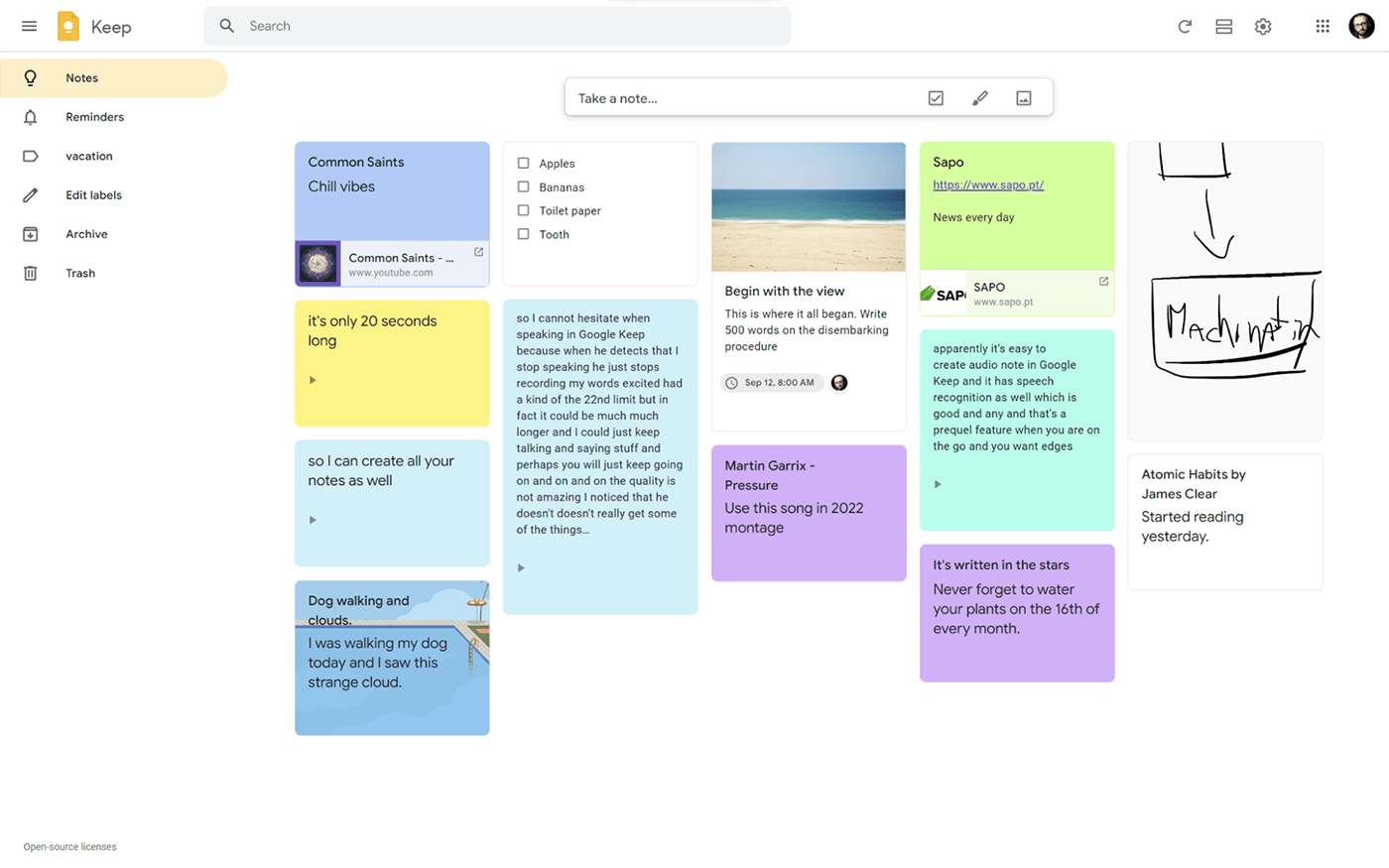
Google Keep is a simple and handy note-taking app. It helps users capture ideas fast. The app fits well for quick notes, checklists, and reminders. It works smoothly with other Google tools, making it easy to stay organized.
Many people use Google Keep for daily tasks. It lets you save thoughts on the go. The app supports voice notes and photos, adding flexibility to how you take notes. Its clean interface keeps things clear and easy to manage.
Creating And Managing Notes
Google Keep lets you create notes with text, images, or voice. You can color-code notes to find them quickly. Labels help organize notes into groups for better tracking. Pin important notes to keep them at the top of your list.
Setting Reminders And To-do Lists
The app allows setting reminders by time or location. This feature helps you remember tasks and appointments. You can build checklists for shopping or daily chores. Mark items as done to track your progress easily.
Collaborating With Others
Google Keep supports sharing notes with others. Collaborators can add or edit notes in real time. This is useful for group projects or family planning. Everyone stays updated without sending multiple messages.
Integrating With Google Workspace
Google Keep works well with Gmail and Google Docs. You can drag notes into documents for quick reference. The app syncs across all devices automatically. This ensures your notes are always accessible.
Joplin For Open Source
Joplin stands out as a reliable open-source alternative to OneNote. It offers a secure and flexible note-taking experience without locking users into proprietary software. Joplin supports multiple platforms, including Windows, macOS, Linux, Android, and iOS. This makes it accessible for a wide range of users.
The app focuses on privacy and data ownership. Users can store their notes locally or sync them through services like Dropbox or Nextcloud. This approach provides control over personal information.
Open Source Freedom
Joplin’s open-source nature means anyone can inspect, modify, or contribute to its code. This transparency builds trust and encourages community-driven improvements. It does not rely on closed systems or subscriptions.
Markdown Support
Joplin uses Markdown for formatting notes. Markdown is simple and widely used, allowing users to create clean and organized documents quickly. It supports images, checklists, and code blocks.
Strong Encryption
Security matters in note-taking apps. Joplin offers end-to-end encryption to protect notes from unauthorized access. This feature keeps sensitive information safe across devices.
Offline Access
Users can access and edit notes without an internet connection. Changes sync automatically once the device is back online. This ensures productivity even in low-connectivity areas.
Flexible Synchronization
Joplin supports various sync methods, including cloud services and local file systems. This flexibility lets users choose the best way to keep their notes updated across devices.
Goodnotes And Notability
GoodNotes and Notability stand out as top alternatives to OneNote, especially for users who prefer writing by hand or drawing. Both apps offer smooth handwriting experiences and powerful tools for managing notes. They work best on tablets like the iPad, making them popular among students and professionals alike.
Goodnotes: Organized Handwritten Notes
GoodNotes allows users to create digital notebooks with handwritten notes. It offers a variety of paper templates and covers to customize notebooks. The app supports typing, drawing, and importing PDFs for easy annotation. Users can search handwritten notes thanks to advanced handwriting recognition. GoodNotes also lets you organize notes into folders and syncs across devices with iCloud.
Notability: Versatile Note-taking And Annotation
Notability combines handwriting, typing, and audio recording in one app. It is great for capturing ideas during lectures or meetings. Users can import and mark up PDFs with ease. Notability offers quick organization using subjects and dividers. The app syncs notes across Apple devices using iCloud. Its simple interface helps keep notes clear and accessible.
Obsidian For Knowledge Base
Obsidian is a powerful tool for building a personal knowledge base. It uses markdown files stored locally on your device. This means you own your data and can access it offline anytime.
Its main strength lies in linking notes together. This creates a web of related ideas and information. Users find it very helpful for research, writing, and study.
Local Storage And Privacy
Obsidian saves all notes as plain text files. This keeps your data private and secure. No cloud storage is required unless you choose to sync manually.
This setup suits people who want full control over their notes. It also reduces the risk of data loss or leaks.
Markdown-based Editing
Editing in Obsidian uses markdown, a simple text format. Markdown lets you add headings, lists, links, and more. It keeps the notes clean and easy to read.
Many users prefer markdown for its speed and flexibility. It is also compatible with many other apps and platforms.
Graph View For Visual Organization
The graph view shows your notes as connected nodes. This visual map helps you see relationships between topics. It makes navigating large collections much easier.
You can quickly find related ideas and track your knowledge growth over time.
Customizable And Extendable
Obsidian offers many plugins and themes. You can customize the app to fit your workflow. Options include task management, calendar integration, and more.
This flexibility makes Obsidian suitable for a wide range of users and needs.
Credit: helpjuice.com
Apps For Handwriting
Handwriting apps provide a natural way to take notes on digital devices. They let users write by hand, draw sketches, or annotate documents. These apps suit students, artists, and professionals who prefer writing over typing. Many come with features like palm rejection, smooth ink flow, and shape recognition. These tools help keep notes organized and accessible across devices.
Microsoft Whiteboard
Microsoft Whiteboard offers a freeform canvas for handwriting and drawing. It supports touch, pen, and mouse input. Users can create notes, diagrams, and sketches easily. Collaboration is simple with real-time syncing across devices. It integrates well with other Microsoft apps, making it a solid choice for teams.
Goodnotes
GoodNotes is popular among iPad users for its smooth handwriting experience. It allows note-taking with a stylus and offers many paper templates. Users can organize notebooks, highlight text, and search handwritten notes. GoodNotes also supports PDF annotation and exporting files in various formats.
Notability
Notability blends handwriting, typing, and audio recording. It is ideal for lectures and meetings. Users can write notes, add images, and record voice simultaneously. The app features easy document management and supports cloud backup. Its intuitive design makes note-taking fast and flexible.
Nebo
Nebo focuses on converting handwritten notes into typed text. It recognizes shapes, diagrams, and math equations. The app supports stylus input on multiple devices. Users can export notes as Word or PDF files. Nebo helps bridge the gap between handwriting and digital text.
Squid
Squid uses vector graphics for smooth handwriting and drawing. It works well with active pens and touch screens. Users can import PDFs for annotation and export notes in various formats. Squid offers an easy-to-use interface with powerful features for note-taking and sketching.
Cross-platform Compatibility
Cross-platform compatibility is essential for note-taking apps today. Users want to access notes on any device without hassle. This feature ensures smooth syncing across Windows, macOS, Linux, iOS, and Android. It helps keep work and ideas organized no matter the platform.
Choosing OneNote alternatives with strong cross-platform support widens your options. It allows switching devices without losing access to important notes. These apps offer flexibility and convenience for everyday use.
Wide Device Support
The best OneNote alternatives work on many devices. They support desktops, laptops, tablets, and smartphones. This variety ensures you can take notes anytime, anywhere. Whether you use a Mac, Windows PC, or Android phone, your notes stay synced.
Seamless Synchronization
Syncing is key for cross-platform note apps. It updates your notes in real-time across devices. You can start writing on one device and continue on another without losing data. Reliable sync reduces frustration and boosts productivity.
Offline Access
Good note-taking apps let you work offline. This is important when internet access is limited. Changes made offline sync automatically once connected. Offline access ensures your notes are always available, no matter your location.
Consistent User Experience
Apps with cross-platform compatibility offer a similar interface on all devices. This reduces the learning curve when switching platforms. Familiar layouts and features help users stay focused and efficient. Consistency matters for smooth note-taking.
Choosing The Right App
Choosing the right note-taking app matters. The best app fits your daily tasks and style. Some apps focus on simple notes. Others offer complex tools for managing projects.
Think about how you use your notes. Do you prefer typing, drawing, or voice memos? Consider the devices you use most. Some apps work better on certain platforms.
Cost can also influence your choice. Free apps often cover basic needs. Paid apps may offer extra features worth the price. Privacy matters too. Some apps keep your data more secure.
Consider Your Primary Device
Pick an app that works well on your main device. Apple Notes suits Mac and iPhone users. Google Keep fits those using Google services. Cross-platform apps like Evernote work on many devices.
Match Features With Your Needs
Basic note-taking needs call for simple apps. Add checklists, reminders, or voice notes if needed. For complex tasks, choose apps with project management tools. Notion offers databases and team collaboration options.
Think About Your Workflow
Some apps help organize information quickly. Others allow deep customization and linking of notes. If you write by hand, Goodnotes or Notability are good picks. For building knowledge bases, Obsidian is popular.
Check Privacy And Data Security
Review how the app handles your data. Joplin offers open-source transparency and strong privacy. Paid apps may have better security measures. Avoid apps that share data without clear consent.
Credit: www.nuclino.com
Frequently Asked Questions
What Is The Best Alternative To Onenote?
Top OneNote alternatives include Evernote for classic note-taking, Notion for all-in-one workspace, Apple Notes for Apple users, Google Keep for quick notes, and Joplin for open-source support. Goodnotes suits handwriting needs, while Obsidian excels at linked note management. Choose based on your specific needs.
What Will Microsoft Replace Onenote With?
Microsoft will replace OneNote with OneNote for Windows 11, a redesigned app with improved features and integration.
Is Onenote Being Discontinued In 2025?
Microsoft OneNote is not being discontinued in 2025. It will continue receiving updates and support from Microsoft.
Does Google Have A Onenote Equivalent?
Google’s OneNote equivalent is Google Keep. It offers quick notes, checklists, reminders, and integrates with Google Workspace apps.
What Are The Top Alternatives To Onenote For Note-taking?
Top alternatives include Evernote, Notion, Apple Notes, Google Keep, Joplin, Goodnotes, and Obsidian.
Which Onenote Alternative Works Best On Linux Systems?
Joplin is a strong choice for Linux users, offering open-source privacy and solid note management.
Can I Use A Free Onenote Alternative On Apple Devices?
Apple Notes is free and built-in on Apple devices, perfect for smooth integration and easy use.
What App Is Best For Handwritten Notes Instead Of Onenote?
Goodnotes and Notability excel for handwriting, drawing, and annotating, especially on tablets like iPads.
Is There A Simple App Like Onenote For Quick Notes?
Google Keep offers fast, easy note-taking with checklists and reminders, syncing well with Google apps.
Which Onenote Alternative Offers An All-in-one Workspace?
Notion combines notes, databases, project management, and wikis for users needing a versatile system.
Conclusion
Choosing the right note app depends on your needs and device. Evernote suits those who want classic note-taking. Notion works well for organizing projects and teams. Apple Notes and Google Keep fit users in their ecosystems. Joplin appeals to open-source and privacy fans.
Apps like Goodnotes help with handwriting and drawing. Test a few to find what feels easiest and best for you. Your perfect OneNote alternative is out there waiting.





