Minecraft offers many ways to become more powerful, but few upgrades are as impressive as building a Haste 2 beacon. This special beacon effect lets you mine blocks incredibly fast, making large builds, resource gathering, and even clearing out underground areas much easier. But getting Haste 2 is not simple—many players get stuck, miss key steps, or don’t get the full power from their beacon. Here, you’ll learn exactly how to get Haste 2, from gathering materials to understanding beacon mechanics, plus smart tips to avoid common mistakes.
What Is Haste 2 And Why Do Players Want It?
Haste 2 is a status effect in Minecraft, given by a fully powered beacon. When active, Haste 2 increases your mining speed by 40%. This is double the normal Haste effect. Haste II speeds up mining, but instant mining is block-dependent: with a suitable Efficiency V pickaxe, ordinary stone can be broken instantly, while many ores and harder blocks cannot. Do not assume Haste II makes every block instant to mine. This is especially useful for:
- Clearing out large areas for building
- Mining for diamonds, ancient debris, or other resources
- Building farms that require removing a lot of blocks
For advanced players, Haste 2 is a game-changer. But even for beginners, it makes mining faster and more enjoyable.
Understanding Beacons: How They Work
Before you can get Haste 2, you need a beacon. But beacons are not simple blocks—they require several steps to build and power.
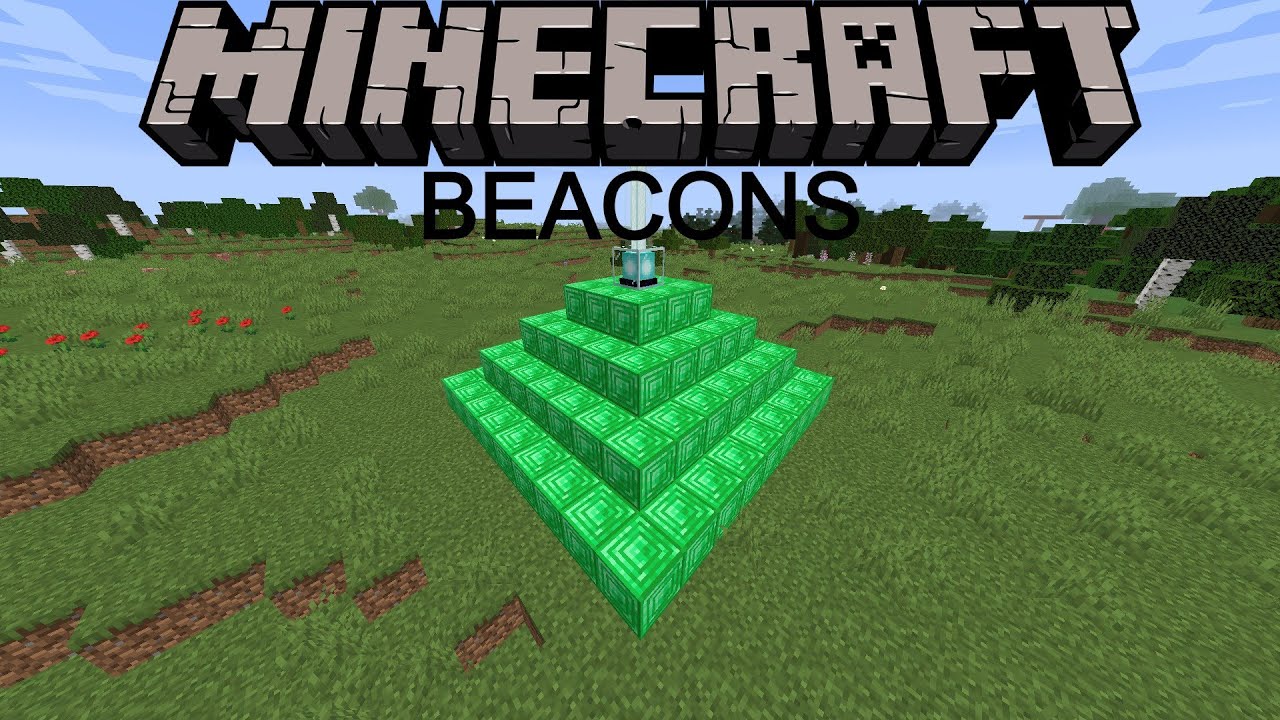
Beacons are special blocks crafted from glass, obsidian, and a Nether star. Once built, you need to place them on a pyramid made from iron, gold, emerald, diamond, or netherite blocks. The bigger the pyramid, the more powerful the beacon.
Here’s a quick overview:
| Pyramid Size | Number of Layers | Blocks Needed | Max Effects | Beacon Range |
|---|---|---|---|---|
| Level 1 | 1 | 9 | One | 20 blocks |
| Level 2 | 2 | 34 | One | 30 blocks |
| Level 3 | 3 | 83 | One primary effect | 40 blocks |
| Level 4 | 4 (full) | 164 | Primary effect at level II, or primary effect plus Regeneration I | 50 blocks |
To get Haste 2, you must build a Level 4 (full) pyramid.

Credit: www.youtube.com
Materials Required For A Haste 2 Beacon
You’ll need a lot of resources. Let’s break down exactly what you need:
The Beacon Block
To craft a beacon, gather:
- 3 obsidian
- 5 glass
- 1 Nether star
Obsidian is made by pouring water over lava and mining it with a diamond or netherite pickaxe. Glass is easy—just smelt sand in a furnace. The Nether star is the hardest part, since it only drops from the Wither boss.
The Pyramid Base
Your beacon must sit on a pyramid with 4 layers. You can use any mix of these blocks:
- Iron blocks
- Gold blocks
- Diamond blocks
- Emerald blocks
- Netherite blocks
For a full-size pyramid, you’ll need a total of 164 blocks. Each block is made from 9 ingots or gems. Most players use iron blocks because iron is the easiest to get in large amounts.
Here’s how many blocks are needed for each layer:
| Layer (from top) | Size (blocks per side) | Total Blocks |
|---|---|---|
| Top | 3 x 3 | 9 |
| Second | 5 x 5 | 25 |
| Third | 7 x 7 | 49 |
| Bottom | 9 x 9 | 81 |
Pro tip: You can mix and match blocks. For example, use iron for most, and save your rare gold or diamond for decorations.
The Nether Star: Defeating The Wither
To get a Nether star, you must summon and defeat the Wither boss. This is often the hardest part for new players.
You need:
- 3 Wither skeleton skulls
- 4 soul sand or soul soil
Wither skeleton skulls drop rarely from Wither skeletons in Nether fortresses (about 2. 5% chance each kill). You may need to kill 40 or more to get all three skulls. Soul sand is easy to find in the Nether.
Once you have the items, place them in a “T” shape (soul sand on the bottom, skulls on top) to summon the Wither. Be sure you’re well prepared—the Wither is a tough fight. Many players dig deep underground or build a special room to trap the Wither and make the fight safer.
Beginner insight: The Wither explodes when it spawns, so keep your distance.
Building The Beacon Pyramid: Step-by-step
Once you have your beacon and 164 blocks for the pyramid, it’s time to build.
- Find a flat area – Your pyramid must be built on flat ground.
- Build the bottom layer (9×9) – Place 81 blocks in a square.
- Add the third layer (7×7) – Center this on the bottom layer.
- Add the second layer (5×5) – Center it on the third layer.
- Add the top layer (3×3) – Center it on the second layer.
- Place the beacon – Put the beacon in the very center of the top layer (the middle block of the 3×3).
- Activate the beacon – If everything is correct, the beacon will light up with a beam of light.
Common mistake: If the beacon doesn’t turn on, check that all layers are complete and made from the correct block types. Air or other blocks in the pyramid will prevent activation.
Selecting Haste 2: Beacon Menu Explained
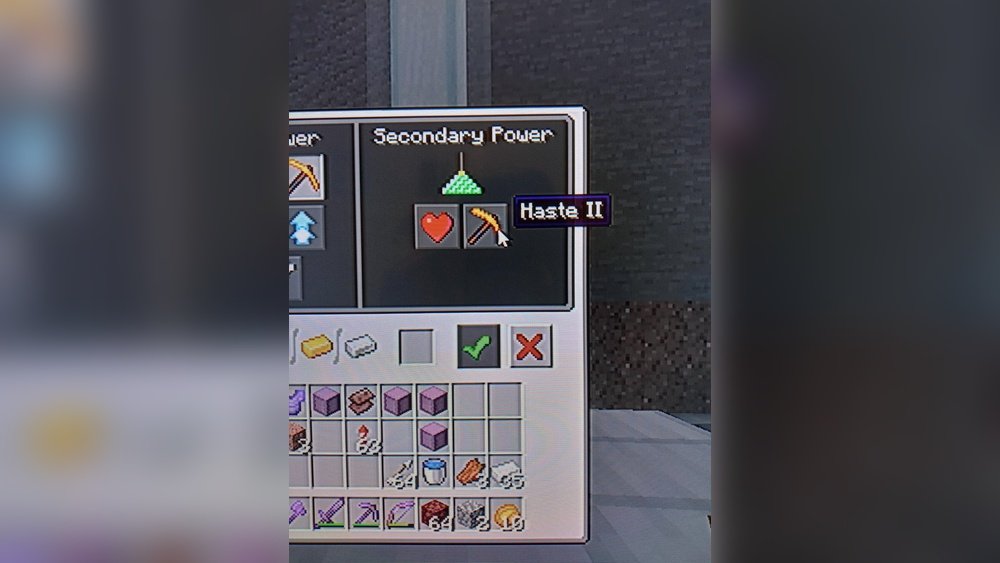
After you build the pyramid and place the beacon, right-click the beacon to open the menu. Here’s what you’ll see:
- Primary Power: Choose one effect (Speed, Haste, Resistance, Jump Boost, Strength).
- Secondary Power: Upgrade your effect to level 2 (e.g., Haste II), or choose Regeneration.
To get Haste 2, do this:
- In the Primary Power column, select Haste (the pickaxe icon).
- In the Secondary Power column, select Haste II.
- Insert one iron ingot, gold ingot, diamond, emerald, or netherite ingot in the slot.
- Click the checkmark.
Your beacon will now give Haste II within its range.
Beginner insight: You must have a full 4-layer pyramid to unlock Haste II. Smaller pyramids only allow Haste I.
Range And Coverage: How Far Does Haste 2 Work?
A Level 4 beacon has a range of 50 blocks in all directions from the beacon block. This means you’ll get Haste 2 up to 50 blocks away, including up and down.
If you move outside this range, the effect fades. Plan your mining or building projects to stay near the beacon. For big projects, some players build multiple beacons and move them as work progresses.
Getting Instant Mining: Pickaxe And Enchantments Needed
Haste 2 alone doesn’t guarantee instant mining. You also need the right tool. For most blocks, you need:
- Diamond or netherite pickaxe
- Efficiency V enchantment
With Haste 2 and Efficiency V, you can instantly break stone and similar blocks. For tougher blocks (like deepslate or ancient debris), instant mining might not be possible, even with the best tools.
Here’s how different pickaxes compare:
| Pickaxe Type | Efficiency Level | Block Type | Instant Mine with Haste 2? |
|---|---|---|---|
| Diamond/Netherite | V | Stone | Yes |
| Diamond/Netherite | IV | Stone | No |
| Iron | V | Stone | No |
| Diamond/Netherite | V | Deepslate | No |
Tip: Always use an Unbreaking III enchantment to make your pickaxe last longer, and Mending to repair it with experience orbs.
How To Get Enough Iron Or Other Blocks
One of the biggest challenges is collecting 164 iron blocks (1,476 iron ingots). Here are some efficient ways:
Building Iron Farms
Many advanced players build iron farms using villagers and zombies. These farms can produce hundreds of iron ingots per hour. Tutorials are available online, and most require a few villagers, beds, workstations, and a place for iron golems to spawn and be killed.
Mining For Iron
If you prefer mining, target Y-levels 16 to 232 in the mountain biomes (Java Edition) or search underground in caves. Bring Fortune-enchanted pickaxes to increase drops.
Trading With Villagers
Toolsmith, armorer, and weaponsmith villagers sometimes trade iron ingots, especially at higher levels. This is slower but can help fill gaps.
Using Multiple Block Types
Remember, you can mix iron, gold, emerald, diamond, and netherite blocks. Save rare blocks for decoration, and use iron for the bulk.

Credit: www.reddit.com
Smart Beacon Placement: Maximizing Your Haste 2
Where you place your beacon matters. Here’s how to get the most from your Haste 2 effect:
- Center the beacon in your work area – For clearing large spaces, put the beacon in the middle.
- Build above or below ground – Beacons shine through blocks, so you can place the pyramid underground or above your work area.
- Move the beacon as you go – For very big areas, mine the beacon and rebuild it in a new spot.
- Stack multiple beacons – On one pyramid, you can place up to 4 beacons (one per corner of the top layer) for multiple effects.
Non-obvious tip: You can build a pyramid under the ocean or inside mountains—beacons work as long as they have a clear path to the sky.
Common Mistakes And How To Avoid Them
Many players run into problems when building Haste 2 beacons. Here are common mistakes:
- Using the wrong blocks – Only iron, gold, diamond, emerald, or netherite blocks work. Blocks like copper or lapis don’t.
- Incomplete layers – A missing block anywhere in the pyramid will prevent activation.
- No line of sight to the sky – The beacon beam needs a clear path straight up. Glass is okay, but leaves, slabs, or other blocks will block the beam.
- Trying to get Haste II on a small pyramid – Only Level 4 pyramids allow secondary powers like Haste II.
Tip: Always double-check your pyramid before placing the beacon.
Advanced Uses: Combining Beacon Effects
A full pyramid can support two effects at once if you place two beacons. For example, you can have Haste II and Regeneration at the same time. Or give one beacon to a builder with Haste II, and another with Speed for faster movement.
Some players build multi-beacon setups for big projects. The only limit is the number of resources you have.
How To Defeat The Wither Safely
Getting the Nether star is a big challenge for many players. Here are practical strategies:
- Fight underground – Dig a tunnel far from your base, and summon the Wither in a tight, stone area. This limits its movement and reduces damage.
- Bring strong gear – Diamond or netherite armor with Protection IV, a good sword or bow, and plenty of food.
- Use milk buckets – The Wither gives the Wither effect, which drains health. Milk removes it instantly.
- Golden apples – These give extra hearts and regeneration.
- Backup plan – Set your spawn point nearby in case you die.
Non-obvious insight: In Bedrock Edition, the Wither is much harder to trap, so plan carefully.
Beacon Design And Decoration Ideas
Beacons don’t have to be ugly. Players often decorate their beacons and pyramids:
- Use different block types in patterns (checkerboard, stripes)
- Hide the pyramid underground, leaving only the beacon visible
- Surround the beacon with glass for a colored beam (use stained glass)
- Build beacons as part of castles, town centers, or industrial areas
Fact: You can change the color of the beacon beam by placing stained glass above it.
Beacon Maintenance And Upgrading
Beacons don’t break, but you might want to move or upgrade them. Here’s how:
- To move a beacon, break the beacon block and all base blocks, then rebuild in a new spot.
- To upgrade, add more layers or swap out blocks for rarer materials.
- To change effects, just open the beacon menu and pay again with an ingot, emerald, or diamond.
Tip: You never lose the beacon or base blocks when moving them.
Haste 2 In Multiplayer And Servers
On Minecraft servers, beacons are often valuable for community projects. Some server admins restrict beacons because they’re so powerful. Always check server rules.
In multiplayer, you can share beacon effects with teammates. Place the beacon in a shared area, or let everyone build their own pyramid.
Non-obvious insight: On busy servers, placing beacons in protected or hard-to-reach areas can prevent griefing.
How Haste 2 Works With Other Effects
Haste 2 stacks with Efficiency on tools, but does not stack with potions of Swiftness. It also does not increase attack speed—only mining speed.
Combining Haste 2 and Efficiency V is the only way to get instant mining for stone and similar blocks. For blocks like obsidian or ancient debris, you’ll mine faster, but never instantly.
Fact: In creative mode, you break all blocks instantly anyway, so Haste 2 is only useful in survival or adventure modes.
How To Get Multiple Haste 2 Beacons
If you want Haste 2 over a very large area, you can build several full beacons and overlap their ranges. This is common in giant mining projects or on big multiplayer servers.
To do this:
- Build multiple full-size pyramids, spaced up to 100 blocks apart.
- Place a beacon on each, and set each to Haste II.
- As you work, you’ll stay within range of at least one beacon.
Advanced tip: You can power up to 4 beacons with one pyramid if you have enough Nether stars.
Using Beacons For Other Projects
While Haste 2 is the most popular, beacons can also give:
- Speed (run faster)
- Jump Boost (jump higher)
- Strength (hit harder)
- Resistance (take less damage)
- Regeneration (heal over time)
Some players build entire “beacon rooms” with every effect for big bases.
Credit: www.youtube.com
Resource Summary: What You Need For Haste 2 Beacon
Here’s a quick checklist for one full Haste 2 beacon:
- 1 beacon (3 obsidian, 5 glass, 1 Nether star)
- 164 iron, gold, emerald, diamond, or netherite blocks (1,476 ingots or gems)
- 1 iron ingot, gold ingot, diamond, emerald, or netherite ingot (for activation)
- Diamond or netherite pickaxe with Efficiency V (for instant mining)
Tip: Plan ahead—gathering everything can take days of playtime.
Mistakes To Avoid When Upgrading Or Moving Beacons
- Forgetting to activate Haste II after moving the beacon
- Not lighting up the work area—beacons can attract mobs if you’re underground
- Not bringing enough food or armor when fighting the Wither
- Building in places that will be mined away—always put your beacon where it won’t get destroyed by accident
Real-world Example: Building A Haste 2 Beacon For A Quarry
Suppose you want to dig a big quarry down to bedrock. Here’s how you might do it:
- Build the beacon pyramid in the center of your planned quarry.
- Activate Haste II.
- Use your Efficiency V pickaxe to mine out layers quickly.
- As you reach the edge of the beacon range, move the pyramid closer to the next area.
- Repeat until the quarry is finished.
Pro tip: Combine Haste II with a shovel for dirt, gravel, and sand to speed up clearing the top layers.
Beacon Achievements And Advancements
In Minecraft Java Edition, building a beacon and activating effects unlocks certain advancements:
- Bring Home the Beacon – Construct and place a beacon.
- Beaconator – Create a fully powered beacon pyramid.
Completing these is a mark of experience for any player.
Useful Links And Resources
If you want to learn more about beacons, effects, and mechanics, check the official Minecraft wiki: Minecraft Wiki.
Frequently Asked Questions
How Long Does The Haste 2 Effect Last?
Haste 2 lasts 9 seconds at a time, but as long as you stay in range of the beacon, it refreshes automatically every 2 seconds. If you leave the range, it will expire after 9 seconds.
What Is The Fastest Way To Get Enough Iron Blocks For A Full Beacon?
Building an iron farm using villagers and zombies is the fastest way. Manual mining works, but will take much longer. Trading with villagers can help fill the gap if you’re short on iron.
Can You Use Copper Or Lapis Blocks For A Beacon Base?
No, only iron, gold, diamond, emerald, or netherite blocks work for beacon pyramids. Copper, lapis, redstone, and other blocks do not work.
Do Beacons Work Underwater Or In The Nether?
Beacons work underwater and in the Nether, as long as the beam has a clear path to the sky (in the Nether, to bedrock ceiling). Glass and water do not block the beam, but other solid blocks do.
Can You Get Haste Ii From A Small Pyramid?
No, you need a full 4-layer pyramid (Level 4) to unlock Haste II. Smaller pyramids only allow Haste I or other effects at level 1.
Reaching Haste 2 beacon power takes time, effort, and a lot of resources, but the payoff is huge for any dedicated Minecraft player. With these steps, tips, and insights, you’ll be mining like a pro—faster than ever before. Enjoy your new beacon power and happy building!





