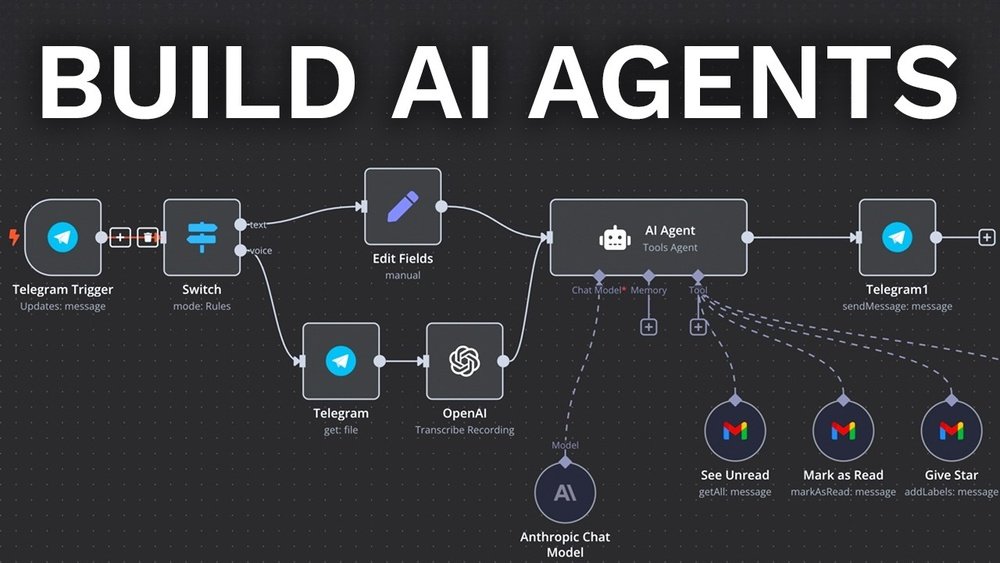
Are you ready to create your very own AI agent but don’t know where to start? Building an AI agent might sound complicated, but with the right steps, you can bring your ideas to life faster than you think.
Imagine having a smart assistant that handles tasks like answering emails, summarizing documents, or even helping you research—all tailored exactly to your needs. In this guide, you’ll discover clear, simple steps to define your agent’s purpose, choose the right tools, and connect it to powerful AI models.
Whether you want a no-code solution or prefer to dive into coding, this article will give you everything you need to build an AI agent that works for you. Stay with me, and you’ll soon be on your way to creating your own intelligent helper.

Credit: www.youtube.com
Set Clear Goals
Setting clear goals is the first step in building an AI agent. Goals guide the design and development process. They help focus efforts on what the AI should achieve.
Without clear goals, the AI agent may become unfocused or ineffective. Goals also make it easier to measure success. They provide a clear target to work towards.
Define The Purpose Of Your Ai Agent
Start by deciding what your AI agent will do. Will it answer questions, automate tasks, or provide recommendations? A clear purpose helps shape the agent’s abilities.
Think about the problem your AI agent will solve. This keeps the project focused and practical.
Set Measurable Objectives
Goals should be specific and measurable. For example, “reduce customer response time by 50%” is better than “improve service.”
Measurable objectives help track progress. They make it easier to know if the AI agent works well.
Consider User Needs
Think about the people who will use the AI agent. What do they want or need? Tailoring goals to user needs improves the agent’s value.
Clear goals based on users create a better experience and higher satisfaction.
Choose A Platform
Choosing the right platform is a key step in building an AI agent. The platform shapes how you create, test, and deploy your agent. It affects the tools you use and the skills you need. Some platforms offer easy drag-and-drop tools. Others require coding knowledge but give more control. Picking the right one depends on your goals and experience level.
No-code Options
No-code platforms let you build AI agents without writing code. They use visual interfaces to design workflows and logic. These platforms are perfect for beginners or those who want quick results. Examples include Make.com and Zapier. They connect AI services with other apps easily. You can create chatbots, automated tasks, and data processing agents fast. No-code tools save time and reduce complexity.
Coding Frameworks
Coding frameworks provide full control over your AI agent. You write code to define behavior and features. Popular frameworks include AutoGen, Pydantic AI, and OpenAI API. These tools require programming skills in languages like Python or JavaScript. Coding lets you customize your agent deeply. You can integrate advanced AI models and complex logic. Developers choose frameworks for flexibility and power. It suits projects needing unique solutions or scaling.
Design The Agent Role
Designing the agent role is a key step in building an AI agent. This step shapes how the agent will act and interact. Clear role design helps the AI meet its goals effectively. It also guides how the AI understands tasks and responds to users. Focus on defining the agent’s purpose and rules. This creates a strong foundation for the agent’s behavior and decisions.
Crafting System Prompts
System prompts set the stage for the AI’s actions. They tell the agent what it should do and how to do it. Write prompts that are clear and simple. Use direct instructions to guide the AI’s responses. Include the agent’s goals and limits in the prompt. This keeps the agent focused and on track. Testing and adjusting prompts can improve results over time.
Defining Behavior
Behavior defines how the AI acts in different situations. Decide how the agent handles questions or tasks. Set rules for polite and helpful communication. Include examples of good and bad responses. This helps the AI learn the right tone and style. Also, plan how the agent deals with errors or unknown requests. Clear behavior rules make the AI reliable and user-friendly.

Credit: markovate.com
Integrate Language Models
Language models power AI agents by understanding and generating text. They help your agent communicate clearly and act intelligently. Integration involves connecting your AI agent with a language model API or library. This step lets your agent process user inputs and create meaningful responses.
Choose a language model that fits your agent’s needs. Consider factors like size, speed, and cost. Popular models include OpenAI’s GPT series and other open-source options. Next, set up your environment to access the model’s API securely.
Choose The Right Language Model
Select a model based on your AI agent’s tasks. Smaller models work well for simple tasks and save resources. Larger models handle complex conversations better but need more computing power. Think about your budget and deployment platform before deciding.
Set Up Api Access
Register for API keys from the language model provider. Keep your keys private to avoid misuse. Install the required software libraries for your programming language. Test the connection by sending a simple text query and checking the response.
Design Prompts For Effective Responses
Create clear prompts to guide the language model. Use simple instructions that explain the agent’s role. Include examples if needed to improve accuracy. Test different prompt styles and adjust based on the responses you get.
Handle Input And Output Properly
Clean user input before sending it to the model. Remove extra spaces and fix typos when possible. After receiving the output, check for relevance and clarity. Format the response for easy reading and smooth interaction.
Optimize For Performance And Cost
Limit the length of prompts and responses to save costs. Use caching for repeated questions to reduce API calls. Monitor usage regularly and adjust your settings to keep the agent efficient.
Add Memory Features
Memory is a key part of any AI agent. It helps the agent remember past interactions and learn from them.
Adding memory makes your AI agent more intelligent and useful. It can keep track of user preferences, past questions, or important data.
This section explains how to add memory features to your AI agent step-by-step.
Choose The Type Of Memory
Select the right memory type for your AI agent’s needs. Common types include short-term memory, long-term memory, and working memory.
Short-term memory stores recent information temporarily. Long-term memory saves important facts for future use. Working memory helps process data during tasks.
Implement Memory Storage
Decide where to store the memory data. You can use databases, files, or cloud storage for this purpose.
Databases like SQLite or MongoDB work well for structured data. Files are simple but less flexible. Cloud storage offers scalability.
Design Memory Retrieval Logic
Build a system for your AI to access stored memories quickly. This helps the agent respond with relevant information.
Use keywords, timestamps, or categories to find memories. Efficient retrieval improves user experience and agent accuracy.
Update Memory Regularly
Keep the memory data fresh by updating it after each interaction. This helps the agent learn from new information.
Set rules for what to save, update, or delete. Avoid overloading memory with unnecessary details.
Test Memory Features
Run tests to check if memory works as expected. Simulate conversations to see if the agent recalls past inputs correctly.
Fix issues like forgetting important facts or confusing data. Reliable memory boosts your AI agent’s performance.
Incorporate Useful Tools
Incorporating useful tools is essential to build a functional AI agent. These tools help the agent perform tasks efficiently and interact with the world. Choosing the right tools can improve the agent’s capabilities and user experience.
Web Searching
Web searching allows the AI agent to find information online quickly. It helps the agent answer questions and gather data from trusted sources. Integrating web search APIs lets the agent fetch real-time information. This keeps the AI updated and relevant.
Email Handling
Email handling tools enable the AI agent to read, send, and organize emails. This feature is useful for managing communication automatically. The agent can prioritize messages and even respond with simple replies. It saves time and reduces the need for manual email management.
Api Access
API access connects the AI agent to various external services and databases. It allows the agent to perform complex tasks like booking appointments or retrieving user data. APIs make the AI flexible and adaptable to different workflows. Proper API integration expands the agent’s functionality greatly.
Connect External Knowledge
Connecting external knowledge is key to building a smart AI agent. It helps the agent learn beyond its initial data. Access to updated information makes the agent more useful and accurate.
External knowledge means data from outside sources. It can be databases, APIs, or web services. Adding this knowledge improves the agent’s decision-making and problem-solving skills.
Integrate Apis For Real-time Data
APIs let your AI agent fetch current data quickly. For example, weather, news, or stock prices. Use simple API calls to get fresh information. This keeps the agent’s responses relevant and timely.
Use Knowledge Bases And Databases
Connect your agent to knowledge bases like Wikidata or custom databases. These provide large sets of facts and details. The agent can query these to answer complex questions. This adds depth and accuracy to its knowledge.
Leverage Web Scraping Tools
Web scraping extracts data from websites not offering APIs. Use tools like Beautiful Soup or Scrapy. This helps gather specialized or niche information. Ensure you follow website rules and legal guidelines.
Incorporate Document And Text Repositories
Upload documents, manuals, or reports your agent can read. Text repositories provide rich content for learning. Use natural language processing to analyze and understand texts. This widens the agent’s knowledge scope.
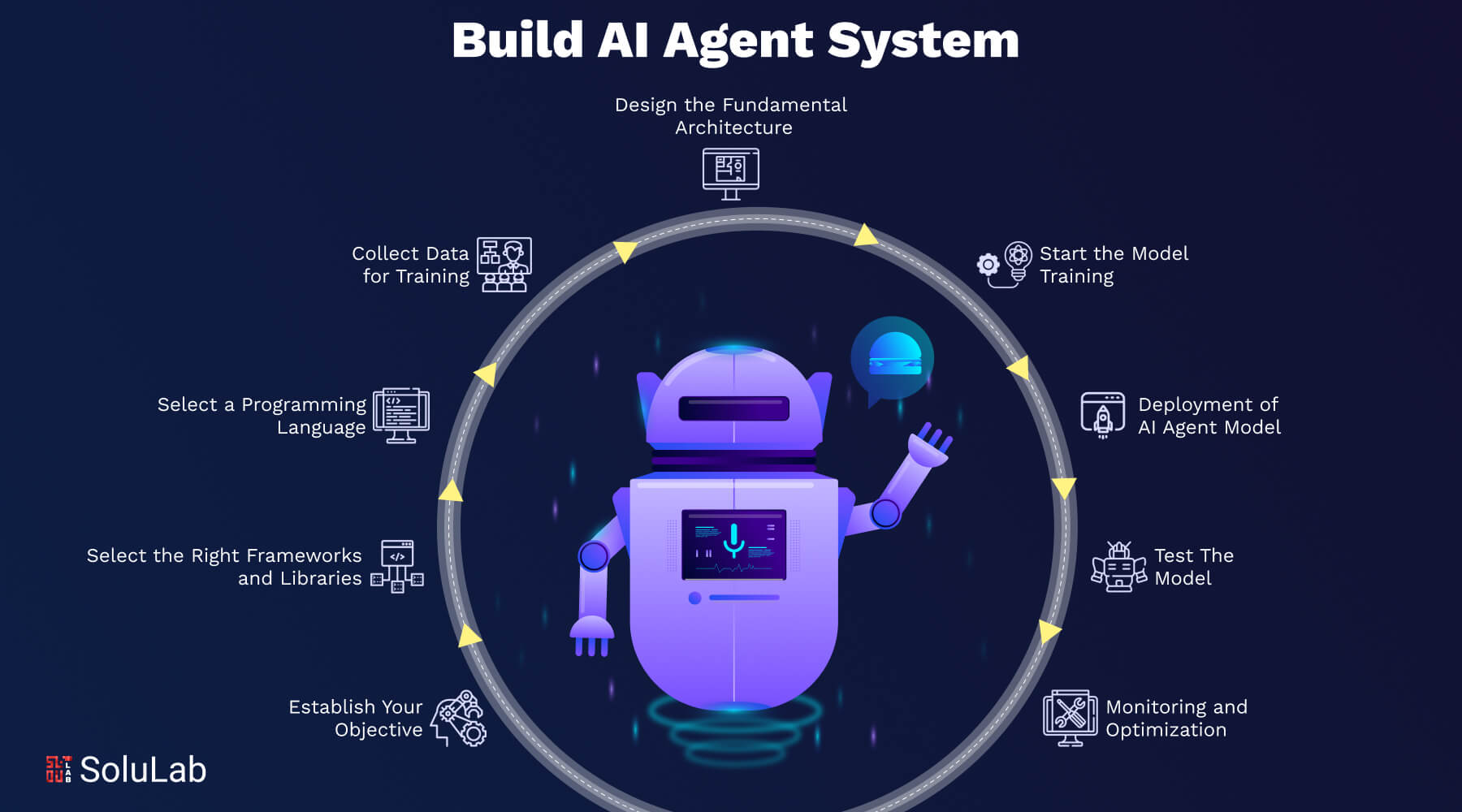
Credit: www.solulab.com
Test Agent Performance
Testing your AI agent’s performance is a key step in building a reliable system. It ensures the agent works as expected and meets your goals. Careful testing helps spot errors early. It also shows how well the agent handles tasks and learns from data.
Performance testing involves checking speed, accuracy, and decision-making quality. It also measures how the agent adapts to new situations. Testing must be thorough to build trust in your AI agent’s abilities.
Define Clear Performance Metrics
Start by setting simple, clear goals for your AI agent. Choose metrics that match your agent’s tasks. For example, measure accuracy for a chatbot or response time for an assistant. Use numbers to track progress over time. Clear metrics help find weak points and guide improvements.
Run Controlled Test Scenarios
Create test cases that mimic real-world situations your agent will face. Use controlled environments to keep tests consistent. Try different inputs and observe how the agent reacts. This method reveals strengths and weaknesses in decision-making. Repeat tests to confirm results and improve reliability.
Analyze Error Cases Thoroughly
Look closely at when and why the agent makes mistakes. Errors often reveal deeper issues in data or logic. Document each error and analyze patterns. Fixing these errors improves overall agent performance. This step is crucial for building a smart and dependable AI agent.
Use User Feedback For Real-world Testing
Gather feedback from real users to test your agent in live conditions. Users provide insights that lab tests may miss. Monitor how users interact and note any problems. Update your agent based on this feedback to make it more helpful and user-friendly.
Automate Testing With Scripts
Use automated scripts to run frequent tests without manual effort. Automation speeds up the testing process and catches new issues quickly. Set up tests to run after each update or change. This practice keeps your AI agent stable and efficient over time.
Refine And Optimize
Refining and optimizing your AI agent is a vital step in the building process. It improves performance and ensures your agent works smoothly. Small changes can lead to big results in accuracy and speed.
Testing the agent regularly helps catch errors early. Use real-world scenarios to check its responses. This practice makes your AI more reliable and user-friendly.
Adjusting Parameters For Better Performance
Fine-tune settings like learning rate and model size. These affect how fast and well your agent learns. Test different values and track results to find the best setup.
Improving Data Quality And Relevance
Use clean, relevant data for training your agent. Remove errors and duplicates from your datasets. Good data helps your AI make smarter decisions.
Iterative Testing And Feedback Loops
Run multiple test cycles to spot weaknesses. Collect feedback from users and logs. Use this information to improve your agent step-by-step.
Optimizing For Speed And Resource Use
Make your AI agent faster by simplifying code and models. Reduce memory and CPU use without losing accuracy. This helps run the agent on various devices.
Deploy And Monitor
Deploying and monitoring an AI agent is the final, crucial step. It ensures your agent works well in real settings. Proper deployment makes your AI accessible to users. Monitoring helps catch issues early and improves performance over time.
Careful monitoring also protects against errors and data problems. This step keeps your AI agent reliable and useful.
Deploy Your Ai Agent To The Cloud
Choose a cloud platform like AWS, Azure, or Google Cloud. These platforms offer easy ways to deploy AI models. Upload your agent code and data securely. Set up the environment with the right dependencies.
Cloud deployment allows scalability. Your AI can handle many users at once. It also offers automatic backups and recovery options.
Set Up Api Endpoints
Use APIs to let applications communicate with your AI agent. Create endpoints for sending and receiving data. Make sure the API is fast and secure.
APIs help integrate your AI into websites, apps, or other systems. This connection lets your agent perform tasks automatically.
Implement Real-time Monitoring
Track your agent’s performance constantly. Use monitoring tools to check response time and accuracy. Watch for unexpected errors or slowdowns.
Real-time data helps you fix problems before users notice. It also guides improvements for better results.
Collect User Feedback
Ask users about their experience with the AI agent. Use surveys or feedback forms. This input helps identify weaknesses and strengths.
Feedback supports continuous improvement. It keeps your AI aligned with user needs and expectations.
Update And Maintain Your Ai Agent
Regularly update the agent with new data and fixes. Maintenance ensures the AI stays accurate and secure. Remove outdated information to improve relevance.
Plan for scheduled updates. This practice keeps your AI agent effective and trustworthy over time.
Frequently Asked Questions
How Can I Create My Own Ai Agent?
Define your AI agent’s purpose clearly. Choose a no-code platform like Make. com or a coding framework like AutoGen. Connect it to a large language model (LLM) such as OpenAI. Provide system prompts and integrate necessary tools or external data for task execution.
How Much Does It Cost To Build An Ai Agent?
Building an AI agent typically costs between $10,000 and $100,000. Pricing depends on complexity, features, and development approach. No-code platforms reduce costs, while custom coding increases expenses. Maintenance and integration also affect overall investment. Budget planning ensures efficient AI agent development within your goals.
What Are The 5 Types Of Ai Agents?
The five types of AI agents are simple reflex, model-based reflex, goal-based, utility-based, and learning agents. Each type varies in complexity and decision-making ability.
Can You Build An Ai Agent With Chatgpt?
Yes, you can build an AI agent using ChatGPT by integrating it with custom prompts and external tools. Define the agent’s purpose, choose a platform or framework, and connect ChatGPT to automate tasks effectively.
What Is An Ai Agent In Simple Terms?
An AI agent is a software that learns, thinks, and acts to solve tasks automatically.
How Do I Start Building An Ai Agent?
Begin by defining its goal, then pick tools and gather data to train it.
Which Programming Languages Are Best For Ai Agents?
Python is popular due to many AI libraries, but JavaScript and Java also work well.
Can I Build An Ai Agent Without Coding Skills?
Yes, no-code platforms like Make. com allow building AI agents using drag-and-drop tools.
How Does Machine Learning Fit Into Ai Agent Building?
Machine learning helps the AI agent learn from data and improve over time.
What Data Do I Need To Train An Ai Agent?
You need clean, relevant data related to the task your AI agent will perform.
Conclusion
Building an AI agent takes clear goals and careful planning. Start by choosing the right platform or framework that fits your skills. Add instructions to guide the agent’s actions and connect it with a language model. Test your agent often and make improvements based on results.
Keep learning as AI technology changes fast. With patience and practice, anyone can create a useful AI agent. The key is to start simple and build up over time. This approach helps you understand AI better and reach your goals step by step.





