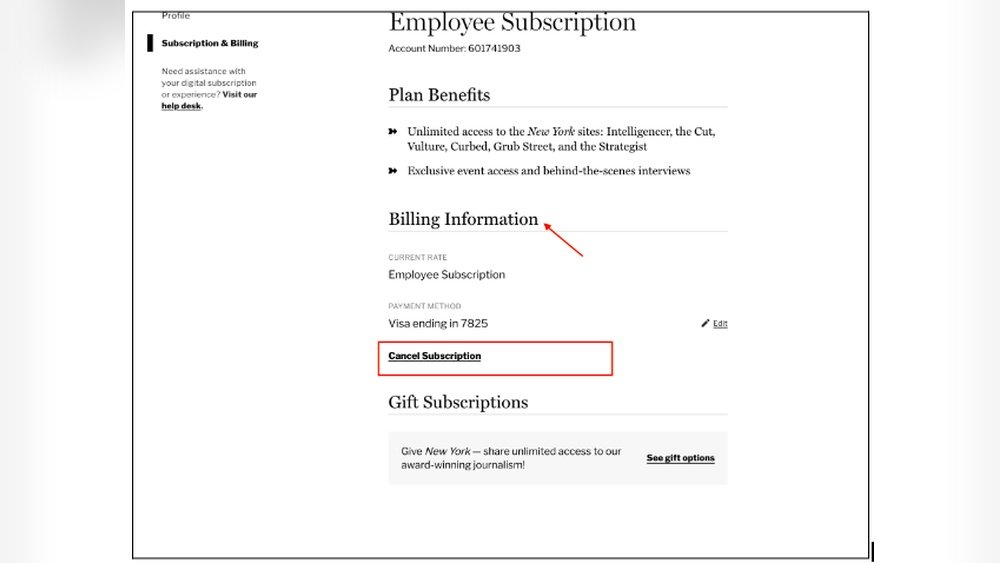
Are you stuck with a magazine subscription you no longer want? Maybe you signed up for a free trial or simply lost interest.
Whatever the reason, canceling a magazine subscription can feel confusing or frustrating if you don’t know where to start. But don’t worry—this guide is here to make the process simple and stress-free for you. By the time you finish reading, you’ll know exactly how to stop those unwanted deliveries and avoid future charges.
Let’s dive in and take control of your subscriptions today!

Credit: www.youtube.com
Locate Your Subscription Details
Locating your subscription details is the first step to cancel a magazine subscription. These details help confirm your identity as a subscriber. They also provide the necessary information to the publisher or service provider.
Gathering this information saves time and avoids confusion during cancellation. It makes the process smoother and faster. Start by checking where you kept your subscription records.
Check Your Email For Subscription Confirmation
Look through your email inbox for a confirmation message. This email usually arrives after you first subscribe. It contains your subscription ID, start date, and payment details. Use the search term with the magazine’s name to find it quickly.
Review Your Magazine Copies For Subscription Information
Physical or digital copies of the magazine often include subscription details. Check the first few pages or the cover for your subscriber number. Sometimes, your account information is printed on the mailing label.
Log Into The Magazine’s Website Account
Many magazines offer an online account for subscribers. Log in to see your subscription status and details. This area often provides options to manage or cancel your subscription directly.
Check Payment Records And Bank Statements
Review your bank or credit card statements for subscription charges. These records show the name of the billing company. They also display the amount and date of each charge. Keep this information ready when contacting customer service.

Credit: www.amazon.com
Check Payment Methods
Checking your payment methods is a key step in canceling a magazine subscription. It helps you find how you are paying for the subscription. Knowing this makes cancellation easier and faster.
Sometimes, subscriptions are paid through credit cards, bank accounts, or third-party services. Each payment method may have a different way to stop the subscription. Look carefully at your bank or credit card statements. Find the charges related to the magazine subscription.
Identifying the payment method also helps avoid future charges. It ensures the subscription is fully canceled and no unexpected fees appear later.
Check Credit Card Statements
Review your credit card statements for recurring magazine charges. These charges usually appear monthly or yearly. Note the name of the magazine or the company charging you. This information helps when contacting customer service.
Review Bank Account Transactions
Look at your bank account for automatic payments. Some subscriptions withdraw money directly from your bank. Check the dates and amounts to match your magazine subscription. This method can reveal hidden or forgotten subscriptions.
Inspect Third-party Payment Services
Services like PayPal or Apple Pay may handle your subscription payments. Log in to these accounts and check your payment history. Cancel subscriptions through these services if possible. They often have easy options to stop recurring payments.
Use Subscription Management Tools
Subscription apps track your payments across different accounts. They show all active subscriptions in one place. Use these tools to spot magazine subscriptions you might miss. These tools can often help you cancel directly from the app.
Use Device Subscription Managers
Using your device’s subscription manager offers a simple way to cancel magazine subscriptions. These managers list all active subscriptions tied to your device account. You can quickly review and stop payments without contacting the publisher.
This method works well for subscriptions purchased through app stores. It saves time and reduces confusion about where to cancel. Follow the steps below based on your device type to manage your subscriptions easily.
Apple App Store Steps
Open the Settings app on your iPhone or iPad.
Tap your name at the top to access Apple ID settings.
Select “Subscriptions” to see all your current subscriptions.
Find the magazine subscription you want to cancel.
Confirm your cancellation when prompted to stop future charges.
Google Play Store Steps
Open the Google Play Store app on your Android device.
Tap your profile icon in the top right corner.
Go to “Payments & subscriptions” and then select “Subscriptions.”
Locate the magazine subscription you wish to cancel.
Tap “Cancel subscription” and follow the on-screen instructions.
Ensure you receive confirmation to avoid unwanted charges.
Contact The Publisher Directly
Contacting the publisher directly is the most straightforward way to cancel a magazine subscription. This method ensures your request reaches the right place quickly. Publishers have specific procedures for cancellations and can confirm when your subscription ends.
Keep your subscription details handy before reaching out. This includes your account number, name, and address used for the subscription. Clear communication helps avoid delays and misunderstandings.
Find The Publisher’s Contact Information
Look for the publisher’s phone number or email on the magazine itself. Most magazines list customer service details on the back cover or inside the first few pages. The publisher’s website also has contact information under the “Contact Us” section.
Prepare Your Cancellation Request
Write down what you want to say before contacting the publisher. State your name, subscription ID, and your wish to cancel. Ask for a confirmation number or email once the cancellation is processed.
Contact The Publisher By Phone Or Email
Call the publisher’s customer service for faster response. Be polite but firm about canceling your subscription. If you prefer email, send a clear, concise message with all necessary details. Keep copies of all emails sent and received.
Confirm Cancellation And Follow Up
Request a confirmation number or email from the publisher. This proof helps if there are any billing issues later. Check your bank or credit card statements to ensure no further charges appear. If needed, follow up with the publisher until your subscription stops.
Utilize Subscription Management Tools
Subscription management tools simplify the process of canceling magazine subscriptions. These tools help track and control all your subscriptions in one place. They reduce the hassle of searching for contact details or account information.
Many devices offer built-in subscription managers. These tools show active subscriptions and provide easy cancellation options. Using them saves time and avoids missed deadlines for cancellation.
Using Built-in Subscription Managers On Your Device
Apple users can open Settings and tap their Apple ID at the top. Then, select “Subscriptions” to view all active services. Find the magazine subscription and follow prompts to cancel it.
Android users should open the Google Play Store app and tap their profile icon. Go to “Payments & subscriptions,” then “Subscriptions.” Select the subscription to cancel and confirm.
Contacting The Publisher Or Service Directly
If the subscription does not appear in your device manager, contact the publisher. Visit their website for customer service contact details. Call or email them to request cancellation. Keep a record of your communication for proof.
Using Third-party Subscription Management Tools
Third-party tools like Rocket Money or Trim help identify subscriptions tied to your bank account. These apps list recurring charges and offer cancellation assistance. They provide a clear overview of all magazine subscriptions.
Keep Records Of Cancellation Requests
Keeping records of cancellation requests is vital when ending a magazine subscription. It protects you from unexpected charges and disputes. Always save proof of your cancellation efforts.
Written or digital records serve as evidence if the company claims you did not cancel. They also help track your communication history. This makes follow-up easier and faster.
Save Email Confirmations And Receipts
After sending a cancellation email, keep the confirmation reply. Save any receipts or cancellation numbers you get. Store these in a folder dedicated to subscription cancellations.
Note Dates And Times Of Calls
Write down the date, time, and name of the person you speak with. Record what was discussed and any promises made. This helps if the company denies your request later.
Use Screenshots And Printed Copies
Take screenshots of online cancellation pages or chat conversations. Print copies of cancellation forms or letters. These backups support your case if digital files get lost.
Organize Records For Easy Access
Keep all cancellation-related documents in one place. Use folders on your computer or a physical file. Easy access saves time during disputes or when renewing subscriptions.
Monitor Credit Card Statements
Regularly check your credit card statements for recurring charges from magazines. Spotting these helps identify subscriptions you may want to cancel. Monitoring statements ensures you avoid unwanted fees after cancellation.
Checking your credit card statements helps track subscription payments. It shows all recurring charges made by the magazine company.
Look closely for any payments related to your magazine subscription. Sometimes charges appear even after cancellation attempts.
Identify Unauthorized Charges
Spot any charges that you did not approve or expect. These might be renewals or hidden fees.
Unauthorized charges can continue until you take action. Keep a record of these charges for your reference.
Report Discrepancies Quickly
Inform your credit card company about any wrong or repeated charges immediately. They can block future payments.
Most credit cards offer dispute options for unauthorized transactions. Use this to protect your money.
Keep Records For Proof
Save all statements showing the subscription charges. This helps prove your case if needed.
Also keep any cancellation confirmations from the magazine company. These documents support your claim during disputes.
Set Reminders For Free Trials
Free trials offer a risk-free way to enjoy magazines. They let you explore content without paying upfront. But forgetting to cancel before the trial ends can lead to unwanted charges. Setting reminders helps you avoid this problem easily.
Reminders keep you aware of trial deadlines. They give you time to decide if you want to continue or cancel. This simple step saves money and prevents surprise bills.
How To Set Reminders For Free Trials
Use your phone’s calendar or reminder app. Enter the trial end date as soon as you sign up. Add alerts a few days before the deadline. This gives you time to act and avoid charges.
Best Tools For Managing Free Trial Reminders
Smartphones have built-in apps for reminders. Google Calendar and Apple Reminders work well. You can also use free apps like Todoist or Microsoft To Do. They send alerts and help track multiple trials easily.
Why Setting Reminders Matters
Many people forget to cancel free trials. This leads to automatic payments for subscriptions they no longer want. Reminders prevent this common mistake. They put you in control of your subscriptions and budget.
Track Subscriptions In A Spreadsheet
Tracking your magazine subscriptions in a spreadsheet helps you stay organized. It shows all your subscriptions in one place. You can quickly see which ones you want to keep or cancel. This method reduces confusion and saves time.
Using a spreadsheet lets you record important details. These include subscription start dates, renewal dates, and contact information. You can also add notes about cancellation policies or last contacts. This keeps all the information handy.
Creating A Simple Subscription Tracker
Open a new spreadsheet in Excel or Google Sheets. Create columns for magazine name, start date, renewal date, cost, and contact info. Add a column for notes about cancellation steps or confirmation numbers. Fill in the details for each subscription.
Setting Reminders For Renewal Dates
Use the renewal date column to set reminders on your phone or computer. This helps you act before the subscription renews automatically. You avoid paying for magazines you no longer want. Timely reminders save money and hassle.
Updating Your Spreadsheet Regularly
Check your subscriptions often and update the spreadsheet. Mark subscriptions you have canceled or paused. Add new subscriptions as you get them. Keeping the list current gives you full control over your magazine services.
Credit: www.poporganizing.com
Choose Prepaid Subscription Options
Prepaid subscriptions allow you to pay for a set period upfront. This method gives you control over how long you want the magazine. You avoid surprise charges later. Once the prepaid period ends, the subscription stops automatically.
This option is simple and clear. No need to cancel later if you do not want to continue. It helps to manage your budget better. You can enjoy the magazine without worrying about ongoing payments.
Benefits Of Prepaid Magazine Subscriptions
Prepaid subscriptions prevent automatic renewals. You only pay once for a set number of issues. There is no risk of forgetting to cancel. This saves time and stress. It is easier to plan your expenses this way.
How To Select A Prepaid Subscription
Look for prepaid options on the magazine’s website. Choose the length of subscription you want. Pay the full amount upfront. Confirm that the subscription will not auto-renew. Keep a copy of the payment receipt for your records.
Managing Prepaid Subscriptions
Keep track of the subscription end date. Decide if you want to renew before it expires. Contact customer service if you want to extend the subscription. If not, simply let it end. This avoids any extra charges or commitments.
Frequently Asked Questions
How To Find And Cancel Magazine Subscriptions?
Check credit card statements for magazine charges. Use device subscription managers or contact the publisher directly. Request cancellation confirmation and keep records. Subscription tracking apps can also help identify and cancel unwanted magazines.
How Do I Cancel Unwanted Subscriptions?
Cancel unwanted subscriptions via your device’s subscription manager like Apple App Store or Google Play. Alternatively, contact the company directly or use subscription tracking tools to identify and cancel recurring payments. Always request cancellation confirmation and monitor credit card statements for unnoticed charges.
What Is The Hardest Subscription To Cancel?
The hardest subscriptions to cancel are often magazine or gym memberships due to complex policies and limited customer support. They may require direct contact, proof of identity, or written requests. Digital app subscriptions are easier, managed via app stores or subscription tools.
How Do I Cancel My Magazine Direct Subscription?
To cancel your magazine direct subscription, contact the publisher’s customer service via phone or email. Request cancellation and keep confirmation. Alternatively, use your device’s subscription manager, like Apple App Store or Google Play Store, to find and cancel the subscription quickly.
How Do I Cancel A Magazine Subscription Online?
Visit the magazine’s website, log into your account, and follow the cancellation instructions.
Can I Cancel A Magazine Subscription By Phone?
Yes, call the publisher’s customer service and request cancellation politely.
How Long Does It Take To Stop Magazine Delivery?
It usually takes one to two billing cycles to stop deliveries after cancellation.
Will I Get A Refund After Canceling My Subscription?
Refund policies vary; some offer partial refunds, others do not refund at all.
Do I Need To Return Magazines After Canceling?
No, most publishers do not require you to return already delivered magazines.
Can I Cancel A Subscription Through My Credit Card Company?
You can dispute charges, but contacting the publisher directly is more effective.
Conclusion
Canceling a magazine subscription does not have to be hard. Start by checking your device’s subscription settings or contact the publisher directly. Keep records of all your cancellation requests for proof. Use tools to find hidden subscriptions and monitor your payments regularly.
Set reminders to avoid unwanted charges from free trials. Staying organized helps you control your subscriptions easily. Taking these simple steps saves time and money in the long run.





