If you’ve ever found yourself second-guessing your grammar or struggling to polish your writing, you’re not alone. Grammarly is a popular tool, but it’s not the only option out there—and it might not always fit your needs.
Whether you want something more affordable, a different style of feedback, or tools that work better with your favorite apps, exploring Grammarly alternatives could be exactly what your writing needs. You’ll discover some top choices that can help you write with confidence and clarity, no matter your style or goals.
Ready to find the perfect fit for your writing? Let’s dive in.
Why Seek Alternatives
Many users search for Grammarly alternatives for various reasons. Some want more features, others need better privacy. Some find Grammarly’s pricing high. Others want tools that fit different writing styles. Exploring other options can improve your writing experience.
Choosing the right tool matters. Alternatives may offer unique benefits not found in Grammarly. Knowing why to seek alternatives helps you decide what suits you best.
Privacy Concerns And Data Security
Grammarly collects user data to improve its service. This raises concerns about privacy for many users. Some organizations block Grammarly to protect sensitive information. Alternatives may offer stronger privacy policies or local editing options. This keeps your writing safe from unwanted access.
Cost And Subscription Plans
Grammarly’s premium features come with a subscription fee. For casual writers, this cost may feel too high. Alternatives can provide free or cheaper plans with useful features. This makes quality grammar checking accessible for all budgets.
Feature Limitations And User Needs
Grammarly focuses mainly on grammar and spelling checks. Some writers need tools for style, tone, or creativity support. Alternatives may offer better customization or advanced editing options. This helps writers meet their specific goals more effectively.
Compatibility And Integration Issues
Grammarly works well with many apps but not all. Some users face problems with certain browsers or platforms. Alternatives might provide better integration with your preferred software. This allows smoother workflow and less disruption while writing.
Accuracy And Writing Style Preferences
Grammarly sometimes suggests changes that feel too strict or generic. Different tools have different editing styles and accuracy levels. Trying alternatives can help you find a tool that matches your voice. This keeps your writing natural and authentic.
Top Grammar Checkers
Choosing the right grammar checker can improve your writing instantly. These tools help spot mistakes and suggest corrections. They save time and boost your confidence in writing. Many options offer unique features beyond basic grammar checks. Here are some top grammar checkers to consider.
Ginger Software
Ginger Software corrects grammar and spelling errors quickly. It also offers sentence rephrasing to make writing clearer. The tool supports multiple languages, useful for non-native speakers. It includes a text reader to hear your writing aloud. Ginger works well on desktops and mobile devices.
Prowritingaid
ProWritingAid checks grammar and style in detail. It highlights repeated words and awkward sentences. The tool helps improve writing structure and readability. It integrates with many platforms like Word and Google Docs. ProWritingAid suits writers who want deep editing help.
Whitesmoke
WhiteSmoke provides grammar, spelling, and punctuation checks. It also includes plagiarism detection for originality. The tool offers video tutorials to improve writing skills. It works on browsers, desktops, and mobile apps. WhiteSmoke is good for professional and casual writing.
Languagetool
LanguageTool supports grammar checks in over 20 languages. It finds errors that other checkers might miss. The tool works as a browser extension and desktop app. It is open-source and free with premium options. LanguageTool suits multilingual writers and students.
Hemingway Editor
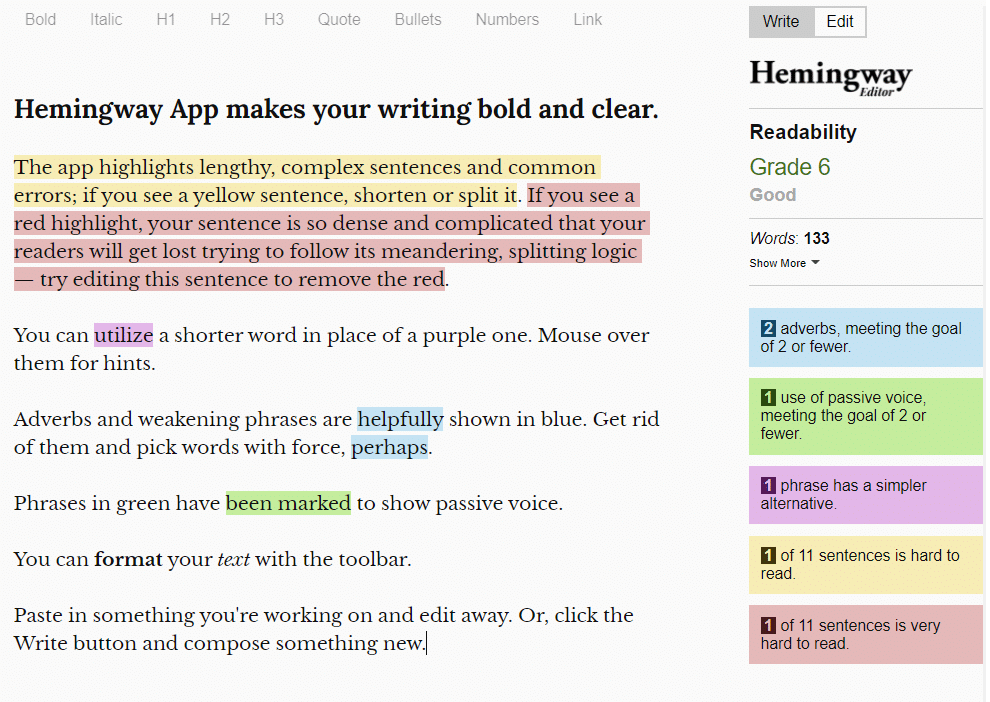
Hemingway Editor focuses on clear and simple writing. It highlights complex sentences and passive voice. The tool encourages short, direct sentences for better flow. It does not check grammar deeply but improves style. Hemingway is ideal for making writing easy to read.
Ai Writing Assistants
AI writing assistants have become important tools for writers. They help improve grammar, style, and clarity. These tools use artificial intelligence to understand text and suggest better ways to write. Many writers choose alternatives to Grammarly for various reasons.
AI writing assistants offer more than just grammar checks. They help with tone, word choice, and even creativity. These features make writing easier and faster for students, professionals, and content creators. Exploring these tools can lead to better writing habits and improved skills.
What Are Ai Writing Assistants?
AI writing assistants are software programs that use artificial intelligence. They scan text and provide suggestions to improve it. These tools check grammar, spelling, punctuation, and style. Some also help with structure and readability. Many AI assistants learn from user feedback to give better advice over time.
Top Ai Writing Assistants Besides Grammarly
Several AI writing assistants offer useful features similar to Grammarly. Tools like ProWritingAid, Ginger, and Hemingway Editor stand out. Each has unique strengths in grammar checking and style improvement. Some focus on detailed reports, while others offer simple fixes. Choosing the right tool depends on writing needs and preferences.
How Ai Writing Assistants Help Non-native English Speakers
Non-native speakers benefit greatly from AI writing assistants. These tools explain grammar rules and suggest clearer words. They reduce common mistakes and improve sentence flow. Easy-to-understand feedback builds confidence in writing English. Many AI assistants support multiple languages, making them accessible worldwide.
Using Ai Writing Assistants For Different Types Of Writing
AI writing assistants adapt to many writing styles. They work well with emails, essays, and creative stories. Some tools offer tone adjustments for formal or casual writing. Writers can choose suggestions that fit their voice. This flexibility makes AI assistants useful for diverse writing tasks.
Real-time Editing Tools
Real-time editing tools help you fix mistakes as you write. They catch grammar, spelling, and punctuation errors immediately. These tools improve your writing speed and accuracy. They also suggest better word choices and sentence structures. Many writers prefer real-time editors for their convenience and instant feedback.
Prowritingaid
ProWritingAid offers detailed grammar and style checks in real time. It highlights errors and explains how to fix them. The tool also gives suggestions to improve readability. Writers can use it as a browser extension or within word processors. ProWritingAid works well for fiction and non-fiction writing.
Ginger Software
Ginger Software provides quick grammar and spelling corrections while you type. It also offers translation and sentence rephrasing features. The tool supports multiple languages, helping non-native speakers. Ginger’s real-time suggestions help you write clear and correct sentences. It works on web browsers, desktop, and mobile devices.
Microsoft Editor
Microsoft Editor is a built-in real-time editor for Microsoft Word and Outlook. It checks grammar, spelling, and style instantly. The editor suggests alternatives for overused words and repetitive phrases. It also adapts to your writing style over time. Microsoft Editor integrates smoothly with Office apps and browser extensions.
Languagetool
LanguageTool is an open-source real-time editing tool with support for many languages. It finds grammar and style errors quickly. The tool offers a simple interface for easy corrections. LanguageTool works on browsers, desktop apps, and mobile devices. It is useful for writers who need multilingual support.
Plagiarism Detection Options
Plagiarism detection is crucial for writers, students, and professionals. It helps ensure that content is original and not copied from other sources. Many tools offer plagiarism checking features alongside grammar and style checks. These options help maintain integrity and avoid penalties for copied content.
Several Grammarly alternatives provide reliable plagiarism detection. These tools scan text against large databases and online sources. They highlight duplicate phrases and suggest ways to improve originality. Choosing the right plagiarism checker depends on accuracy, speed, and ease of use.
Turnitin
Turnitin is a popular plagiarism detection tool in education. It checks papers against millions of academic sources and internet content. Teachers and students use it to verify originality. Turnitin also provides detailed reports to identify copied sections.
Quetext
Quetext offers a user-friendly plagiarism checker. It scans documents quickly and shows matching text. The tool uses color-coded highlights to mark copied content. Quetext also provides citation suggestions to fix plagiarism issues.
Copyscape
Copyscape focuses on web content plagiarism detection. It helps website owners find duplicate content online. The tool compares your pages with billions of web pages. Copyscape alerts users if copies of their content appear elsewhere.
Plagscan
PlagScan is widely used by businesses and academics. It checks documents against scientific papers, websites, and internal databases. The software delivers detailed similarity reports. PlagScan offers integration with popular learning management systems.
Smallseotools Plagiarism Checker
SmallSEOTools provides a free plagiarism checker online. It allows users to paste text or upload files for scanning. The tool highlights copied parts and shows source links. It is a quick and easy option for basic plagiarism detection.
Credit: kindlepreneur.com
Creative Writing Helpers
Creative writing helpers offer more than just grammar checks. They assist writers in finding fresh ideas and improving story flow. These tools support imagination and make writing easier for everyone.
Many of these alternatives focus on enhancing creativity. They help generate new content and suggest better ways to express thoughts. Writers gain confidence and produce richer texts with their aid.
Chatgpt For Creative Writing
ChatGPT helps create unique stories and ideas quickly. It rewrites sentences to sound more natural. This tool works well for brainstorming and expanding on rough drafts. Users get flexible suggestions that fit many writing styles.
Prowritingaid As A Writing Coach
ProWritingAid offers in-depth style and structure advice. It points out repeated words and awkward phrases. Writers receive tips to make their text clearer and more engaging. This tool also includes detailed reports to track progress.
Hemingway Editor For Clarity
Hemingway Editor highlights long and complex sentences. It suggests simpler words to improve readability. Writers learn to write in short, direct sentences. This tool helps keep the reader’s attention focused.
Scrivener For Organized Writing
Scrivener helps manage large writing projects easily. It allows writers to arrange notes, research, and drafts in one place. This software supports story development and idea tracking. Writers stay organized and productive with it.
User Experience And Interface
User experience and interface play a crucial role in choosing a writing assistant. A clean, intuitive design helps users write faster and with fewer errors. Simple navigation lets users focus on their content, not the tool. The best alternatives to Grammarly offer clear layouts and easy-to-understand controls. This section explores how different tools compare in these areas.
Ease Of Use
Many Grammarly alternatives aim for simplicity. Their interfaces are minimal and user-friendly. Users can quickly find grammar checks, style suggestions, and vocabulary enhancements. Clear icons and buttons make editing less stressful. Some tools offer one-click corrections, saving time and effort.
Customization Options
Good writing tools allow users to adjust settings. Alternatives provide options to tailor feedback to your writing style. You can set goals like tone, formality, and audience. This customization ensures suggestions fit your unique needs. It enhances the overall writing experience.
Integration With Other Apps
Seamless integration is vital for smooth workflows. Many Grammarly alternatives work inside popular apps. You can write in browsers, email clients, or word processors. This reduces the need to switch between programs. Some tools also offer browser extensions or desktop apps for easy access.
Real-time Feedback
Instant feedback helps catch errors as you write. Most alternatives provide live grammar and spelling checks. Suggestions appear without delay, improving writing flow. This feature reduces the chance of missing mistakes. It also helps users learn and improve over time.
Credit: kinsta.com
Integration And Compatibility
Integration and compatibility are essential factors when choosing a Grammarly alternative. These features determine how well a tool works with your favorite apps and devices. A good grammar checker should fit smoothly into your daily writing workflow.
Many users write on different platforms. Some prefer web browsers, others use Microsoft Word or Google Docs. Your chosen tool should support these environments for easy access and quick corrections.
Integration With Popular Writing Platforms
Top Grammarly alternatives offer extensions for Chrome, Firefox, and Edge. These add-ons check your grammar directly in your browser. They work on emails, social media, and online documents without switching apps.
Some tools also provide plugins for Microsoft Word and Google Docs. These plugins bring grammar checking inside your documents. This saves time and keeps your writing error-free as you type.
Compatibility With Operating Systems
Most grammar tools work on Windows and macOS. A few also support Linux, though choices are limited. Mobile apps for iOS and Android let you check grammar on your phone or tablet.
Check if the tool offers a desktop app or works online. Desktop apps can work offline, useful if internet access is limited. Online tools need a stable connection but require no installation.
Support For Multiple File Formats
Good alternatives support various file types. Common formats include DOCX, TXT, and PDF. This lets you upload documents directly for grammar checks.
Some tools also allow you to export corrected documents in multiple formats. This flexibility helps when sharing files with others or submitting work.
Pricing And Accessibility
Pricing and accessibility play a crucial role in choosing the right grammar tool. Users need clear options that fit their budgets and devices. A good alternative offers flexible pricing plans and works smoothly on many platforms. This ensures everyone can access its features without hassle.
Affordable Plans For Every User
Many Grammarly alternatives offer free versions with basic features. These free plans help users check grammar and spelling quickly. Paid plans usually add advanced checks and style suggestions. Pricing varies from monthly to yearly subscriptions. Some tools even provide lifetime access for one-time fees. This variety helps users find a plan that suits their needs.
Device And Platform Compatibility
Accessibility means the tool works on different devices. Most alternatives support Windows and Mac computers. Many also offer browser extensions for Chrome, Firefox, and Edge. Mobile apps for iOS and Android increase convenience on the go. Some tools integrate with popular writing software like Google Docs or Microsoft Word. This makes editing easier across platforms.
Offline And Online Use
Some grammar checkers require an internet connection to work. Others offer offline modes for privacy and convenience. Offline use helps users edit documents without internet access. This is helpful for travelers or those with limited connectivity. Choose a tool that fits your editing habits and needs.
Combining Tools For Best Results
Combining multiple writing tools can boost your editing process. Each tool has unique strengths that cover different needs. Using them together helps catch more mistakes and improve clarity. This approach saves time and enhances the quality of your writing.
Choosing Complementary Tools
Select tools that focus on different areas. For example, one tool may catch grammar errors, while another checks style. This way, you get a wider range of feedback. Pairing a simple spell checker with an advanced editor works well.
Balancing Ai And Human Input
AI tools offer quick corrections but may miss context. Human review adds deeper understanding and nuance. Use AI for initial drafts and humans for final edits. This balance ensures your content is clear and accurate.
Integrating Tools Into Your Workflow
Set up tools to fit your writing routine smoothly. Use browser extensions for real-time checks while writing. Run full reports after completing drafts. Consistent use of multiple tools improves your writing over time.
Credit: medium.com
Frequently Asked Questions
Why Are Schools Blocking Grammarly?
Schools block Grammarly mainly to protect student data and comply with privacy laws. Some districts worry about data security and external access.
Is Editgpt Better Than Grammarly?
EditGPT offers deeper, flexible editing and creative content generation. Grammarly excels in real-time grammar checks, plagiarism detection, and seamless app integration. Choose based on your needs: EditGPT for complex edits, Grammarly for quick, reliable corrections. Both tools serve different writing purposes effectively.
Is Chatgpt Better Than Grammarly?
ChatGPT excels in creative writing, brainstorming, and content generation. Grammarly specializes in real-time grammar checks, plagiarism detection, and easy editing within apps. Both serve different needs; choose ChatGPT for creativity and Grammarly for precise, in-app corrections and workflow efficiency.
Will My Paper Get Flagged If I Use Grammarly?
Using Grammarly will not flag your paper. It only checks grammar and plagiarism without submitting your work to databases.
What Are The Top Grammarly Alternatives Available Today?
Some popular alternatives include ProWritingAid, Hemingway Editor, Ginger, WhiteSmoke, and LanguageTool.
Why Do Some Users Prefer Grammarly Alternatives?
Users seek different features, pricing, offline use, or simpler interfaces not offered by Grammarly.
Can Grammarly Alternatives Check Plagiarism Effectively?
Many alternatives like ProWritingAid and WhiteSmoke offer plagiarism detection but may vary in accuracy.
Are Grammarly Alternatives Suitable For Non-native English Speakers?
Yes, several tools provide easy explanations and simple grammar corrections ideal for learners.
Which Grammarly Alternative Is Best For Creative Writing?
ChatGPT and Hemingway Editor help improve style and creativity beyond grammar checks.
Do Grammarly Alternatives Support Multiple Platforms And Devices?
Most alternatives work on web browsers, desktop apps, and mobile devices for convenience.
Conclusion
Choosing the right grammar tool depends on your needs and writing style. Many alternatives offer unique features worth trying. Some focus on creativity, while others emphasize accuracy or ease of use. Test a few options to find what fits best.
This way, you can improve your writing confidently and efficiently. Keep exploring to enhance your skills without relying on just one tool.





