Minecraft is one of the most popular games in the world, loved by millions for its blocky style and open-ended play. If you’re thinking about installing it, or you want to manage your device’s storage better, you might wonder: How much space does Minecraft take up? The answer isn’t as simple as one number. The storage Minecraft uses can change a lot based on the edition, device, updates, and how you play. Some players are surprised when their game starts using gigabytes of space, while others keep it small and fast.
In this guide, you’ll learn exactly how much space each Minecraft edition needs, what affects the size, and how you can control or reduce it. Whether you play on PC, console, or mobile, you’ll find clear answers and practical advice, even if you’re not a tech expert.
What Determines Minecraft’s Storage Size?
Many people expect Minecraft to always be a small game, but that’s not always true. Several factors decide how much space Minecraft uses:
- Edition and platform: Java, Bedrock, and Education editions all have different storage needs.
- Updates: Each update adds new features and can increase the space needed.
- World size and number: More worlds, or big worlds, take more room.
- Mods and resource packs: These can make Minecraft much larger.
- Screenshots and recordings: Saving images or videos from the game adds up over time.
Understanding these factors helps you plan ahead and avoid surprises.
Minecraft Java Edition: Storage Explained
The Java Edition is the classic version for Windows, Mac, and Linux. It’s popular for its flexibility and support for mods.
Installation Size
After a fresh install, Minecraft Java Edition is usually between 500 MB and 1 GB. This includes the game files, default assets, and the launcher.
Game Updates
Each update can add 50–300 MB depending on new features, textures, and bug fixes. If you update often, the game will need more space for new files.
Worlds And Save Files
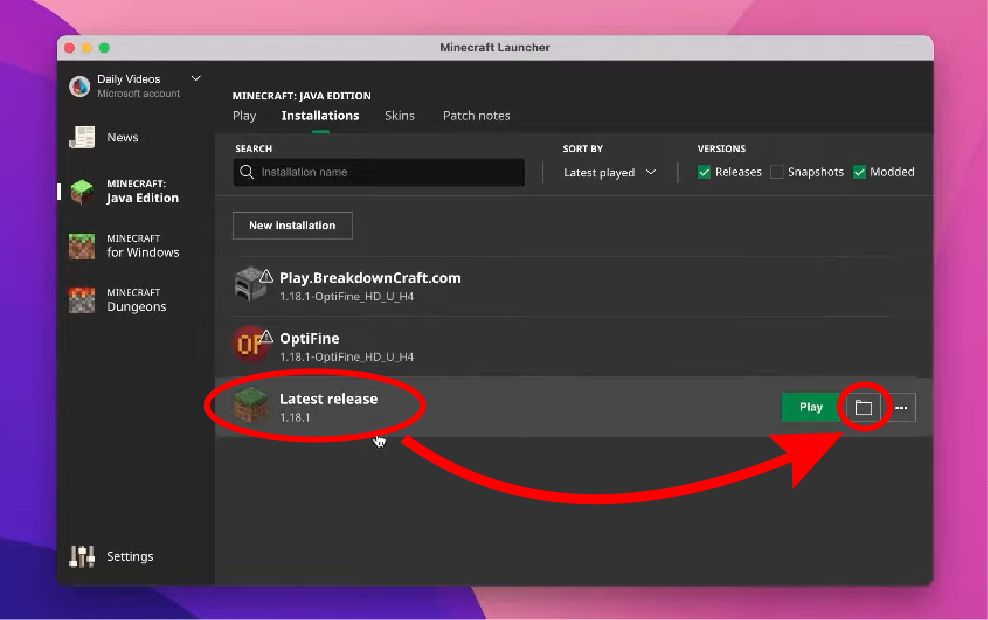
Each world you create in Java Edition grows as you explore. A new world might start at 5–10 MB, but can quickly become hundreds of MBs if you travel far or build a lot.
Mods And Resource Packs
Mods, datapacks, and resource packs can make Minecraft much bigger:
- A simple resource pack: 1–10 MB
- Large modpacks (like Feed The Beast): 200 MB to 1 GB or more
- Multiple packs: Add their sizes together
Example: Typical Java Storage Usage
A player with three worlds (each 200 MB), a few mods (500 MB total), and some screenshots (100 MB) can easily reach 2–3 GB. Add-on-heavy players might use 10 GB or more.
Credit: alvarotrigo.com
Minecraft Bedrock Edition: How Much Space?
The Bedrock Edition is used on Windows 10/11, Xbox, PlayStation, Nintendo Switch, and mobile. It’s designed to run smoothly on many devices.
Initial Download Size
Here’s what you can expect when downloading Bedrock Edition:
- Windows 10/11: About 300–600 MB
- Xbox/PlayStation: 1–2 GB
- Mobile (Android/iOS): 100–400 MB
Console versions are bigger because they include extra assets and must meet platform requirements.
Updates And Dlcs
Every update adds new content, usually 50–150 MB. Downloadable content (DLC), like skins and marketplace worlds, also take up space. Some DLC worlds are 100 MB or more each.
Saved Worlds
Bedrock worlds are more compressed than Java, but big builds and lots of exploration still increase file size:
- Small world: 2–10 MB
- Large world: 100 MB or more
Marketplace Content
If you buy or download maps, skins, or texture packs from the marketplace, each one adds to your storage use. Some packs are surprisingly large.
Minecraft Education Edition: Storage For Schools
Minecraft Education Edition is used in classrooms and has some extra features.
- Windows/Mac: About 1–1.5 GB for the base install
- Updates: Add 100–200 MB each time
- Worlds: Similar to Bedrock, but large classroom projects can be much bigger
If many students share a device, space can add up quickly.
Minecraft On Mobile Devices
Space is more limited on phones and tablets, so it’s important to check Minecraft’s needs.
Android
- App size: 100–200 MB
- First launch: Downloads extra files, total up to 300–400 MB
- Large worlds, add-ons, and skins: Add to this number
Ios (iphone/ipad)
- App size: 200–400 MB
- Game data: Can increase with worlds, texture packs, and screenshots
Storage Tips For Mobile Users
- Delete unused worlds and old screenshots
- Remove unused resource packs
- Move worlds to cloud storage if supported
Minecraft On Console: Storage Details
Console editions (Xbox, PlayStation, Switch) are often bigger than PC or mobile versions.
Xbox One / Series X|s
- Base game: 1–1.5 GB
- Updates: Each update adds 100–300 MB
- Worlds: Each world 10–150 MB depending on play style
- Marketplace content: Large packs can be 200 MB or more
Playstation 4/5
- Base game: 1–2 GB
- Updates: Similar to Xbox
- Saved data: Worlds and DLC add extra space
Nintendo Switch
- Game: 1–1.5 GB
- Updates/DLC: Add as you download
- Limited system storage: Consider a microSD card if you play a lot
Storage Comparison Table
Here’s a summary comparing the initial size of Minecraft across platforms:
| Platform | Base Game Size | Typical Update Size | World Size Range |
|---|---|---|---|
| Java Edition (PC) | 500 MB – 1 GB | 50 – 300 MB | 5 MB – 1 GB+ |
| Bedrock (Windows 10/11) | 300 – 600 MB | 50 – 150 MB | 2 MB – 500 MB |
| Bedrock (Mobile) | 100 – 400 MB | 50 – 100 MB | 2 MB – 100 MB |
| Xbox/PlayStation | 1 – 2 GB | 100 – 300 MB | 10 MB – 500 MB |
| Nintendo Switch | 1 – 1.5 GB | 50 – 150 MB | 5 MB – 300 MB |
| Education Edition | 1 – 1.5 GB | 100 – 200 MB | 2 MB – 1 GB+ |
What Makes Minecraft Grow In Size?
Many players are surprised when Minecraft starts using much more space over time. Here’s why this happens:
1. World Exploration
The more you travel in a world, the more the game must save. Minecraft only loads and saves the areas (called “chunks”) that you visit. If you wander far in every direction, your world file grows quickly.
2. Building And Redstone Machines
Large, detailed builds or complex redstone circuits can use more data. Each block and its state must be saved.
3. Mods And Add-ons
Installing many mods or add-ons can multiply the size of your game. Some modpacks include hundreds of mods and require several gigabytes.
4. Resource Packs
High-resolution or custom resource packs can add hundreds of megabytes. A few packs can use more space than the base game.
5. Screenshots And Videos
If you take lots of screenshots or record your gameplay, these files are saved on your device. They can use up gigabytes, especially if you never clean them out.
6. Backups And Old Worlds
Minecraft doesn’t delete old worlds automatically. Old saves, backups, and experimental worlds add up over time.
Managing Minecraft’s Storage On Pc
If your computer is running low on storage, here are some ways to control Minecraft’s size:
Delete Unused Worlds
Go to your saves folder and remove worlds you no longer play. Each world can be hundreds of MB.
Remove Old Resource Packs And Mods
Delete packs and mods you don’t use. This can free up gigabytes, especially if you’ve tried many different ones.
Move Screenshots And Videos
Transfer these files to a cloud drive or external storage if you want to keep them but need space.
Clean Up Backups
If you use a backup system, check for old or duplicate files that can be safely deleted.

Credit: fictionhorizon.com
Managing Minecraft’s Storage On Console
Console storage is often more limited. Here’s what helps:
- Delete old worlds and DLC you don’t use
- Uninstall unused skin or texture packs
- Check saved data for large or unnecessary files
- Use external drives (where supported, like on Xbox and PlayStation)
Managing Minecraft’s Storage On Mobile
Phones and tablets fill up fast, so:
- Regularly delete unused worlds and packs
- Move important worlds to cloud storage if available
- Clear out screenshots and recordings

Credit: www.reddit.com
Advanced: Where Does Minecraft Store Files?
If you want to go deeper, here’s where Minecraft keeps its data on different devices:
Pc (java Edition)
- Game files: `C:\Program Files (x86)\Minecraft`
- Worlds: `C:\Users\[YourName]\AppData\Roaming\.minecraft\saves`
- Resource packs: `.minecraft\resourcepacks`
- Screenshots: `.minecraft\screenshots`
Bedrock Edition (windows 10/11)
- Game files: `C:\Program Files\WindowsApps\Microsoft.MinecraftUWP…`
- Worlds: `C:\Users\[YourName]\AppData\Local\Packages\Microsoft.MinecraftUWP…\LocalState\games\com.mojang\minecraftWorlds`
Mobile
- Android: `Android/data/com.mojang.minecraftpe/files/games/com.mojang/`
- IOS: Inside the app sandbox, accessible through iTunes or Files app
Console
- Data is managed by the system and not usually accessible directly. Use in-game tools to delete or manage content.
Minecraft With Mods: How Much Space Is Needed?
If you play heavily-modded Minecraft, your storage needs change a lot.
Example: Popular Modpacks
Some packs like SkyFactory 4 or RLCraft need 3–5 GB just for game files and assets. With a few large worlds, total usage can be 10 GB or more.
Why Mods Use So Much Space
- High-resolution textures
- Extra sounds and music
- More code and scripts
- Multiple libraries and dependencies
Modpack Comparison Table
Here’s how different modpacks can affect size:
| Modpack Name | Game Files Size | Typical World Size | Total Storage Needed |
|---|---|---|---|
| Vanilla (No Mods) | 500 MB – 1 GB | 5 MB – 500 MB | ~1 GB |
| Feed The Beast (FTB) | 1 – 3 GB | 100 MB – 1 GB | ~4 GB |
| RLCraft | 2 – 4 GB | 200 MB – 1 GB | ~5 GB |
| SkyFactory 4 | 3 – 5 GB | 200 MB – 2 GB | ~7 GB |
Non-obvious Insight: Multiple Mod Loaders
If you install both Forge and Fabric mod loaders, you’ll need even more space, as each keeps its own set of mods and config files.
Minecraft Realms And Online Play: Does It Use Local Space?
Some players use Minecraft Realms or other servers. Here’s how this affects your device:
- Playing on a server or Realm does not save the world to your device, unless you download it.
- Any screenshots, resource packs, or downloaded maps still use local storage.
- Downloading a Realm world can be hundreds of MB.
How To Check Minecraft’s Storage Use
Each device lets you check how much space Minecraft uses:
Pc
- Right-click the `.minecraft` folder, select “Properties” to see total size.
- For mods: Check the “mods” and “resourcepacks” folders.
Windows 10/11
- Settings > Apps > Minecraft > Advanced options > See storage used.
Console
- Check storage in system settings. Look for saved data and add-ons.
Mobile
- Android: Settings > Apps > Minecraft > Storage
- IOS: Settings > General > iPhone Storage > Minecraft
How Much Space Is Enough?
For most players, you should plan for 2–5 GB of free space for Minecraft. Here’s a breakdown for different play styles:
- Casual vanilla play: 1–2 GB is enough
- Many worlds, some resource packs: 2–4 GB
- Heavy modding and screenshots: 5–10 GB or more
Always keep extra space for updates and backups.
Non-obvious Tips For Managing Minecraft Storage
Here are two tips many players miss:
- Compress old worlds you don’t play but want to keep. Zip them up and move them to cloud or external storage.
- Check for duplicate downloads in your mods or resource packs folder. Some launchers re-download the same files multiple times.
When Minecraft Gets Too Big: What To Do
If Minecraft is using too much space, try these steps:
- Delete unused content first (worlds, packs, mods)
- Move worlds to another drive or cloud
- Uninstall and reinstall the game (back up worlds first)
- On mobile, clear app cache/data if you don’t need old files
If your system is nearly full, Minecraft can slow down or crash. Always leave some free space for updates and operating system tasks.
Minecraft’s Size Compared To Other Games
Minecraft is smaller than most modern games, especially shooters or open-world titles. For example:
- Fortnite: 30–40 GB
- Call of Duty: 100+ GB
- Roblox: 1–2 GB
Minecraft’s base install is light, but mods and worlds can make it grow quickly.
Is Minecraft’s Size A Problem For Older Devices?
On older PCs or phones with only 16–32 GB storage, Minecraft can fill up space fast, especially with mods or big worlds. If your device is almost full:
- Limit the number of worlds and packs
- Use cloud storage for important files
- Consider using a lightweight edition (like Bedrock on mobile)
How Updates Affect Storage
Every update adds new features, but also increases the size. Sometimes, old files are replaced, but often the storage used grows over time. If you play for years, your Minecraft folder will almost always get bigger.
Backing Up And Restoring Minecraft Worlds
If you want to keep your worlds safe but not take up space:
- Back up worlds to an external drive or cloud
- Delete them from your device after backup
- Restore them only when you want to play
Many players forget to back up and lose worlds when reinstalling or switching devices.
Final Thoughts: Planning For Minecraft’s Space Needs
Minecraft starts small, but grows with your creativity. If you play often, build big worlds, or love mods, plan for at least 5–10 GB of free space. For casual players, 2–3 GB is usually enough. Always keep backups, clean up unused files, and check your storage every few months.
If you want to see the official requirements or get more storage tips, visit the official Minecraft Help Center.
Frequently Asked Questions
How Much Space Does Minecraft Use With No Mods Or Add-ons?
A fresh install of Minecraft, with just the base game and one or two small worlds, uses between 500 MB and 2 GB depending on your platform. Mobile versions are usually under 1 GB, while PC and console versions can be a bit larger.
Why Does My Minecraft Folder Keep Getting Bigger?
Minecraft saves every new world, screenshot, and update. If you install mods, resource packs, or marketplace content, these add even more. Exploring more in-game causes your world files to grow as well.
Can I Install Minecraft On A Device With Limited Storage?
Yes, but you must manage your storage closely. Delete unused worlds and packs often, and avoid large modpacks or many add-ons. On some devices, you can use external storage or cloud backups to help.
Does Playing On Servers Or Realms Save Data To My Device?
Not usually. Playing online doesn’t save the whole world locally, but screenshots, resource packs, and downloaded maps still use space. Downloading a world from a Realm does save a copy to your device.
How Can I Reduce Minecraft’s Storage Use Without Losing My Worlds?
You can move old worlds to cloud storage or an external drive, then delete them from your device. Also, remove mods, resource packs, and screenshots you don’t need. Always back up important worlds before deleting anything.





