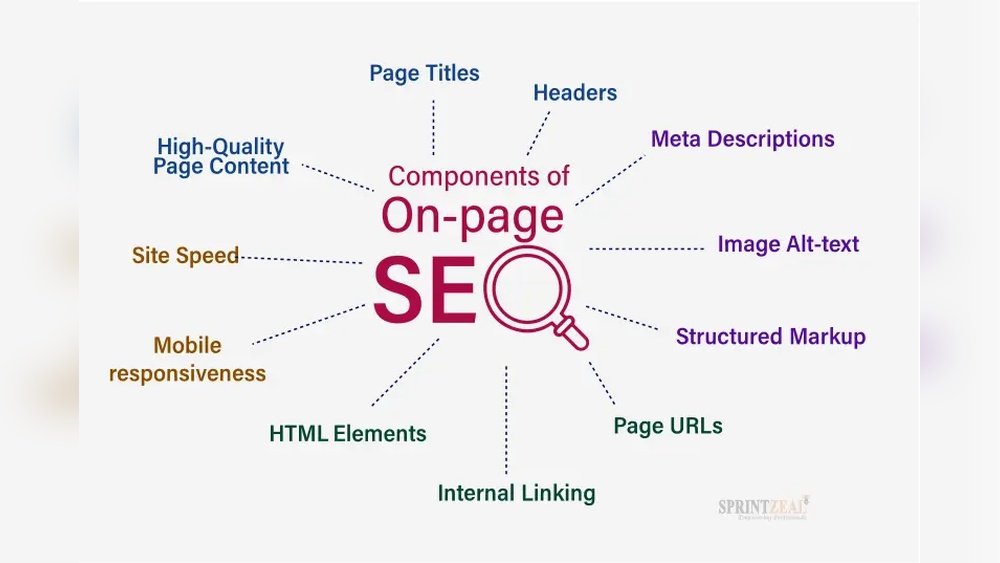
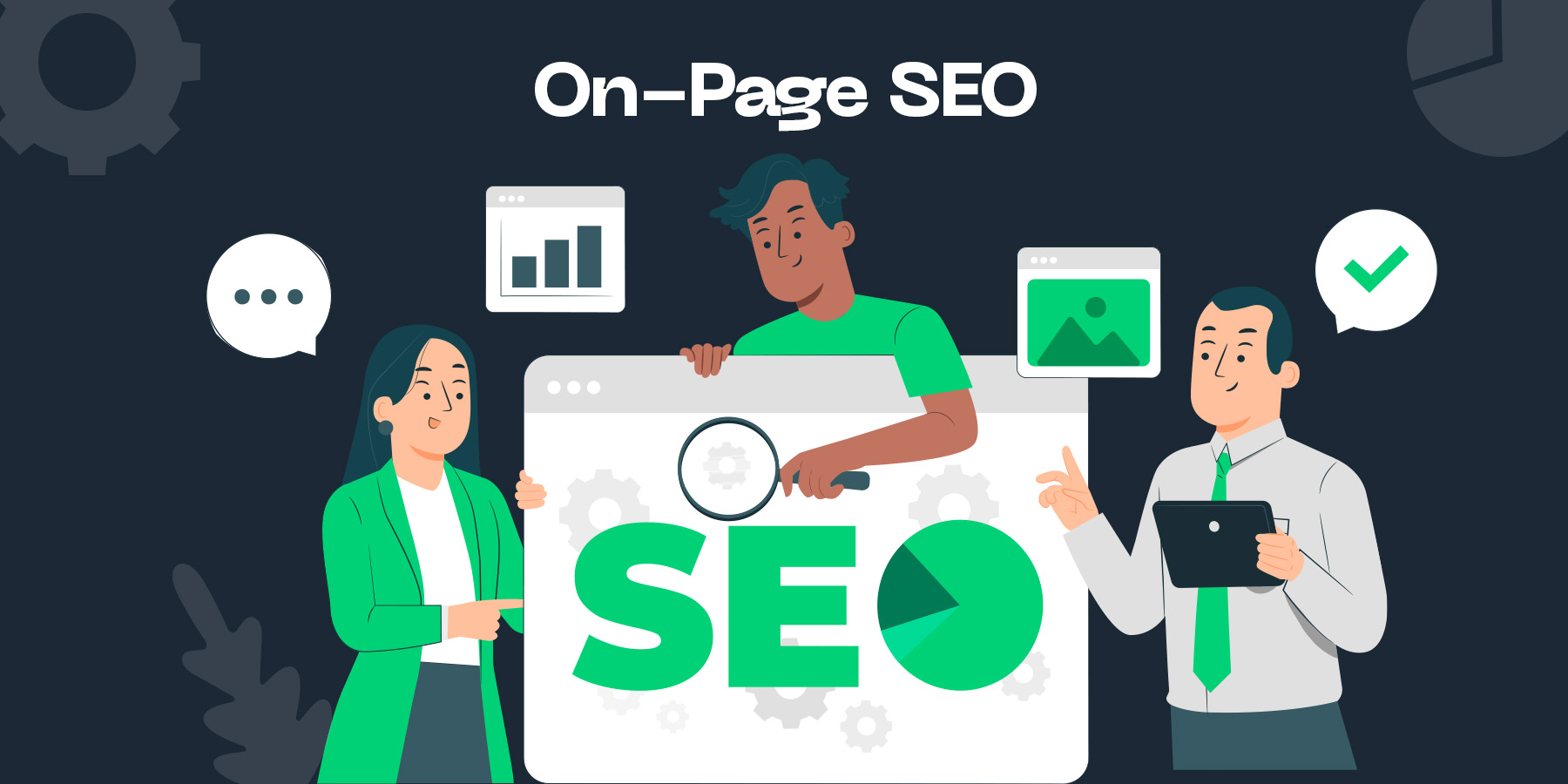
If you want your website to stand out and rank higher on Google, mastering On-Page SEO is essential. This is where you take control of your own pages and make them as clear, helpful, and easy to navigate as possible—not just for visitors but also for search engines.
By optimizing key elements like your content, titles, headers, and images, you can boost your chances of showing up at the top of search results. You’ll discover simple, practical steps to improve your On-Page SEO and attract more organic traffic.
Ready to unlock the full potential of your website? Let’s dive in!
Content Quality
Content quality plays a vital role in on-page SEO. Search engines reward pages that offer valuable, clear, and well-structured information. High-quality content attracts visitors and keeps them engaged. It also helps your site rank better in search results. Focus on creating content that serves the needs of your audience and stands out from competitors.
In-depth And Unique Content
Content should cover topics thoroughly. Provide detailed information that answers common questions. Avoid copying content from other sites. Unique content increases your site’s authority and trustworthiness. It encourages users to spend more time on your page. Depth and originality help search engines understand your page’s value.
Aligning With User Intent
Understanding what users want is key. Your content must match their search goals. Whether they seek information, want to buy, or need help, your content should respond clearly. Use simple language and clear answers. Meeting user intent reduces bounce rates and improves rankings. It builds trust and loyalty among visitors.
Keeping Content Updated
Regular updates keep content fresh and relevant. Search engines favor pages that stay current. Review your content often to add new facts or fix errors. Updated content reflects your expertise and dedication. It also improves user experience by providing the latest information. Staying current helps maintain and boost your search rankings.
Keyword Integration
Keyword integration is a vital part of on-page SEO. It helps search engines understand your page content. Proper use of keywords improves your site’s visibility and ranking. The aim is to include keywords naturally without overloading the text. This section explains key aspects of keyword integration for better SEO results.
Keyword Research Techniques
Start by finding the right keywords for your topic. Use tools like Google Keyword Planner or Ubersuggest. Look for terms with good search volume and low competition. Check related searches to discover more options. Focus on long-tail keywords that match user intent. These keywords attract targeted visitors to your site.
Natural Keyword Placement
Place keywords where they fit smoothly in the content. Include them in the first 100 words to signal relevance. Use keywords in headings and subheadings for better structure. Avoid keyword stuffing, which makes text hard to read. Write for people first, search engines second. This keeps your content engaging and easy to understand.
Using Keywords In Urls
Include main keywords in your page URLs. Keep URLs short and descriptive. Use hyphens to separate words for better readability. Avoid unnecessary words or numbers in URLs. Clear URLs help both users and search engines understand the page. This small step boosts your SEO and user experience.
Title Tags And Meta Descriptions
Title tags and meta descriptions play a crucial role in on-page SEO. They help search engines understand the content of your page. At the same time, they attract users to click on your link in search results. These elements must be clear, relevant, and engaging.
Optimizing title tags and meta descriptions can boost your website’s visibility. It also improves the click-through rate (CTR) from search engine results pages (SERPs). Careful attention to these details helps your page stand out among competitors.
Crafting Effective Title Tags
Title tags appear as clickable headlines in search results. They tell both users and search engines what your page is about. Keep titles under 60 characters to avoid being cut off.
Include your main keyword near the beginning of the title. Use simple and direct language that matches the page content. Avoid keyword stuffing or vague phrases. Each title should be unique for every page.
A well-crafted title tag improves rankings and attracts clicks. It sets the right expectations for users before they visit your site.
Optimizing Meta Descriptions For Ctr
Meta descriptions show a short summary below the title in search results. They do not directly affect rankings but influence user clicks. Write clear, concise descriptions between 150 and 160 characters.
Highlight the page’s value and include a call to action if possible. Use relevant keywords naturally. Avoid repeating the title or stuffing keywords.
Effective meta descriptions create interest and encourage users to visit your page. They provide a quick preview that can boost your CTR significantly.
Credit: www.convertmate.io
Header Tags Usage
Header tags play a crucial role in on-page SEO. They help organize content and guide readers through your page. Proper use of header tags improves both user experience and search engine understanding. Search engines use headers to grasp the structure and main topics of your content. Using header tags correctly can boost your page’s SEO performance and make your content easier to read.
Structuring Content With H1, H2,
The H1 tag is the main title of your page. It should clearly describe the page’s topic. Use only one H1 tag per page to avoid confusion. H2 tags break the content into main sections. They act as subheadings under the H1. H3 tags further divide H2 sections into smaller parts. This creates a clear hierarchy and makes the content easier to scan.
Improving Readability And Seo
Headers improve readability by breaking text into chunks. Readers can quickly find the information they need. Search engines use headers to understand content context and relevance. Including keywords naturally in headers helps improve SEO rankings. Avoid stuffing keywords or using headers only for style. Proper header use balances user experience and search engine needs.
Internal Linking
Internal linking is a key part of on-page SEO. It connects different pages within your website. This helps users find related content easily. It also guides search engines through your site structure. A strong internal linking strategy improves user experience and site authority.
Linking To Relevant Pages
Links should point to pages related to the current content. This keeps visitors interested and engaged. It also signals to search engines the relationship between pages. Relevant links help distribute page authority across your site. Avoid linking to unrelated or low-quality pages.
Enhancing Site Navigation
Internal links act like signposts for your website visitors. They help users move smoothly from one page to another. Clear navigation reduces bounce rates and increases time spent on site. Organize links in menus, sidebars, or within content. This makes your site easier to explore.
Boosting Crawlability
Search engines use links to find and index your pages. Good internal linking improves crawl efficiency. It ensures all important pages get discovered and ranked. Use a logical linking structure with no broken or orphan pages. This helps search engines understand your site’s hierarchy and content.

Credit: backlinko.com
Image Optimization
Images play a vital role in enhancing user experience and SEO. Proper image optimization helps search engines understand your content better. It also improves page load speed, which impacts rankings and user satisfaction.
Optimized images contribute to better visibility in search results. They also make your site more accessible to users with disabilities. Focus on three key areas: file names, alt text, and load speed.
Descriptive File Names
Use clear and relevant file names for all images. Replace generic names like “IMG1234.jpg” with descriptive phrases. For example, “red-running-shoes.jpg” describes the image and includes keywords.
This practice helps search engines index your images properly. It also improves the chances of your images appearing in image search results. Keep file names short, simple, and keyword-rich.
Adding Alt Text
Alt text describes images for users who cannot see them. Screen readers use alt text to explain images to visually impaired users.
Include keywords naturally while describing the image content. Avoid keyword stuffing or irrelevant descriptions. Alt text also improves SEO by helping search engines understand your page context.
Improving Load Speed
Fast-loading images enhance user experience and reduce bounce rates. Compress images without losing quality using tools like TinyPNG or ImageOptim.
Choose the right file format: JPEG for photos, PNG for graphics with transparency, and WebP for modern browsers. Resize images to match display size. Use lazy loading to defer off-screen images.
Url Structure
URL structure is a key part of on-page SEO. It helps search engines and users understand your page content easily. A well-crafted URL improves your site’s visibility and user experience. Clear and simple URLs encourage more clicks and better rankings.
Creating Clean Urls
Clean URLs avoid unnecessary characters or numbers. Use only letters, numbers, and hyphens. Avoid special symbols or long strings of random text. Short URLs are easier to read and remember. They look more trustworthy to users and search engines.
Including Keywords
Keywords in URLs signal what the page is about. Include relevant keywords that match your content focus. Place important keywords near the beginning of the URL. Do not overstuff keywords; keep it natural and relevant. This helps search engines rank your page better.
Keeping Urls User-friendly
User-friendly URLs are simple and descriptive. Use words that describe the page’s topic clearly. Avoid complex numbers or codes that confuse visitors. Make URLs easy to type and share. This improves user experience and increases the chance of clicks.
Schema Markup
Schema markup is a type of structured data added to your website’s HTML. It helps search engines understand your content better. This improved understanding can enhance how your pages appear in search results. Schema markup uses a specific vocabulary to label information. This labeling allows search engines to display rich results with additional details.
Using schema markup can make your site stand out. It provides more context about your content, products, or services. This clarity can attract more clicks and improve user experience. Schema is easy to add and supports many content types, such as articles, events, products, and reviews.
Adding Structured Data
Structured data is code added to web pages. It follows a standard format like JSON-LD or Microdata. You can add this code directly to your HTML. Many tools help generate structured data automatically. Google’s Structured Data Markup Helper is a popular choice. Once added, search engines can read and understand the data easily.
Enabling Rich Snippets
Rich snippets show extra information in search results. This can be star ratings, prices, or event dates. Schema markup enables these enhanced displays. Rich snippets make your listing more attractive. They can increase the click-through rate significantly. Search engines use this data to provide users with quick answers.
Improving Search Visibility
Schema markup improves how search engines see your pages. It helps them index your content more accurately. This can lead to better rankings over time. Enhanced listings with rich snippets attract more attention. More clicks mean more traffic to your site. Schema markup is a strong factor in modern SEO strategies.
Page Speed And Performance
Page speed and performance play a crucial role in on-page SEO. Fast-loading pages provide a better user experience and help improve search engine rankings. Slow sites frustrate visitors and increase the chance they will leave quickly.
Optimizing your website’s speed ensures users stay longer and engage more. Search engines prioritize sites that load quickly and run smoothly across all devices. Focus on improving load times, mobile responsiveness, and reducing bounce rates.
Optimizing Load Times
Reducing load times improves user satisfaction and SEO rankings. Compress images to lower file sizes without losing quality. Use browser caching to store site data locally for faster repeat visits. Minimize CSS and JavaScript files to speed up page rendering. Choose a reliable hosting provider to handle traffic efficiently.
Mobile Responsiveness
Mobile-friendly sites rank higher in search results. Use responsive design to ensure your website adapts to all screen sizes. Test your pages on various devices to check usability. Avoid large images and complex layouts that slow down mobile performance. Fast, easy navigation improves the mobile user experience.
Reducing Bounce Rates
Fast and responsive pages help keep visitors on your site. High bounce rates signal poor user experience to search engines. Improve content clarity and page layout to engage users immediately. Clear calls to action encourage users to explore more pages. A smooth, quick-loading site reduces frustration and increases time on site.
Credit: www.semrush.com
User Experience Factors
User experience factors play a key role in on-page SEO. They help visitors stay longer and interact more with your content. A positive experience also signals search engines that your site is valuable and trustworthy.
Optimizing these factors improves both usability and SEO performance. Focus on clear navigation, readable layouts, and engaging multimedia to create a user-friendly website.
Easy Navigation
Easy navigation helps users find information quickly. Use clear menus and simple structures. Organize content logically with categories and subcategories. Avoid clutter and too many options at once. A clean navigation system lowers bounce rates and boosts user satisfaction.
Readable Layouts
Readable layouts make content easy to scan and understand. Use short paragraphs and bullet points. Choose legible fonts and proper font sizes. Add enough spacing between lines and sections. Use headings to break content into sections. Clear layouts keep visitors engaged and reduce frustration.
Engaging Multimedia
Engaging multimedia adds visual interest and supports your message. Use images, videos, and infographics relevant to your content. Optimize media files to load quickly without slowing the site. Multimedia helps explain complex ideas and keeps users interested longer.
Frequently Asked Questions
What Is An On-page Seo?
On-page SEO optimizes website elements like content, titles, headers, and images to improve search rankings. It enhances user experience and search engine understanding.
What Is The Difference Between Onpage And Offpage Seo?
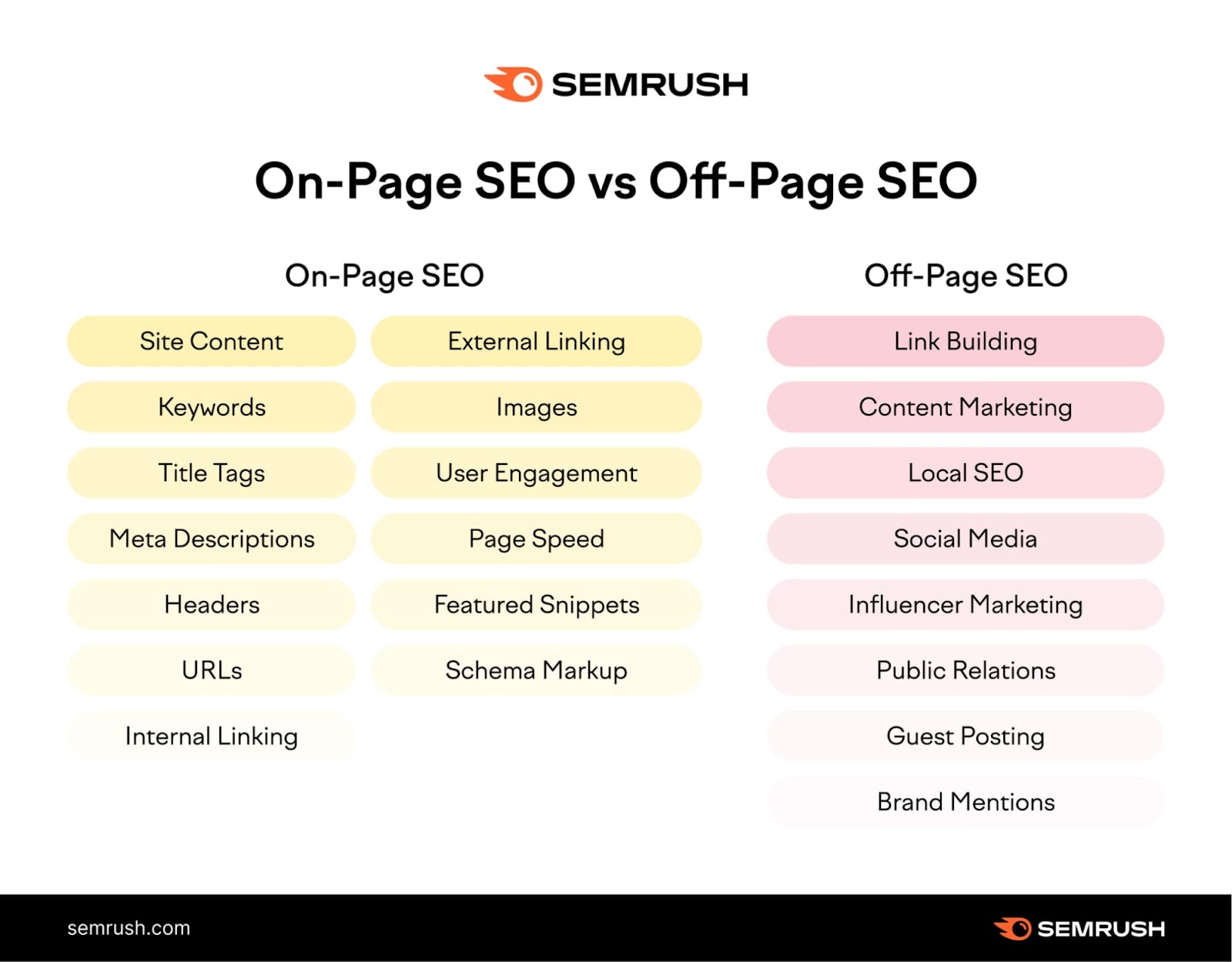
On-page SEO optimizes elements within your website, like content and tags. Off-page SEO builds external links and reputation to boost rankings.
What Is The 80/20 Rule For Seo?
The 80/20 rule for SEO means focusing 80% on high-impact tasks like quality content and backlinks, and 20% on minor optimizations. Prioritize efforts that drive most traffic and rankings for efficient SEO results.
How To Improve Seo On-page?
Improve on-page SEO by optimizing title tags, meta descriptions, headers, and URLs with relevant keywords. Create unique, quality content. Use internal links and descriptive image alt text. Add schema markup for better search engine understanding and enhance user experience.
What Is On Page Seo And Why Is It Important?
On Page SEO improves web pages to rank higher in search results and attract visitors.
How Do Keywords Affect On Page Seo?
Keywords help search engines understand your content and match it with user searches.
What Role Do Title Tags Play In On Page Seo?
Title tags show the page topic to search engines and influence click rates.
How Can Meta Descriptions Improve Seo Performance?
Meta descriptions summarize page content and encourage users to click your link.
Why Is Header Tag Optimization Crucial For Seo?
Headers organize content and help search engines understand the page structure.
How Does Internal Linking Benefit On Page Seo?
Internal links guide visitors and search engines to related pages on your site.
Conclusion
On-page SEO helps your website rank higher in search results. Focus on clear titles, good keywords, and quality content. Use headers and internal links to guide visitors. Optimize images with descriptions to improve accessibility. Clean URLs and structured data make your site easier to understand.
These simple steps improve user experience and search engine visibility. Keep your pages helpful and easy to navigate. Regular updates keep your SEO strong and relevant. Consistency matters for lasting results.





