Minecraft is more than just a video game—it’s a digital world where creativity meets adventure. For millions of players, young and old, it’s a space to build, survive, and explore. But if you’re new, Minecraft can feel confusing. There are blocks everywhere, strange creatures, and no clear instructions.
This guide is made for you. It explains the basics of Minecraft in simple, clear language. Whether you want to craft your first tool, survive your first night, or start building, you’ll find the answers here.
You’ll also learn tips that most beginners miss, and get a full view of what makes Minecraft so much fun. Let’s start your journey from a curious beginner to a confident player.
What Is Minecraft?
Minecraft is a sandbox game. This means you can do almost anything you want—explore, build, fight monsters, or just survive. The world is made of blocks. You can break blocks and place them anywhere you like. This simple idea gives you endless possibilities.
The game was first released in 2011 by Mojang Studios. Since then, it has sold over 200 million copies and has more than 100 million active players each month. Minecraft is available on PC, Mac, consoles, and mobile devices.
Game Modes Explained
Minecraft has different ways to play, called game modes. Each mode changes how you interact with the world.
| Game Mode | Main Features | Who It’s For |
|---|---|---|
| Survival | Health, hunger, monsters, crafting, mining | Players who want challenge and adventure |
| Creative | Unlimited blocks, flying, no health or hunger | Builders and designers |
| Adventure | Custom maps, limited block breaking | Players trying custom stories or puzzles |
| Spectator | Fly through blocks, invisible, cannot interact | Observers and explorers |
| Hardcore | Like Survival, but only one life | Players seeking extreme challenge |
Survival mode is the most popular for beginners. You must gather resources, craft tools, and stay alive.
Starting Your First World
When you open Minecraft, you will need to create a new world. You can name your world and choose your game mode. For your first game, pick Survival.
You can also choose the difficulty:
- Peaceful: No monsters, easy to survive
- Easy: Fewer monsters, less damage
- Normal: Standard monster behavior
- Hard: More dangerous monsters, less food
Start with Easy or Normal if you’re new.
Each Minecraft world is randomly created using something called a seed. Every world is unique, with different mountains, forests, and caves.
Understanding The User Interface
Once you enter your world, you’ll see a few things on your screen:
- Hearts show your health
- Drumsticks show your hunger
- Hotbar is the row of items at the bottom (quick access)
- Inventory (press E on PC) shows all items you’re carrying
The mouse and keyboard (or touchscreen/controller) let you move, jump, and interact with the world.
Your First Day: Step By Step
The first day is the most important for a beginner. Here’s how to survive and get started:
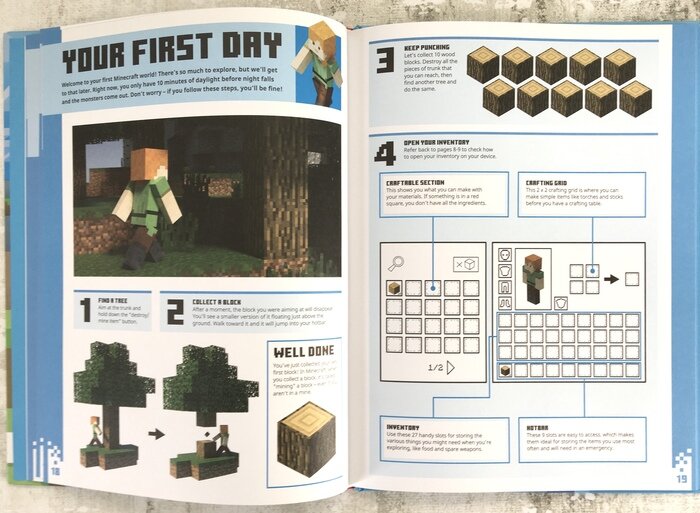
- Punch a tree: Walk to a tree and hold down the punch button. Collect wood blocks.
- Make planks: Open your inventory. Place wood in the crafting area to make planks.
- Craft a crafting table: Use 4 planks in your crafting grid to make a crafting table.
- Make basic tools: Place the crafting table. Use sticks and planks to make a wooden pickaxe.
- Find shelter: Before night, dig into a hill or build a small hut with dirt or wood.
- Make a door and a torch: If you find coal, combine it with a stick to make torches. If not, use wood to make charcoal.
- Wait out the night: Stay inside. Monsters like zombies and skeletons appear at night.
A common mistake is wandering far from your shelter at night. Many beginners are surprised by how quickly monsters can defeat an unprepared player.
Gathering And Using Resources
Everything in Minecraft comes from the world around you. Here’s how to collect and use the most important resources:
Wood
- Found in trees everywhere
- Used for tools, building, crafting tables, and sticks
Stone
- Found underground or in hills
- Use a wooden pickaxe to mine stone blocks
- Stone tools last longer and work faster than wooden tools
Coal
- Black speckled stone underground
- Used for making torches and smelting items
Iron
- Brownish ore deeper underground
- Needs a stone pickaxe to mine
- Smelt iron ore in a furnace to get iron ingots
Food
- Animals (cows, pigs, chickens) drop meat
- Wheat can be grown from seeds (break grass to get seeds)
- Eating restores hunger and health
Other Materials
- Sand (for glass)
- Clay (for bricks)
- Wool (from sheep, for beds)
Crafting: Making Tools And Items
Crafting lets you turn raw materials into useful items. You use the crafting table to make most items. Recipes are shapes you fill with materials.
Here are some basic recipes:
- Pickaxe: 3 planks or stone (top row), 2 sticks (middle column)
- Axe: 3 planks/stone (in an L shape), 2 sticks
- Sword: 2 planks/stone (center), 1 stick (bottom center)
- Furnace: 8 stone blocks in a square (leave center empty)
Upgrading tools from wood to stone, then to iron, makes a big difference. Stone tools mine faster and last longer. Iron tools can mine special blocks like diamonds.
Surviving The Night
When the sun sets, hostile mobs appear—zombies, skeletons, spiders, and creepers. Here’s how to stay safe:
- Stay indoors: Build a shelter with a door and no open holes
- Light up: Place torches inside your house to keep monsters away
- Listen: Mobs make sounds. If you hear groans or hissing, don’t go outside
Many beginners don’t realize that even a single open block can let monsters attack them. Always double-check your walls and ceiling.
Credit: www.coderkids.com
Hunger And Health
Minecraft’s survival mode has two bars: health and hunger.
- Eating food fills your hunger bar
- If hunger is full, your health will slowly heal
- If hunger runs out, you start to lose health (except on Peaceful)
Some foods restore more hunger than others. For example, cooked meat is much better than raw meat or apples.
| Food | Hunger Restored | Easy to Get? |
|---|---|---|
| Cooked Beef | 8 | Yes (from cows) |
| Bread | 5 | Yes (from wheat) |
| Apple | 4 | Sometimes (from trees) |
| Cooked Chicken | 6 | Yes (from chickens) |
A tip most beginners miss: Never eat raw chicken—it can make you sick (hunger effect).
Exploring The World
Minecraft worlds are huge—bigger than most real-life cities. You’ll find forests, deserts, mountains, oceans, and caves. Each biome has different resources, animals, and dangers.
- Forests: Lots of wood, animals, easy to survive
- Deserts: Few trees, but you may find temples with treasure
- Mountains: Great views, lots of stone and coal
- Oceans: Fish, shipwrecks, and buried treasure
It’s easy to get lost. Always remember where your home is. Many players build a tall tower or put torches to mark their way.
Mining And Going Underground
Mining is at the heart of Minecraft. You dig underground to find valuable resources like coal, iron, redstone, gold, and diamonds. Here’s how to mine safely:
- Bring torches: Light up tunnels to keep monsters away
- Make stairs: Don’t dig straight down—you could fall into lava or a cave
- Listen for sounds: Water or lava noises can warn you of danger
- Bring food: You’ll need to heal and keep your hunger up
- Use the right tool: Only an iron pickaxe or better can mine diamonds
Most beginners miss that mining at level 11 or 12 (Y-coordinate) gives the best chance for diamonds while avoiding most lava.
Crafting Advanced Tools And Armor
As you collect resources, you can craft better tools and armor. Armor protects you from attacks. Here’s a quick look at tool and armor strength:
| Material | Tool Strength | Armor Strength |
|---|---|---|
| Wood | Low | None |
| Stone | Medium | None |
| Iron | High | Good |
| Diamond | Very High | Excellent |
| Netherite | Best | Best |
Always upgrade as soon as you can. Even a simple iron helmet or chestplate can save your life.
Farming And Food Production
Once you survive your first few days, you’ll need a steady food supply. Farming is the answer. Here’s what you can farm:
- Wheat: Plant seeds on tilled soil, add water nearby
- Carrots and potatoes: Found in villages, easy to grow
- Animals: Breed cows, pigs, chickens for meat and other resources
- Sugar cane: Grows next to water, used for paper and sugar
To breed animals, feed two of the same type. For example, feed wheat to cows, carrots to pigs, seeds to chickens.
A common mistake: Forgetting to light up your farm. Crops grow faster with light, especially at night.
Crafting And Using Beds
One of the most important items is the bed. Sleeping in a bed sets your respawn point. If you die, you’ll reappear at the last bed you slept in.
To craft a bed:
- 3 wool (from sheep, any color)
- 3 planks (any wood)
Place the wool in the top row, planks in the middle row on your crafting table.
Pro tip: Always carry an extra bed if you travel far from home.
Dealing With Mobs And Combat
Minecraft has many mobs—animals, monsters, and villagers. Here’s how to handle some common ones:
- Zombies: Slow but strong in groups. Use a sword, keep doors closed.
- Skeletons: Shoot arrows. Dodge and attack quickly.
- Creepers: Silent and explode. Hit, back away, repeat.
- Spiders: Can climb. Build walls higher or add a roof.
Armor and shields make a big difference. A shield blocks arrows and creeper blasts.
Many beginners forget to keep a sword or shield ready at night. Always check your hotbar before leaving your shelter.
Building And Creativity
Minecraft isn’t just about survival. It’s a world where you can build anything you imagine—houses, castles, machines, or even cities.
- Start small: Build a safe house first
- Try different materials: Mix wood, stone, glass for style
- Use stairs and slabs: Add detail to roofs and floors
- Windows: Use glass for light and safety
Experiment! There’s no wrong way to build. Many famous Minecraft builds started with simple shapes.
Credit: www.youtube.com
Redstone And Automation (a Beginner’s Peek)
Redstone is Minecraft’s version of electricity. With redstone dust, you can create simple machines and traps.
- Levers and buttons: Turn things on and off
- Doors and pistons: Open and close with redstone power
- Simple traps: Protect your base from mobs
Redstone can get complicated, but start small. Try making a door open with a button.
Exploring Villages And Structures
As you explore, you’ll find villages, temples, and other structures.
- Villages: Safe places with food, beds, and friendly villagers. Some trade useful items.
- Temples (desert/jungle): Contain treasure but may have traps
- Mineshafts: Old tunnels with loot, but often dangerous
- Strongholds: Hidden underground, needed to reach the game’s final area (The End)
Be careful—some structures have traps or strong mobs.
Enchanting: Making Tools Stronger
Once you find lapis lazuli (a blue ore) and build an enchanting table, you can add special powers to tools and armor.
- Efficiency: Tools work faster
- Unbreaking: Tools last longer
- Protection: Armor absorbs more damage
- Sharpness: Weapons do more damage
You’ll need experience points (XP), which you get from mining, fighting, and smelting. Enchanting adds a new layer of strategy.
The Nether And The End
Minecraft has two extra dimensions for advanced play.
- The Nether: A dangerous underworld with special resources and strong mobs. Enter with a Nether portal (made from obsidian).
- The End: A mysterious world with the game’s final boss, the Ender Dragon.
You don’t need to rush to these places. Many players spend hundreds of hours in the main world first.
Playing With Friends: Multiplayer Basics
Minecraft is even more fun with friends. You can join each other’s worlds or play on servers.
- LAN: Play on the same Wi-Fi network
- Online servers: Join worlds with games, mini-games, or big builds
- Realms: Mojang’s official private servers
Be kind and follow the server rules. Some servers have special plugins and games, like Skyblock or Bed Wars.
Common Beginner Mistakes
Even experienced players sometimes forget the basics. Here are mistakes to avoid:
- Digging straight down: You might fall into lava or a deep cave
- Ignoring hunger: Running out of food can end your adventure fast
- Not lighting up your base: Monsters can spawn inside!
- Attacking Endermen: These tall black mobs are powerful if you look them in the eyes
- Traveling at night: Wait until morning to explore safely
- Forgetting a bed: You’ll respawn far away if you die
Remember, every mistake is a lesson. Minecraft rewards creative problem-solving.
Useful Tips And Non-obvious Insights
- Carry a water bucket: Instantly put out fires, climb cliffs, or turn lava to stone
- Use F3 (on PC): See coordinates—helpful for finding your base or resources
- Use torches on the right wall: When exploring caves, always place torches on one side. That way, you can find your way out by following them on the left.
- Shear sheep: Using shears gives more wool than killing sheep (friendlier too)
- Crouch to avoid falling: Hold shift to move safely on edges
These small tricks make the game smoother and safer.
Minecraft’s Community And Resources
Minecraft has one of the world’s largest gaming communities. You’ll find thousands of:
- YouTube tutorials: From beginner guides to advanced builds
- Forums and wikis: For tips, tricks, and answers
- Mods and maps: Custom content created by players
A great resource for official information is the Minecraft Wiki.

Credit: www.amazon.com
Frequently Asked Questions
What Is The Goal Of Minecraft?
Minecraft is open-ended. There’s no single goal. Many players try to defeat the Ender Dragon, but you can also build, explore, or just survive as long as you like.
Can I Play Minecraft With Friends If I’m On Mobile And They’re On Pc?
Yes, if both use the Bedrock Edition. This version supports cross-play between mobile, Windows 10, and consoles. Java Edition (PC/Mac) is separate and only works with other Java players.
How Do I Find Diamonds?
Dig deep underground, usually between Y-levels 11 and 12. Look for blue diamond ore. Always use an iron pickaxe or better, and bring plenty of torches.
What Happens If I Die In Minecraft?
In Survival, you drop your items and respawn at your last bed (or world spawn). You can return to pick up your items, but they disappear after 5 minutes. In Hardcore mode, death ends the world.
How Do I Keep Villagers Safe?
Light up the village, build a wall or fence around it, and add doors to houses. Zombies can break doors on Hard difficulty, so use fence gates or iron doors for extra safety.
Minecraft is a game where every player’s story is unique. With these basics, you’re ready to start your own adventure—full of creativity, challenge, and endless discovery. So punch your first tree, build your first house, and remember: in Minecraft, the only limit is your imagination.





