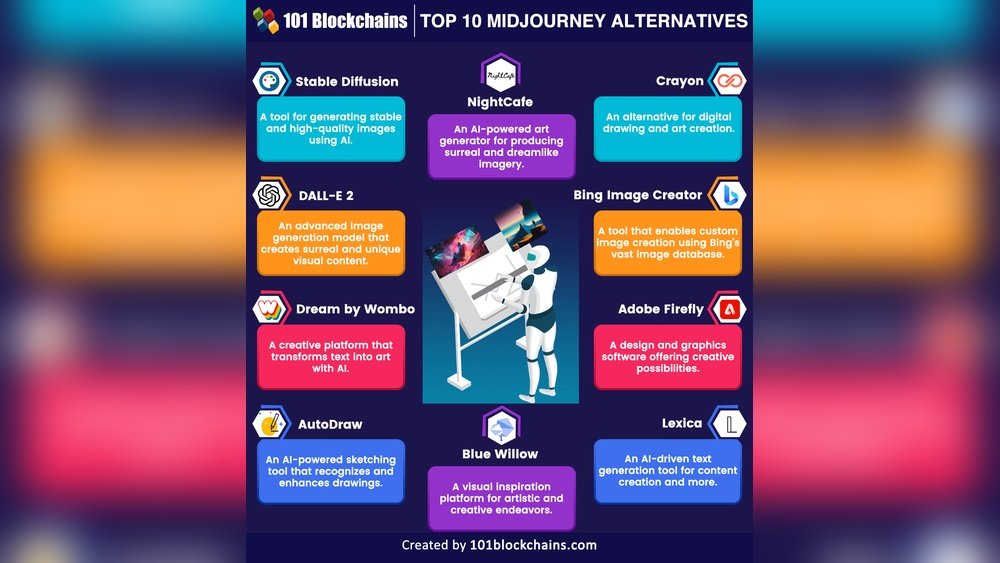
Looking for fresh ways to create stunning AI-generated images without relying solely on Midjourney? You’re not alone.
Whether you want more control, different styles, or simply a budget-friendly option, exploring Midjourney alternatives can open up exciting creative possibilities for your projects. You’ll discover top tools that match or even surpass Midjourney in unique ways—helping you bring your ideas to life faster and easier.
Keep reading to find the perfect AI image generator tailored just for you.
Top Free Alternatives
Many free tools offer great features similar to Midjourney. These options help create images using AI without cost. They suit beginners and users wanting to explore AI art.
Some tools focus on ease of use, while others provide more control. Each alternative has unique strengths worth trying out.
Adobe Firefly
Adobe Firefly is part of Adobe’s creative suite. It offers a free plan with useful editing tools. The interface is friendly for new users. It supports image creation and enhancement.
Stable Diffusion
Stable Diffusion is open-source and highly customizable. You can run it on your computer or use cloud services. It allows more control over image style and detail. This makes it popular with tech-savvy users.
Dall·e 3
DALL·E 3 comes from OpenAI and follows prompts well. It creates clear and creative images based on text descriptions. The free version lets users explore many ideas easily.
Leonardo Ai
Leonardo AI stands out for video generation features. It offers a free tier with good limits. Users appreciate its creative options and strong output quality. This makes it a solid choice for multimedia projects.
Canva Ai
Canva AI integrates image generation in a design platform. It helps add AI art directly to projects. The tool is simple and fits well with graphic design work. A good pick for everyday users.
Bing Image Creator is free and easy to use. It generates images from text quickly. The tool suits casual users who want simple AI art. Microsoft supports it with reliable service.
Playground Ai
Playground AI is a popular platform for AI image creation. It offers a mix of features for free users. The site is intuitive and supports various art styles. Good for experimenting with AI art.
Adobe Firefly Features
Adobe Firefly offers a powerful set of tools for creative projects. It blends AI with traditional editing features. This makes it a strong choice for artists and designers.
The tool is part of Adobe’s creative suite. Users find it easy to use with familiar Adobe interfaces. It supports various creative tasks, from image editing to design enhancements.
Ai-powered Image Generation
Adobe Firefly creates images from simple text prompts. The AI understands natural language and turns ideas into visuals. This feature helps users quickly visualize concepts.
The generated images can be customized further. Users can adjust colors, shapes, and styles to fit their needs. This flexibility makes it ideal for creative experimentation.
Seamless Adobe Integration
Firefly works smoothly with Adobe Photoshop and Illustrator. This allows easy import and export of AI-generated content. Designers can enhance their existing work with AI tools.
The integration supports layers and smart objects. This keeps the editing process non-destructive and flexible. It fits well into professional workflows without disruption.
Creative Style Transfer
The tool can apply artistic styles to images. Users can transform photos into paintings or sketches in seconds. This feature adds variety and uniqueness to projects.
Style transfer is adjustable for intensity and detail. It helps create consistent visual themes across multiple images. This is useful for branding and storytelling.
Advanced Text Effects
Firefly includes text effect options powered by AI. Users can create glowing, embossed, or textured text easily. This enhances graphic design and marketing materials.
The effects are customizable to match the project’s mood. It saves time compared to manual text editing. Perfect for quick, eye-catching designs.
User-friendly Interface
The interface is clean and intuitive. New users can start creating without a steep learning curve. Clear menus and helpful tips guide the creative process.
This simplicity makes Adobe Firefly accessible to beginners and experts alike. It removes barriers to creativity and speeds up production.
Stable Diffusion Benefits
Stable Diffusion stands out as a powerful alternative to Midjourney. It offers flexibility and control for users at all levels. This tool is open-source, allowing creative freedom without high costs.
Users can run Stable Diffusion on their own devices or use cloud services. This local option ensures privacy and faster processing. It also supports customization to match unique project needs.
Open-source Flexibility
Stable Diffusion is fully open-source. This means anyone can access and modify the code. Developers and artists can tailor the tool to fit their exact requirements. Open-source nature encourages a strong community and regular updates.
Local Installation Option
You can install Stable Diffusion on your computer. Running it locally protects your data and speeds up image creation. No need to rely on internet speed or third-party servers. This option appeals to those valuing privacy and control.
High Customization
Stable Diffusion supports many tweaks and settings. Users can adjust style, resolution, and output details. This level of control helps create unique and precise images. It fits diverse artistic styles and project goals.
Cost-effective Solution
Unlike some AI tools, Stable Diffusion is free to use. There are no subscription fees or hidden costs. This makes it ideal for beginners, hobbyists, and professionals on a budget. Cost savings allow more experimentation and creativity.
Strong Community Support
A large community surrounds Stable Diffusion. Users share tips, models, and resources. This support network makes learning easier and faster. Many tutorials and forums help users solve problems and improve results.
Credit: www.fotor.com
Dall-e 3 Capabilities
DALL-E 3 is a powerful AI image generator by OpenAI. It creates images from simple text prompts. This makes it a strong alternative to Midjourney for many users.
DALL-E 3 can produce detailed and creative images quickly. It understands complex descriptions well. This helps users get exactly the image they want without much effort.
Dall-e 3’s Text Understanding
DALL-E 3 reads and interprets text prompts clearly. It captures subtle details in the description. This allows it to create images that match user ideas closely. The model handles long and detailed prompts better than before.
Image Quality And Style
The images made by DALL-E 3 are sharp and vibrant. It supports various art styles, from realistic to cartoon-like. Users can generate images with different moods and themes. This flexibility suits many creative projects.
Editing And Variations
DALL-E 3 offers tools for editing images after creation. Users can change parts of an image by describing edits. It also creates multiple variations of one prompt. This helps users find the best image among options.
Accessibility And Use
DALL-E 3 is easy to access through OpenAI’s platform. It works on most devices with internet access. The interface is simple, making it good for beginners. It also supports integration into other apps and services.
Leonardo Ai Highlights
Leonardo AI stands out among Midjourney alternatives for its powerful features. It offers a smooth experience for creating images and videos. This tool suits both beginners and experienced users.
Leonardo AI provides a wide range of creative options. Users can generate detailed visuals quickly. Its easy interface helps users focus on creativity without hassle.
High-quality Image Generation
Leonardo AI creates sharp and vivid images. It uses advanced algorithms to enhance details. The results look natural and clear in various styles.
Video Creation Capabilities
This AI supports video generation, a rare feature in similar tools. Users can create short clips from simple text prompts. It adds new possibilities for digital content creators.
Generous Free Tier
Leonardo AI offers a free plan with ample usage limits. This allows users to test features without cost. It is ideal for small projects and learning purposes.
User-friendly Interface
The platform is designed for ease of use. Navigation is simple and intuitive. Users can quickly generate and edit images or videos.
Customization And Control
Users have control over style, colors, and details. Leonardo AI lets users adjust outputs to match their vision. This flexibility helps create unique and personal designs.
Canva Ai Integration
Canva AI Integration brings powerful artificial intelligence directly into your design workspace. This feature allows users to create stunning images with simple text prompts. It is ideal for those who want quick, creative visuals without complex software.
By combining AI with Canva’s easy-to-use tools, you get a seamless design experience. The integration helps generate unique images that fit your project style. It saves time and effort while enhancing creativity.
How Canva Ai Enhances Design Workflow
Canva AI speeds up the creative process by generating visuals instantly. You can create backgrounds, icons, and illustrations without leaving the platform. This reduces the need for multiple tools and streamlines your work.
The AI understands simple prompts and produces relevant images. This makes it accessible to beginners and professionals alike. It also allows easy editing after the image is generated, giving full control over the final look.
Features Of Canva Ai Integration
Canva AI offers text-to-image generation, style customization, and smart suggestions. You can choose from different art styles to match your project’s theme. The AI also suggests design improvements based on your inputs.
This integration supports multiple languages and works well on both desktop and mobile devices. It fits perfectly into Canva’s collaborative environment, allowing teams to create together effortlessly.
Why Choose Canva Ai As A Midjourney Alternative
Canva AI is beginner-friendly with no steep learning curve. It combines design and AI in one place, reducing tool switching. The platform offers free and premium plans, making it affordable for different users.
Its rich template library and design assets enhance the AI-generated images. This makes Canva AI a versatile choice for bloggers, marketers, and small business owners seeking efficient design solutions.
Bing Image Creator
Bing Image Creator offers a simple way to generate images using AI. It is powered by advanced technology from Microsoft. The tool is accessible for free and does not require complex setup.
Users can create unlimited images by entering text prompts. The interface is clean and easy to navigate. This makes Bing Image Creator suitable for beginners and casual users.
Bing Image Creator Features
Bing Image Creator supports various styles and themes. It understands simple text descriptions well. The AI quickly produces images that match user prompts. There is no limit on the number of images created.
How To Use Bing Image Creator
Start by typing a clear description of the image you want. The tool then generates multiple image options. Users can select and save their favorite creations. No advanced skills or software installations are needed.
Advantages Over Midjourney
Bing Image Creator is completely free with no hidden costs. It integrates well with other Microsoft products. The tool requires less learning time. It is ideal for quick and easy image generation.
Playground Ai Overview
Playground AI is a versatile platform for AI-generated images. It offers tools for creating art from text prompts. Users enjoy its simple interface and powerful features. The platform supports various AI models to suit different creative needs.
Playground AI stands out by combining ease of use with advanced options. It works well for beginners and experienced users alike. The site allows quick image generation without complicated setups. It also offers customization to refine the final output.
Easy-to-use Interface
Playground AI has a clean and simple layout. Users can start creating images in just a few clicks. Text input fields are clear and easy to understand. The design helps users focus on creativity, not technical details.
Multiple Ai Models
The platform supports different AI engines. Each model produces unique styles and image qualities. Users can switch between models to find the best fit. This variety adds flexibility to every project.
Customization Options
Playground AI lets users adjust settings like image size and style. It offers sliders and toggles for easy control. These tools help create images that match user vision closely. Customization improves the overall user experience.
Free And Paid Plans
Playground AI offers both free and premium options. The free plan includes basic features with some limits. Paid plans unlock higher resolution and more daily uses. This range suits casual users and professionals.
Community And Support
The platform has an active user community. Users share tips and showcase their creations. Support resources include guides and FAQs. This support makes learning and troubleshooting easier.
Mobile-friendly Options
Mobile-friendly AI art generators let you create stunning images anytime. They work smoothly on smartphones and tablets. These apps are perfect for quick creativity on the move. No need for a powerful desktop or laptop. Just open the app and start designing.
Dream By Wombo
Dream by WOMBO offers a simple interface tailored for mobile use. It allows users to generate AI art from text prompts easily. The app supports various artistic styles to choose from. It requires minimal input but delivers impressive visuals. Dream by WOMBO also saves your creations for easy access later. The app is available on both Android and iOS platforms.
Craiyon App
Craiyon App is a lightweight AI image generator designed for phones. It creates images based on short text descriptions. The app loads quickly, even on slower connections. It is free to use with no complex setup needed. Craiyon App is ideal for casual users who want fast results. The interface is clean and straightforward, making it user-friendly for all ages.
Credit: www.ifoto.ai
Specialized Tools
Specialized tools offer unique features for specific creative tasks. These tools focus on particular types of content, making them ideal for users with targeted needs. They enhance productivity by providing tailored functions. This section highlights two notable specialized alternatives to Midjourney.
Ideogram Text Focus
Ideogram excels in turning text into clear, meaningful images. It prioritizes the connection between written words and visual output. This tool is perfect for projects needing precise text interpretation. It supports a variety of languages and simple commands. Users can create detailed images based on short text prompts. The interface is straightforward, making it accessible to beginners. Ideogram helps communicate ideas visually with strong text-image alignment.
Runway Ml Video Tools
Runway ML offers powerful video editing and creation tools. It uses AI to automate complex video tasks quickly. Users can generate video content from text descriptions or enhance existing footage. The platform supports real-time collaboration and easy export options. Runway ML is designed for creators focused on video production. It simplifies adding AI effects and transitions to videos. This tool is a strong choice for video-centric projects needing AI assistance.
Credit: neuralnetworkpress.com
Frequently Asked Questions
Which Ai Is Better Than Midjourney?
Adobe Firefly, DALL·E 3, Stable Diffusion, and Leonardo AI often outperform Midjourney in customization, realism, and ease of use. Bing Image Creator and Canva AI also provide user-friendly, free options. These alternatives offer diverse features suited for various creative needs beyond Midjourney.
Is Dall’e Better Than Midjourney?
DALL·E excels in creative and detailed image generation. Midjourney produces more realistic, precise visuals. Choice depends on your project needs.
Is Dall’e Free Now?
DALL·E offers free usage with limited credits. Users receive monthly free credits and can buy more as needed.
Is Midjourney Ai Censored?
Midjourney AI censors some text and image inputs automatically. Violations may lead to warnings, time-outs, or service bans.
What Are The Best Free Midjourney Alternatives?
Stable Diffusion, Bing Image Creator, and Canva AI offer free, easy-to-use image generation features.
Which Midjourney Alternative Offers The Most Realistic Images?
DALL-E 3 creates highly realistic images with precise prompt following.
Can I Use Adobe Firefly As A Midjourney Replacement?
Yes, Adobe Firefly provides professional editing and AI image creation tools with a free plan.
Are There Open-source Options Like Midjourney?
Stable Diffusion is open-source and allows local or cloud-based custom image creation.
Which Midjourney Alternative Is Beginner-friendly?
Lexica and Bing Image Creator are simple and great for new users.
Do Any Midjourney Alternatives Support Video Generation?
Leonardo AI is known for strong video generation features alongside image creation.
Conclusion
Exploring Midjourney alternatives opens many creative doors. Each tool offers unique features to fit different needs. Some focus on ease of use, while others provide deep customization. Many alternatives come with free plans to try risk-free. Choosing the right option depends on your project goals and budget.
Experiment with several to find what works best for you. This variety ensures everyone can create stunning AI-generated images. Keep exploring and enjoy the creative journey ahead.





