
Are you tired of your inbox being flooded with unwanted subscription emails you never signed up for? Subscription bombing can turn your email into a chaotic mess, making it hard to find important messages and putting your security at risk.
The good news is, you don’t have to live with this annoyance. You’ll learn simple and effective ways to stop subscription bomb attacks and keep your inbox clean. Whether you should unsubscribe or mark emails as spam, how to protect your email address from being targeted, and what steps to take to regain control — we’ve got you covered.
Keep reading to discover how to defend your inbox and protect your peace of mind.

Credit: guardiandigital.com
What Is Subscription Bombing
Subscription bombing floods your email with unwanted sign-ups, making your inbox chaotic. Stopping it involves marking suspicious emails as spam instead of unsubscribing. This helps your email provider block similar messages and keeps your inbox safer.
What Is Subscription Bombing?
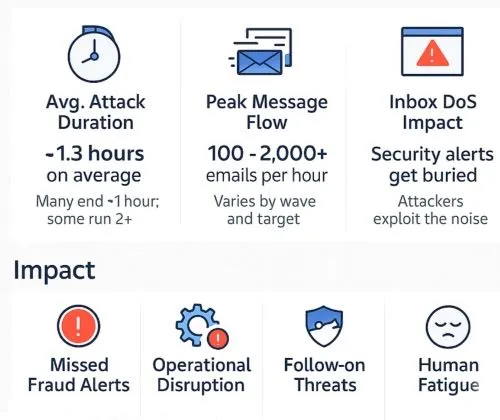
Subscription bombing is a type of online attack that floods an email inbox with many unwanted subscriptions. Attackers use someone’s email address to sign up for multiple newsletters, services, or promotions. This causes the victim to receive a large number of emails in a short time.
The goal is to overwhelm the inbox, making it hard to find important messages. It can also slow down email systems and create frustration for the user. Subscription bombing is a form of email abuse and can be part of larger cyber attacks.
How Does Subscription Bombing Work?
Attackers use automated tools called bots to quickly sign up for many services using the victim’s email. They do not need access to the victim’s account, only the email address. These bots enter the email repeatedly on different websites to trigger multiple confirmation emails.
The victim’s inbox fills up with subscription confirmation emails, newsletters, and promotional messages. Some services require the user to confirm the subscription, but many do not. This means the victim gets all these emails without ever signing up.
Why Is Subscription Bombing A Problem?
Subscription bombing can block important emails from reaching the inbox. It wastes time sorting through unwanted messages. Email servers may slow down or limit the number of emails the user can receive. This attack can also hide real threats like phishing emails among the flood of subscriptions.
Some attackers use subscription bombing to distract users while trying other cyber attacks. It can cause emotional stress and reduce productivity. Many people do not know how to stop or prevent this attack, increasing its impact.
How Subscription Bombing Affects You
Subscription bombing floods your inbox with fake sign-ups. It overwhelms your email with unwanted newsletters and offers. This makes finding important messages difficult and stressful.
Your email storage can fill up quickly, causing delays or bounced emails. It can slow down your device and reduce your productivity. Constant notifications can distract you from important tasks.
Increased Email Clutter
Subscription bombing creates a huge volume of unwanted emails. Your inbox fills with newsletters you never requested. This clutter hides important emails and slows your email app.
Security Risks
Some subscription bombing emails contain harmful links. Clicking these links can install malware or steal your information. Fake unsubscribe links can trick you into confirming your email.
Wasted Time And Effort
Deleting hundreds of spam emails takes time and patience. Sorting through clutter wastes your energy every day. It can lead to missing urgent or personal emails.
Reduced Email Performance
Too many emails can slow your email service. It may delay receiving new messages or cause syncing problems. Your device’s storage may also fill up faster.
Why Unsubscribe Links Can Be Risky
Unsubscribe links often seem like the easiest way to stop unwanted emails. They promise a quick end to annoying messages. But clicking them can sometimes cause more harm than good. Many spam emails use fake unsubscribe links to trick users. These links can confirm your email address is real. Spammers then send even more unwanted mail. Some links lead to harmful websites. These sites might try to steal your personal information or install viruses on your device. Understanding these risks helps you protect your inbox and your data.
How Unsubscribe Links Confirm Your Email Is Active
Spammers want to know which emails reach real people. When you click an unsubscribe link, it shows your address works. This confirmation makes your email a target. You may get more spam after unsubscribing. It is often better to avoid clicking unknown unsubscribe links.
Malicious Links Hidden In Unsubscribe Buttons
Not all unsubscribe links are safe. Some lead to dangerous websites. These sites can install malware or steal information. Cybercriminals use these tactics to harm your device or data. Avoid clicking unsubscribe links from unknown or suspicious emails.
How Marking Spam Helps Your Inbox
Marking spam emails instead of unsubscribing is safer. This action tells your email provider to block similar messages. Over time, your inbox receives fewer unwanted emails. Email filters get smarter and protect you better. Use the “Mark as spam” button for unknown senders.
Credit: guardiandigital.com
Benefits Of Marking Emails As Spam
Marking emails as spam offers clear benefits in managing subscription bomb attacks. It helps keep your inbox cleaner and safer. Learning why this simple action matters can improve your email experience.
Spam filters get smarter with every email marked as spam. This reduces the number of unwanted messages reaching your inbox. Your email provider uses this data to block similar emails automatically.
Stops More Spam
Marking an email as spam helps filter out future messages from the same sender. Your email provider learns which emails you consider unwanted. This prevents many similar emails from arriving later.
Protects Your Security
Spam emails often contain fake unsubscribe links. These links can lead to dangerous websites or malware. Marking such emails as spam avoids clicking on unsafe links and protects your device.
Prevents Confirming Your Email Is Active
Clicking unsubscribe on spam emails tells senders your address is real. This confirmation can increase the amount of spam you receive. Marking emails as spam avoids this risk by not confirming your address.
When To Use Unsubscribe Safely
Knowing when to use the unsubscribe option can protect your inbox and your data. Not all emails are safe to unsubscribe from. Some emails use fake unsubscribe links to cause harm.
Choosing the right time to unsubscribe helps reduce spam safely. It keeps your email secure and your inbox clean. Learning the right moments to click unsubscribe avoids more trouble.
Unsubscribe From Legitimate Newsletters
Use unsubscribe for emails you signed up for yourself. These include newsletters from stores or websites you trust. If you no longer want these emails, unsubscribe safely.
Legitimate senders often include a real unsubscribe link. It usually appears at the email’s bottom or near the top in Gmail or Outlook. Using these links stops future emails without risk.
Avoid Unsubscribing From Unknown Senders
Do not use unsubscribe on emails from unknown sources. These can be spam or phishing attempts. Clicking unsubscribe here can confirm your email is real.
This confirmation may bring more spam or expose you to scams. Instead, mark these emails as spam or delete them immediately. This action helps keep your inbox safer.
Use Email Provider Tools For Safer Unsubscribing
Many email services offer built-in unsubscribe options. These tools are safer than clicking links inside emails. They help block unwanted emails without risk.
Using your email provider’s unsubscribe feature reduces chances of malware. It also trains the spam filter to catch similar emails later. This way, your inbox stays cleaner and safer.
Credit: moremax.net
Steps To Handle Spam Emails
Handling spam emails effectively is key to stopping subscription bomb attacks. These steps help keep your inbox clean and protect your personal information. Follow each carefully for better email safety.
Do Not Click Unsubscribe Links In Unknown Emails
Many spam emails have fake unsubscribe links. Clicking them confirms your email is active. This action invites more spam or even malware. Avoid clicking unsubscribe if you never signed up.
Mark Suspicious Emails As Spam
Use your email provider’s “Mark as spam” button. This trains the system to block similar messages later. It keeps your inbox safer and reduces unwanted emails over time.
Delete Unrecognized Emails Without Opening
Unknown emails can contain dangerous links or attachments. Deleting them immediately reduces risk. Do not open or reply to these messages under any circumstance.
Block Persistent Senders Directly
Most email services let you block specific senders. Use this feature for repeated spam emails. Blocking stops future emails from reaching your inbox completely.
Use Email Filters To Manage Spam
Create custom filters to catch common spam keywords or addresses. Filters automatically move suspicious emails out of your inbox. This helps keep important emails front and center.
Blocking Senders To Stop Spam
Blocking senders is a practical way to stop subscription bomb spam. It stops unwanted emails from reaching your inbox. This method helps reduce clutter and protects your privacy. Blocking is simple and works well with most email providers.
You can block specific email addresses or entire domains. Once blocked, emails from those senders go straight to the spam or trash folder. This method prevents future spam from the same source.
How To Block Senders In Gmail
Open the spam email in your Gmail inbox. Click on the three dots in the top right corner of the message. Select “Block [Sender’s Name]” from the drop-down menu. Gmail will send future emails from this sender to your spam folder.
Blocking Senders In Outlook
Open the unwanted email in Outlook. Click the “Junk” button in the toolbar. Choose “Block Sender” from the options. Outlook will automatically move future emails from that sender to the junk folder.
Using Filters To Block Spam
Create custom filters to block emails with specific words or addresses. Filters send matching emails directly to spam or delete them. This adds an extra layer of protection against subscription bombs.
Benefits Of Blocking Senders
Blocking stops repeat spam from the same source. It keeps your inbox clean and organized. It reduces the chance of clicking harmful links. Blocking helps your email provider learn which messages you don’t want.
Using Email Filters Effectively
Using email filters effectively can reduce subscription bomb emails quickly. Filters sort incoming messages automatically. This keeps your inbox cleaner and easier to manage.
Filters help block unwanted emails before they reach your main inbox. Setting them up takes just a few steps. Once active, they work quietly in the background.
Understanding Email Filters
Email filters are rules you create to handle messages. These rules can move emails to folders or delete them. Filters can spot certain words, sender addresses, or subjects.
Creating Filters To Catch Subscription Bombs
Start by identifying common words in spam emails. Use words like “subscribe,” “offer,” or suspicious sender names. Set filters to send these emails to spam or a special folder.
Using Filters To Block Unknown Senders
Create filters that reject emails from unknown addresses. This stops random subscription emails from entering your inbox. You can also block domains known for spam.
Managing Filtered Emails
Check filtered emails regularly to avoid missing important messages. Sometimes, legit emails may end up filtered by mistake. Adjust your filters as needed to improve accuracy.
Protecting Your Email Address
Protecting your email address is key to stopping subscription bombs. These attacks flood your inbox with unwanted emails. Keeping your email safe reduces spam and keeps your account secure.
Simple steps can make a big difference. Avoid sharing your email on public sites. Use unique emails for different sign-ups. This way, you can spot where spam starts.
Use A Secondary Email For Sign-ups
Create a separate email address just for signing up on websites. This keeps your main inbox clean and safe. If spam starts on the secondary email, you know where it came from.
Be Careful Where You Share Your Email
Only enter your email on trusted websites. Avoid sharing it on forums or public comment sections. Spammers often scrape emails from these places.
Enable Email Filtering And Spam Protection
Turn on spam filters in your email settings. These filters catch many unwanted emails before they reach you. Check your spam folder regularly to catch any missed messages.
Tools To Combat Subscription Bombing
Subscription bombing floods your inbox with unwanted emails. Specialized tools help fight back. They stop these floods before damage occurs.
These tools identify and block suspicious sign-ups quickly. They keep your email clean and safe.
Spam Filters
Spam filters catch most subscription bomb emails early. They move these emails to the spam folder. This reduces clutter and risk.
Modern filters learn from your habits. They improve by watching what you mark as spam.
Email Alias Services
Email alias services create temporary addresses for sign-ups. These aliases forward real emails to your inbox. You can delete them anytime to stop spam.
This method protects your main email from being flooded. It also helps track where spam comes from.
Subscription Management Tools
Subscription managers show all newsletters and services signed up. They allow easy cancellation of unwanted subscriptions. This stops future emails at the source.
These tools often provide reminders for active subscriptions. They help avoid accidental sign-ups that cause spam.
Captcha And Email Verification
Websites use CAPTCHA to block bots from signing up. Email verification asks users to confirm their email. Both reduce fake sign-ups and subscription bomb risks.
This stops automated attacks and keeps your inbox safer from spam.
Frequently Asked Questions
Is It Better To Unsubscribe Or Mark As Spam?
Marking unknown emails as spam helps block future messages and protects your security. Unsubscribe only from trusted, legitimate senders.
How Does Subscription Bombing Work?
Subscription bombing floods your email with fake newsletter sign-ups using bots. This overwhelms your inbox and wastes your time.
How Do I Remove A Bomb Bomb From Gmail?
To remove a BombBomb from Gmail, mark its emails as spam instead of unsubscribing. This blocks future messages safely. Avoid clicking unsubscribe links to prevent confirming your email address or risking malware. Use Gmail’s block feature to stop emails from that sender permanently.
Is There A Way To Permanently Stop Spam Emails?
No method guarantees permanently stopping spam emails. Use spam filters, avoid clicking unknown links, and block senders to reduce spam effectively.
What Is Subscription Bomb And Why Does It Happen?
Subscription bomb is a spam tactic where your email is signed up for many newsletters to flood your inbox.
How Can I Stop Subscription Bomb Emails Effectively?
Mark spam emails as spam and avoid clicking unsubscribe links in unknown emails.
Is It Better To Unsubscribe Or Mark Spam?
Marking spam trains your email provider to block similar emails; unsubscribing may confirm your address.
How Does Marking Emails As Spam Help Me?
It helps your email provider filter out unwanted messages, reducing spam in your inbox.
Can Clicking Unsubscribe Links Cause Security Issues?
Yes, some unsubscribe links lead to malicious sites that can steal your data or infect your device.
When Is It Safe To Use Unsubscribe Links?
Only use unsubscribe for emails from companies or newsletters you actually signed up for.
Conclusion
Stopping subscription bomb emails takes simple, smart steps. Always mark unknown emails as spam instead of unsubscribing. This helps your email provider block similar messages fast. Avoid clicking links in suspicious emails to stay safe. Use unsubscribe only for newsletters you trust and no longer want.
Delete unknown emails without opening to reduce risks. Blocking persistent senders also keeps your inbox clean. These actions protect your email and save time. Stay alert and keep control over your inbox every day.





