Are you tired of magazines piling up on your doorstep or cluttering your inbox? Stopping unwanted magazine subscriptions can feel confusing and frustrating, especially when you’re not sure who to contact or how to go about it.
But here’s the good news: you don’t have to keep paying for something you no longer want. In this guide, you’ll discover simple, step-by-step ways to cancel your magazine subscriptions quickly and avoid future charges. Whether you signed up yourself or got stuck with a surprise delivery, these tips will help you take control and save money.
Keep reading to learn exactly what you need to do to stop those subscriptions once and for all.
Identify Your Subscriptions
Stopping magazine subscriptions starts with knowing what you have. Many people forget about subscriptions they signed up for. These can continue to charge your account without your notice.
Take time to list all your active magazine subscriptions. Check your bank and credit card statements carefully. This step helps avoid surprises later.
Check Your Email For Subscription Confirmations
Look through your email inbox for subscription receipts. Search for keywords like “subscription,” “magazine,” or the magazine’s name. Save these emails to track each subscription’s details.
Emails often include subscription ID, start date, and cancellation instructions. Keep this information handy for easier cancellation.
Review Your Bank And Credit Card Statements
Scan your recent bank and credit card statements for recurring charges. Look for magazine names or unknown vendors. These charges often appear monthly or yearly.
Mark all charges related to magazines. This helps confirm active subscriptions you may have forgotten.
Use Your Device’s Subscription Settings
Some magazine subscriptions come through apps on your phone or computer. Check your device’s subscription settings to find these.
On iPhone, go to Settings > Your Name > Subscriptions. On Android, open Google Play Store > Profile > Payments & Subscriptions > Subscriptions. Cancel unwanted ones directly here.
Try Subscription Management Apps
Apps like Rocket Money or Trim scan your accounts to find subscriptions. These tools show all active magazine subscriptions in one place.
You can cancel subscriptions through these apps without contacting each company. They simplify the process and save time.

Credit: www.amazon.com
Check Device Settings
Checking your device settings is a quick way to find and stop magazine subscriptions. Many subscriptions are managed through your phone or computer’s app stores. These platforms keep track of your active subscriptions. You can review and cancel them directly from your device. This saves time and avoids calls or emails to the publisher.
Iphone And Ios
Open the Settings app on your iPhone. Tap your name at the top of the screen. Select “Subscriptions” from the menu. You will see a list of all active subscriptions. Find the magazine subscription you want to stop. Tap it, then choose “Cancel Subscription.” Follow the prompts to confirm your cancellation. The subscription will remain active until the end of the billing cycle.
Android And Google Play
Launch the Google Play Store app on your Android device. Tap your profile icon in the top right corner. Select “Payments & subscriptions,” then tap “Subscriptions.” Here, you will see all your current subscriptions. Tap the magazine subscription you want to cancel. Choose “Cancel Subscription” and confirm. The subscription will stop after the paid period ends.
Mac App Store
Open the App Store app on your Mac. Click your name or the sign-in button at the bottom of the sidebar. Click “View Information” at the top of the window. Scroll down to the “Manage” section and click “Manage” next to Subscriptions. Find the magazine subscription you want to cancel. Click “Edit,” then select “Cancel Subscription.” Confirm your choice to stop the subscription.
Use Subscription Apps
Subscription apps make it easier to manage and stop unwanted magazine subscriptions. They scan your bank and credit card statements for recurring charges. These apps help you find subscriptions you forgot about. You can cancel many subscriptions directly through the app. This saves time and effort compared to contacting each company yourself.
Using subscription apps can also alert you to new or hidden subscriptions. They provide a clear overview of your spending habits. This helps you control your budget better. These tools work on both iOS and Android devices.
Rocket Money
Rocket Money connects to your bank accounts and credit cards. It detects all your subscriptions automatically. The app shows you a list of current magazine subscriptions. You can cancel subscriptions with just a few taps. Rocket Money also tracks your bills and sends reminders.
This app offers spending insights to avoid surprises. It helps you save money by stopping unwanted payments fast. Rocket Money’s user-friendly interface suits people new to subscription management.
Trim
Trim reviews your transactions and finds subscriptions you no longer want. It negotiates bills and cancels services on your behalf. Trim saves you time by handling cancellations directly. The app sends notifications about upcoming charges.
Trim works well for those who prefer a hands-off approach. It helps you avoid paying for magazines you do not read. The app focuses on cutting costs and improving your financial health.
Pocketguard
PocketGuard monitors your spending and recurring payments. It highlights magazine subscriptions and other regular expenses. The app helps you decide which subscriptions to keep or cancel. PocketGuard shows how canceling subscriptions affects your budget.
This app is simple to use and offers clear budget tracking. It suits users who want control without complicated steps. PocketGuard helps you reduce wasteful spending by stopping unneeded magazine deliveries.
Review Bank Statements
Reviewing your bank statements is a smart way to spot magazine subscriptions you may have forgotten about. These statements show all your charges, including recurring payments for magazines. Checking them regularly helps you identify any unwanted subscriptions draining your money.
Look through each transaction carefully. Watch for charges labeled with magazine or publisher names. Some subscriptions renew automatically, so they keep charging your account even if you do not read the magazines anymore.
Identify Recurring Charges
Scan your bank statements for repeated charges. These often happen monthly, quarterly, or yearly. Mark down the name of the magazine and the amount charged. These details help you contact the publisher to stop the subscription.
Check For Hidden Or Unrecognized Payments
Some subscriptions appear under different company names. If you see unfamiliar charges, research the company name online. This step can reveal hidden magazine subscriptions or other services you may want to cancel.
Keep Records Of Your Findings
Save copies or screenshots of your bank statements showing the subscription charges. Keep a list of subscriptions to cancel. This record helps track your cancellation requests and ensures you stop all unwanted payments.
Contact Publishers Directly
Contacting publishers directly is the most effective way to stop magazine subscriptions. Publishers handle all subscription requests, including cancellations. Speaking with them ensures your request is processed quickly and accurately.
Many magazines have customer service teams ready to assist. They can confirm your subscription details and guide you through the cancellation steps. Keeping your subscription information handy speeds up the process.
Find Publisher Contact Information
Look for contact details on the magazine’s website. Most publishers list phone numbers and email addresses for customer support. You can also check the magazine’s inside cover or billing statement for contact info.
Prepare Your Subscription Details
Have your subscription number, name, and address ready. This information helps the publisher identify your account. Clear details reduce delays and confusion during cancellation.
Make The Cancellation Request
Call or email the publisher to request cancellation. State your desire to stop the subscription immediately. Ask for confirmation in writing to keep as proof.
Follow Up To Confirm Cancellation
If you do not receive confirmation, contact the publisher again. Confirm your subscription has ended and no future charges will occur. Keep records of all communication for your records.

Credit: vette-vues.com
Keep Cancellation Records
Save all cancellation emails, letters, or confirmation numbers. This proof helps if the subscription keeps charging you. Keep records organized for easy reference.
Keeping records of your cancellation requests helps protect you. It proves you tried to stop the subscription. You avoid paying for something you no longer want.
Save emails, letters, or messages sent to the magazine company. Note the date and time of phone calls. Write down the name of the person you spoke with.
Save Email Confirmations
After canceling, companies often send a confirmation email. Keep this email safe as proof of cancellation. It shows you followed the correct steps to stop the subscription.
Store these emails in a special folder on your device. You can quickly find them if any dispute arises.
Keep Notes Of Phone Calls
Phone cancellations can be tricky. Write down the call date and time. Record the name and ID of the representative. Jot down what was said during the call.
These notes help if the company claims you never canceled. They provide clear evidence of your action.
Keep Copies Of Written Requests
If you send a cancellation letter or fax, keep a copy. Use certified mail to get a receipt. This receipt proves you sent your cancellation request.
Physical proof is often stronger in disputes. It shows you followed the proper process.
Handle Unordered Subscriptions
Sometimes magazines arrive without your order. These unordered subscriptions can cause confusion and extra charges. It is important to handle them quickly to avoid paying for something you never wanted.
Start by verifying if you truly did not order the magazine. Check with family or friends who might have used your address. If no one claims it, treat it as an unordered subscription.
Contact The Publisher Directly
Find the publisher’s contact information on the magazine or their official website. Call or email them to explain the situation clearly. Request immediate cancellation and stop future deliveries.
Keep a record of all communication. Save emails and note phone call details like date, time, and person spoken to. This helps if you need proof later.
Report To Consumer Protection Agencies
Unordered subscriptions may be a scam or mistake. Report the issue to your local consumer protection agency. They can offer advice and may investigate the publisher’s practices.
Filing a report protects you and others from unwanted charges. Agencies often have online forms or phone numbers for easy reporting.
Check Your Payment Methods
Look at your bank and credit card statements. Watch for charges from the magazine or publisher. If you find any, contact your bank to dispute the charge.
Ask your bank or card issuer to block future payments to that company. This stops them from withdrawing money without your consent.
Use Subscription Management Tools
Apps like Rocket Money or Trim scan your accounts for recurring payments. They help identify unwanted magazine subscriptions. These tools often allow cancellation directly through the app.
Using these apps can save time and prevent missed charges. They provide a clear overview of all active subscriptions linked to your accounts.
Use Virtual Credit Cards
Virtual credit cards help control magazine subscriptions easily. They create a temporary card number for online payments. This number works like a real card but limits charges.
Using virtual credit cards prevents unwanted renewals. You can stop payments without contacting the magazine company. It gives you more control over your subscriptions.
What Are Virtual Credit Cards?
Virtual credit cards are temporary card numbers linked to your real account. They work for online shopping and subscriptions. Each number can have spending limits or expiration dates.
How Virtual Credit Cards Help Stop Magazine Subscriptions
You can cancel virtual cards to block magazine charges. This stops automatic payments without calling customer service. It saves time and effort.
Steps To Use Virtual Credit Cards For Magazine Subscriptions
First, check if your bank offers virtual cards. Then, create a new card number for each subscription. Use that number when subscribing online. Cancel the card when you want to stop the subscription.
Benefits Of Using Virtual Credit Cards
- Prevent unwanted charges easily
- Control spending with limits
- Cancel subscriptions without calls
- Keep your real card details safe
Avoid Future Charges
Stopping magazine subscriptions is not enough to prevent unwanted payments. You need to take steps to avoid future charges. Canceling subscriptions early helps stop automatic renewals. Always confirm cancellation with the publisher or service provider. Keep records of your cancellation requests for proof.
Review your bank and credit card statements monthly. Look for any recurring charges related to magazines. This helps catch any missed or hidden subscriptions. Acting fast can prevent more charges from occurring.
Check Your Subscription Status
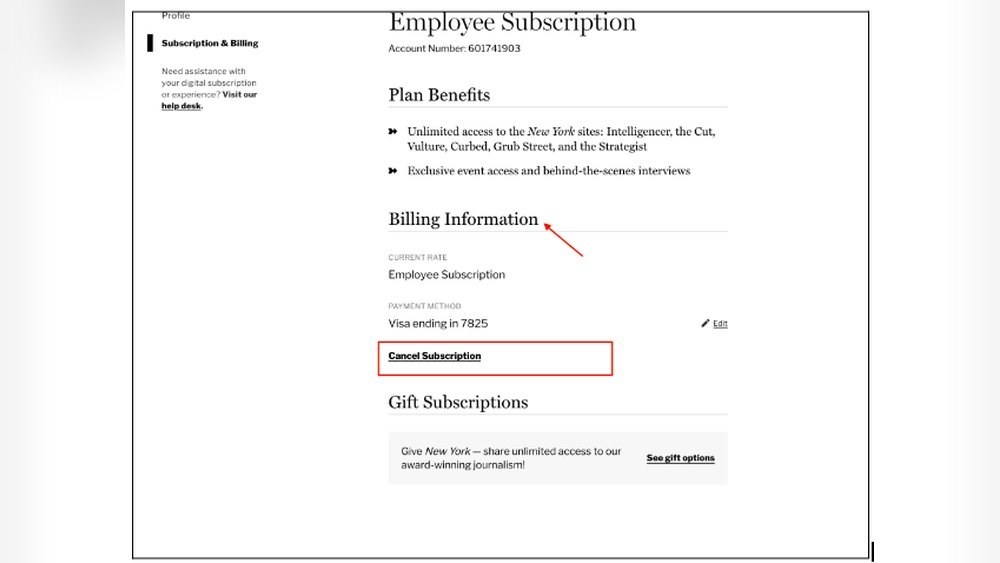
Start by checking your current subscription status. Many magazines offer online accounts where you can see active subscriptions. Log in to your account and verify if the subscription is still active. If it is, follow their cancellation steps carefully. Some subscriptions need a written request or phone call to stop.
Cancel Through Your Payment Method
Canceling the magazine subscription through your payment method stops automatic billing. Contact your credit card company or bank to block future charges. You can request a stop payment on recurring magazine fees. This method works well if the publisher does not respond to cancellation requests.
Use Subscription Management Apps
Subscription management apps help track and cancel recurring payments easily. These apps scan your bank or credit card for active subscriptions. They let you cancel magazine subscriptions directly from the app. Popular apps include Rocket Money, Trim, and PocketGuard. Using these tools saves time and avoids missed cancellations.
Notify Your Bank About Unauthorized Charges
Sometimes magazine subscriptions continue without your consent. Inform your bank about any unauthorized charges immediately. Banks can block or reverse these payments. They may also help prevent future charges from the same source. Reporting quickly protects your money and stops unwanted fees.

Credit: rethinkingschools.org
Seek Consumer Protection Help
Seeking consumer protection help is a smart step to stop unwanted magazine subscriptions. Sometimes, canceling directly with the publisher does not work. Consumer protection agencies can offer guidance and support to resolve these issues.
These agencies protect your rights as a customer. They handle complaints about unfair or deceptive subscription practices. Reporting your problem to them can speed up cancellation and stop future charges.
How To Contact Consumer Protection Agencies
Find your local consumer protection office online or in the phone book. Many states have a dedicated consumer affairs department. You can call, email, or visit their website to file a complaint.
Provide clear details about the subscription issue. Include your name, subscription account number, and communication records with the publisher. This helps the agency understand and act on your case.
What Consumer Protection Agencies Can Do
They investigate subscription complaints and communicate with the company for you. They may issue warnings or fines to publishers who break rules. They help recover money lost to unwanted subscriptions.
Agencies can also offer advice on your legal rights. They guide you on how to avoid similar problems in the future. Their involvement often encourages companies to cancel subscriptions promptly.
Keep Records Of All Communications
Document every call, email, or letter sent to the magazine or agency. Note dates, names of representatives, and responses received. This information is useful if the issue escalates or needs legal attention.
Clear records prove your attempts to cancel the subscription. They support your case in disputes or chargeback claims with your bank or credit card company. Staying organized improves your chances of success.
Frequently Asked Questions
How To Get Rid Of Unwanted Magazine Subscriptions?
Contact the magazine publisher directly to request cancellation. Check device settings or use subscription apps like Rocket Money. Review bank statements for charges. Keep cancellation confirmations to avoid future billing. Report unauthorized subscriptions to consumer protection agencies.
What Is The Hardest Subscription To Cancel?
The hardest subscriptions to cancel are often streaming services with complex policies. They require multiple steps or direct contact to end service.
How Do I Unsubscribe From Unwanted Subscriptions?
Use your device’s settings (App Store or Google Play) or subscription apps like Rocket Money to cancel subscriptions. For others, contact the company directly. Review bank statements regularly to spot and cancel unwanted charges. Keep cancellation confirmations to avoid future billing.
How To Find And Cancel Magazine Subscriptions?
Check your device’s subscription settings (iOS or Android) or use apps like Rocket Money to find subscriptions. Contact the publisher directly to cancel unwanted magazines. Review bank statements for recurring charges and keep cancellation confirmations for records.
How Can I Stop A Magazine Subscription Quickly?
Contact the magazine’s customer service by phone or email to request cancellation.
What Info Do I Need To Cancel A Magazine Subscription?
Provide your subscription number, name, and contact details for identification.
Can I Cancel A Magazine Subscription Online?
Many publishers offer online cancellation forms or account management on their websites.
Will I Get A Refund After Canceling A Subscription?
Refund policies vary; some offer partial refunds, others may not refund at all.
How Long Does It Take To Stop Magazine Deliveries?
Cancellation can take one to two billing cycles to process fully.
Can I Cancel A Magazine Subscription Through My Bank?
You can stop payments via your bank, but also notify the publisher directly.
Conclusion
Stopping magazine subscriptions does not have to be hard. Use your device settings or trusted apps to cancel quickly. Always check your bank statements for hidden charges. Contact the company directly if online options fail. Keep a record of all cancellation requests.
Taking these steps saves money and avoids unwanted deliveries. Stay organized and review subscriptions regularly to prevent future issues. Simple actions make managing subscriptions easier and stress-free.





