Are you wondering how to properly cite AI-generated images in APA 7 format? As AI tools become popular for creating visuals, knowing the correct way to give credit is essential.
You don’t want to risk plagiarism or confusion in your work. This guide will walk you through simple steps to cite AI-generated images clearly and accurately. By the end, you’ll feel confident about including these images in your papers or projects while following APA 7 rules perfectly.
Keep reading to learn how to make your citations both professional and easy to understand.
Ai Image Citation Basics
Citing AI-generated images in APA 7 requires clear and specific details. This ensures proper credit and transparency in your work. Understanding the basics of AI image citation helps maintain academic integrity and follows APA guidelines.
AI-generated images differ from traditional images. They are created by algorithms, not human artists. This means citation rules adjust to include the AI model and version used.
Identifying The Author
The author of an AI-generated image is the creator of the AI model. Usually, this is the company or organization behind the software. For example, OpenAI is the author of the DALL·E model.
Including The Year
Use the year of the AI model version you used to create the image. This helps readers identify the exact version. If the year is unclear, use the year of your image generation.
Describing The Ai Model
Include the full name of the AI model in italics. Add the version number in parentheses. Follow this with a brief description, like [Image generation model].
Providing The Source Url
Add the URL of the AI tool or platform where you generated the image. This allows readers to access or verify the source.
Figure Caption And Notes
Place a figure number and title above the image. Italicize the title. Below the image, add a caption with the prompt used and the AI tool name.
Apa 7 Format Rules
The APA 7 format has clear rules for citing AI-generated images. These rules ensure proper credit to AI tools and creators. Following these guidelines helps maintain academic honesty and clarity.
AI images are treated like software or digital content in APA 7. The citation includes the AI model’s author, version, and source. Proper format helps readers find the original image or model easily.
Figure Caption And Title
Place a figure number and title above the image. The title should be brief and descriptive. Italicize the title for emphasis.
Below the image, add a caption with details. Include the AI prompt used to create the image. Mention the AI tool or model name.
In-text Citation
Use a parenthetical citation with the AI model’s author and year. Format it like this: (Author, Year). This citation goes near the image or in the text.
Reference List Entry
List the AI model in the reference section. Follow the software citation format but adapt it for AI. Include author, year, model name in italics, version, description, publisher, and URL.
Example format: Author. (Year). Model Name (Version) [Description]. Publisher. URL
Citing Ai Model As Author
Citing AI-generated images requires special attention in APA 7 style. One key aspect is how to credit the AI model as the author. Unlike traditional creators, AI models are software programs. They generate images based on prompts given by users. Proper citation ensures ethical use and clarity for readers.
When an AI model creates an image, it acts as the author of that work. APA 7 allows citing software or tools as authors. This method helps identify the source clearly. It also respects intellectual property and supports academic honesty.
Citing The Ai Model In Text
In-text citations should include the AI model’s name and year of the version used. Place this information in parentheses after the reference. For example, (DALL·E, 2023). This format is simple and consistent with APA guidelines.
Creating The Reference List Entry
The reference list entry follows the software citation template. Start with the author, which is the AI model’s name. Then add the year of the version used. Next, italicize the model’s name and include the version number in parentheses. Add a description like “[AI image generator]”. Finally, provide the publisher and URL where the model is accessed.
Example: DALL·E. (2023). DALL·E 2 (Version 2) [AI image generator]. OpenAI. https://openai.com/dall-e
Adding Figure Captions For Ai Images
Below the image, write an italicized title as a figure caption. Follow this with a note explaining the prompt and AI tool used. This provides transparency about the image’s origin. It also helps readers understand the creative process behind the image.
Example:
Figure 1 A serene mountain landscape at sunrise.
Note. Image created using the prompt “mountain sunrise” with DALL·E 2 (OpenAI, 2023).
In-text Citation For Ai Images
Citing AI-generated images in APA 7 requires clear in-text citations. These citations help readers identify the source of the image. They also give credit to the AI tool that created the image.
In-text citations for AI images differ slightly from traditional sources. The AI model’s name and the year of creation are essential. This information appears in parentheses right after the image reference.
Basic Format For In-text Citation
The standard format includes the AI model’s author and year. For example: (OpenAI, 2023). This format matches APA’s parenthetical citation style.
Placing The Citation Near The Image
Place the citation close to the image or its mention in text. This placement helps readers quickly connect the image to its source.
Using The Ai Model As The Author
Treat the AI model as the author since it generated the image. Use the company or organization behind the AI if the author is unclear.
Example Of An In-text Citation
An example might look like this: (DALL·E 2, 2023). This citation shows the AI tool and the version year clearly.
Figure Number And Title
The figure number and title are essential when citing AI-generated images in APA 7. They help readers identify and refer to the image clearly within your text. The figure number appears above the image. It is followed by a concise, descriptive title.
Always use the format “Figure 1,” “Figure 2,” and so on. This sequential numbering matches the order images appear in your paper. The title should briefly describe what the image shows. Keep it clear and straightforward.
How To Format The Figure Number
The figure number must be bold and placed on its own line. Use “Figure” followed by the number and a period. For example: Figure 1. This helps differentiate the number from the title. Align the figure number to the left margin.
Writing The Figure Title
Place the title directly under the figure number. Italicize the title for proper APA style. Use sentence case: only the first word and proper nouns start with capital letters. The title should not end with a period.
Example Of Figure Number And Title
Figure 1.A colorful AI-generated landscape with mountains and a river
This format makes it easy for readers to locate and understand the image in your paper.
Writing Image Captions
Writing clear and accurate image captions is essential when citing AI-generated images in APA 7 style. Captions help readers understand the image’s content and source. They also ensure proper credit to the AI tool used. Follow specific guidelines to create captions that are informative and compliant with APA standards.
Structure Of An Ai-generated Image Caption
Start with a figure number and a brief, italicized title describing the image. Place this title below the image. The title should be concise and relevant to the image content. Use simple words that clearly describe what the image shows.
Below the title, add a note that explains the prompt used to create the image. Include the name and version of the AI tool. This note gives readers context about how the image was generated.
Example Of A Proper Caption
Note. Image generated using DALL·E 2 (Version 2) with the prompt “a futuristic cityscape at sunset.”
This format highlights both the image description and the AI model information. It maintains transparency and follows APA 7 citation rules.
Tips For Writing Effective Captions
Use clear and simple language. Avoid jargon or complex terms. Keep the caption short but informative. Make sure to include the specific AI model name and version. Always mention the exact prompt used for image creation. This helps readers understand the origin and context of the image.
Check for accuracy. Confirm the AI tool’s name and version from the source. This practice improves the credibility of your work and respects copyright rules.
Reference List Entry Format
The reference list entry format for AI-generated images in APA 7 requires specific details. These details help readers find the exact image source. The format is similar to citing software or digital content.
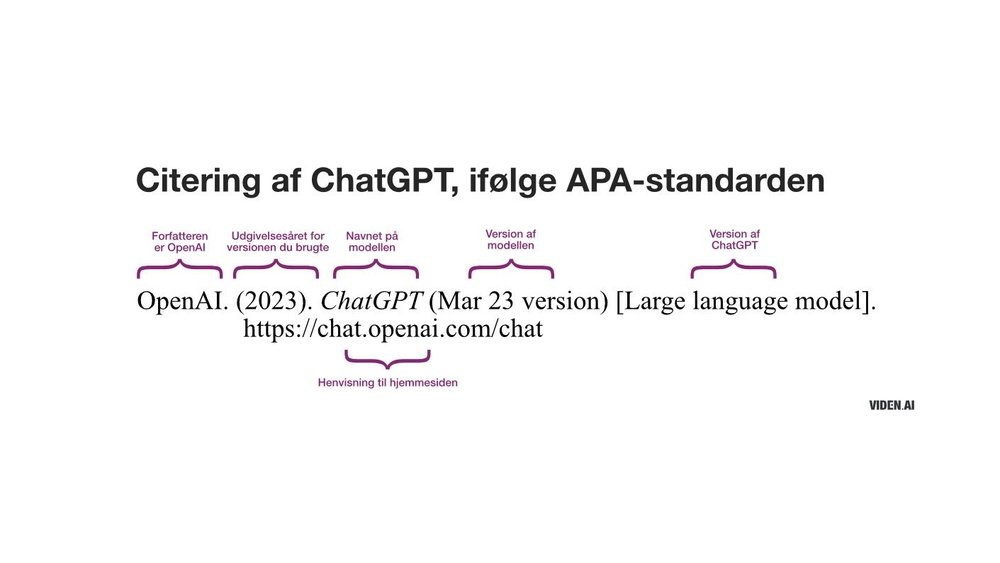
Include the creator or author of the AI model. Next, add the year of the model’s version you used. Then, provide the name of the AI model in italics. Mention the version number in parentheses right after the name.
Describe the type of model in square brackets, such as [AI image generation model]. List the publisher or company that created the AI. Finally, add the URL where the AI can be accessed.
Basic Structure For Ai-generated Image Citation
The basic format looks like this:
Author of AI Model. (Year). Name of AI Model (Version) [Description]. Publisher. URL
Example Of A Reference List Entry
Here is an example citation for an AI-generated image:
OpenAI. (2023). DALL·E 2 (Version 2) [AI image generation model]. OpenAI. https://openai.com/dall-e
Important Notes On Formatting
Use the official name of the AI model as given by its creator. The description should clearly state that it is an AI image model. Ensure the publisher is the company or organization behind the AI. The URL must link directly to the AI tool or its homepage.

Credit: nist.libguides.com
Including Ai Prompt Details
Cite AI-generated images by naming the AI model and year in your reference list. Include a figure title and caption with the prompt and tool used below the image. Use a clear in-text citation with the AI creator’s name and date.
Why Include Ai Prompt Details?
AI-generated images come from specific prompts. These prompts guide the AI to create the image. Including prompt details shows how the image was made. It adds clarity and transparency to your citation.
Readers can understand the context and creativity behind the image. This practice supports academic honesty and proper attribution.
How To Format Ai Prompt Details In Apa 7
Place the prompt details in a note below the figure caption. Use clear and simple language to describe the prompt. Mention the AI tool used for generating the image.
Example:
Figure 1 A futuristic cityscape at sunset.
Note. Prompt: “A futuristic cityscape at sunset with flying cars.” Image generated by DALL·E 2.
Where To Place The Prompt Information
Put the prompt details directly below the image caption. Italicize the figure title but keep the note in plain text. This placement helps readers connect the prompt with the image easily.
Keep the note brief and informative. Do not overload with too many details.
Common Mistakes To Avoid
Citing AI-generated images in APA 7 requires careful attention. Many make common mistakes that reduce clarity and accuracy. Avoiding these errors improves your work’s professionalism and trustworthiness.
Errors often happen in formatting, attribution, and description. Understanding these pitfalls helps you create correct citations. This section highlights the most frequent mistakes to avoid.
Incorrect Author Attribution
Many cite the AI tool as the author instead of the developer. APA style requires crediting the creator or company behind the AI. Naming only the AI model confuses readers and breaks citation rules.
Missing Version Information
Omitting the version number of the AI model is common. Version details clarify which tool generated the image. Always include the version to help readers find the exact source.
Lack Of Detailed Figure Captions
Some captions are too brief or missing important details. A proper caption includes the image title, prompt used, and AI tool. This gives context and supports transparency.
Improper Formatting Of Reference Entries
Reference lists often lack the correct structure. Use the format for software citations adapted to AI models. This includes author, year, model name in italics, version, description, publisher, and URL.
Failing To Include In-text Citations
Forgetting in-text citations confuses readers about image origins. Always add a parenthetical citation with the author and year. This links the figure to the reference list entry clearly.

Credit: rmit.libguides.com
Tips For Ethical Usage
Using AI-generated images ethically is important for trust and respect. Ethical use protects creators and users from legal and moral issues. Following clear guidelines makes your work reliable and honest.
Ethical use means giving proper credit and being transparent about the image’s origin. It also involves respecting copyright and avoiding misleading claims about the image’s creation.
Provide Clear Attribution
Always name the AI tool that created the image. Include the version and year of the software. This shows respect for the technology and its developers.
In your caption or reference list, write the AI model’s full name in italics. Add a short description of the image generation process.
Disclose Ai Involvement
Let readers know the image was created by AI. Transparency builds trust and avoids confusion. Mention the AI tool in the figure caption or text.
Explain briefly how the image was generated. This helps others understand the role of AI in your work.
Avoid Misrepresentation
Do not claim AI images as your original artwork. Misleading readers harms your credibility. Be honest about the AI’s contribution.
Use AI images only for appropriate purposes. Avoid using them to deceive or manipulate viewers.
Respect Copyright And Usage Rights
Check the AI tool’s terms before using generated images. Some platforms restrict commercial or public use. Follow all licensing rules carefully.
If you modify the AI image, note the changes in your citation. This keeps your use transparent and ethical.
Credit: www.eastcentral.edu
Frequently Asked Questions
How To Cite Ai Image In Apa 7?
Cite AI images in APA 7 by providing a figure number, italicized title, and caption with the AI tool and prompt. Include an in-text citation with the AI model’s author and year. No reference list entry is needed for self-generated AI images.
How Do I Reference A Picture Generated By Ai?
Reference an AI-generated picture by adding a figure number and title above it. Below, write a caption with the AI tool’s name and prompt used. Include an in-text citation naming the AI model and year. A reference list entry is optional unless required by your style guide.
Do You Have To Cite Ai-generated Photos?
Yes, cite AI-generated photos by naming the AI tool, creator, and prompt. Follow citation style rules like APA or Chicago.
How To Cite Canva Ai Generated Images In Apa?
Cite Canva AI images in APA by labeling the figure with a title and caption. Include the AI tool, prompt used, and creation year. No reference list entry is needed if you generated the image yourself. Use in-text citation only if required by your instructor.
How Do I Cite Ai-generated Images In Apa 7 Format?
Use the author, year, image title in italics, description, and source URL in the reference list.
What Is The Correct In-text Citation For Ai Images?
Include the AI model’s author and year in parentheses, e. g. , (OpenAI, 2023).
How To Write A Figure Caption For Ai-generated Images?
Place an italicized title below the image, followed by the prompt and AI tool used.
Can I Cite Ai Image Generators As Authors?
Yes, list the AI model or company as the author in the citation.
Do I Need To Include Version Numbers For Ai Models?
Yes, include the version number in parentheses after the model name if available.
How Do I Mention The Ai Prompt In My Paper?
Add the prompt text as a note below the figure caption.
Conclusion
Citing AI-generated images in APA 7 is straightforward. Use the AI model’s author, year, and version. Include a clear figure caption with the prompt and tool used. Always add an in-text citation matching the reference list entry. This helps readers find the original AI source easily.
Following these steps ensures your work stays clear and credible. Keep your citations simple and consistent for best results.





