If you’re thinking, “How do I cancel my Curology subscription?” you’re not alone. Whether your skin goals have changed or you want to try something new, stopping your Curology plan should be simple and hassle-free.
But if you’ve ever felt confused about the steps or worried about unexpected charges, this guide is here to help you. You’ll learn exactly how to cancel your subscription smoothly, avoid extra fees, and know what to expect after cancellation.
Keep reading—taking control of your skincare routine starts with understanding how to manage your Curology subscription.

Credit: www.reddit.com
Curology Subscription Basics
Curology is a popular skincare subscription service that offers custom formulas. Subscribers receive personalized products based on their skin needs. Understanding the basics of Curology subscriptions helps manage your account effectively.
Knowing how the subscription works can make canceling or pausing easier. Each month, Curology ships your custom formula directly to your door. You can adjust your plan or cancel anytime before the next shipment.
What Is Included In A Curology Subscription?
The subscription includes a custom skincare formula made for your skin type. You also get access to skincare providers who review your progress. Monthly shipments contain the formula and sometimes additional skincare products.
How Billing Works For Curology
Curology charges your payment method each month when the order processes. The charge covers the formula and shipping. You must cancel or pause at least two business days before shipment to avoid charges.
Options To Manage Your Subscription
You can pause, cancel, or change your formula anytime through your account. Pausing stops shipments temporarily without canceling your profile. Canceling ends the subscription and stops all future shipments.
When To Cancel
Knowing when to cancel your Curology subscription helps avoid unwanted charges. Timing your cancellation right can save money and hassle. Understanding the best moments to stop is key for a smooth experience.
Before Your Next Shipment Processes
Cancel at least two business days before your next order processes. This timing stops the system from charging you again. Missing this window means you will receive and pay for another shipment.
After Completing Your Trial Period
The trial period is a good time to test Curology. Cancel if you don’t see results or like the products. This prevents automatic renewal and further charges after the trial ends.
If Your Skin Has Cleared Up
Some users cancel after their skin improves. Remember, stopping might cause old acne to return. Consider continuing or consulting your provider before canceling for skin health.
When You No Longer Need Custom Skincare
Cancel if you switch to another skincare routine or product. Curology is ideal for personalized treatment but may not fit all needs long term. Ending the subscription avoids paying for unused service.
Logging Into Your Account
Logging into your Curology account is the first step to cancel your subscription. It gives you access to manage orders and subscription settings. Keep your login details handy for a smooth process.
Access The Curology Website
Open your preferred web browser. Go to curology.com. This is where you will start the cancellation process.
Enter Your Login Credentials
Click on the “Login” button at the top right corner. Enter the email address you used to sign up. Type your password carefully to avoid errors.
Use Password Recovery If Needed
Forgot your password? Click “Forgot Password” on the login page. Follow the instructions to reset it quickly. Check your email for the reset link.
Navigate To Your Account Dashboard
Once logged in, find the account or profile icon. Click on it to open your dashboard. Here you can see subscription details and billing information.

Credit: www.reddit.com
Navigating To Payment Settings
Start by logging into your Curology account. Find the Payment Settings section to manage your subscription details. From there, you can easily locate options to cancel your Curology subscription.
Understanding The Cancellation Confirmation Process
After you request to cancel your Curology subscription, confirmation is crucial. This step ensures your cancellation is recorded correctly. Without confirmation, your subscription may continue, leading to unwanted charges.
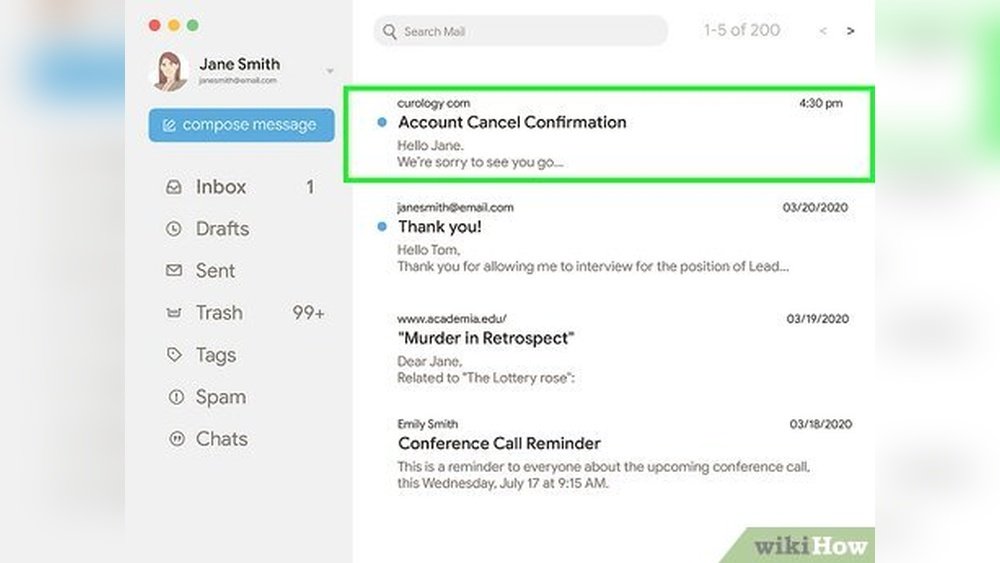
Curology usually sends a confirmation email. Check your inbox and spam folder for this message. The email will state that your subscription is cancelled and include important details.
Checking Your Account Status Online
Log in to your Curology account to verify cancellation. Look for subscription status or order history sections. These areas show if your plan is active or cancelled. A cancelled status means no future shipments will occur.
If your account still shows an active subscription, repeat the cancellation steps or contact support. Do not assume cancellation without this check.
Contacting Curology Support For Confirmation
If you do not receive confirmation, reach out to Curology support. Use their official email or help center. Provide your account details and cancellation date. Ask for written proof of cancellation.
Customer support can clarify any issues. They may help avoid future charges or shipments. Keep all correspondence until you see the cancellation reflected in your account.
Step-by-step Cancellation Process
Start by logging into your Curology account online. Navigate to the subscription settings and select the cancel option. Follow the prompts to confirm and complete the cancellation process easily.
Cancelling your Curology subscription by email is a clear and direct method. It allows you to communicate your request in writing and keep a record.
This option suits those who prefer to write down their reasons or need confirmation in text form. The process is straightforward and usually handled by Curology’s customer support team.
How To Write Your Cancellation Email
Start your email by addressing Curology’s support team politely. Include your full name and the email linked to your account.
State clearly that you want to cancel your subscription. Mention your subscription ID or any relevant details to help them find your account quickly.
Keep the tone simple and direct. You do not need to explain your reasons unless you want to.
Where To Send Your Cancellation Email
Send your cancellation email to hello@curology.com. This is the official support address for Curology subscriptions.
Double-check the email address before sending. Make sure your subject line includes “Subscription Cancellation” for faster processing.
What To Expect After Sending Your Email
Curology usually replies within a few business days. They may confirm your cancellation or ask for more details.
Keep an eye on your inbox for their response. Save the email confirmation as proof of cancellation.
Remember to send your cancellation email at least two business days before your next shipment to avoid charges.
Confirming Your Cancellation
Unexpected charges from Curology can cause frustration and confusion. Avoiding these extra fees requires clear steps. Knowing when and how to cancel helps stop future payments. It also prevents shipments you do not want. Acting early is the best way to manage your subscription.
Confirm Your Cancellation Before The Deadline
Curology requires cancellation at least two business days before the next order date. Missing this window may result in another charge. Check your account for the exact date. Mark it on your calendar to avoid surprises. Early cancellation ensures no new shipments or fees.
Contact Curology Customer Support Immediately
If you see an unexpected charge, reach out to Curology support right away. Explain your situation clearly and politely. Keep records of your communications for reference. Customer support can help resolve billing issues faster. Quick contact may prevent further unwanted charges.
Refuse Shipments You Do Not Want
If a package arrives after cancellation, refuse it at delivery. Write “refused” on the package before returning it. Inform Curology about the refused shipment by contacting them. This step helps avoid being charged for that order. Returning the package stops additional fees and future deliveries.
Dispute Charges With Your Credit Card Company
If Curology does not refund a wrongful charge, dispute it with your credit card company. Provide evidence of your cancellation and refused shipments. Credit card companies often investigate and can reverse charges. This action protects your money from unauthorized payments. Use this as a last resort if other steps fail.
Email Cancellation Option
To cancel your Curology subscription by email, send a clear cancellation request to hello@curology. com. Make sure to contact them at least two business days before your next shipment to avoid charges. Keep a copy of your email for your records.
Understanding The Curology Refund Policy
Curology creates custom skincare products for each user. Because of this, their refund policy is strict. They do not offer refunds after the initial trial box. The trial is a chance to test the product first. Once you move beyond this trial, all sales are final.
The policy is clear: no returns or exchanges for used or opened products. Custom formulas cannot be resold or repurposed. This helps keep the products safe and effective for each customer.
Refunds For The Trial Box
The trial box is Curology’s only product eligible for a refund. If you are not happy with it, you can contact Curology support. They will listen to your concerns and may offer a refund. This option is only valid before moving to full subscription orders.
No Refunds On Subscription Orders
After the trial, Curology does not refund any subscription orders. This is because each bottle is made specifically for you. Once shipped, it cannot be returned or reused. It is important to cancel before the next shipment to avoid charges.
How To Handle Unexpected Charges
If you get charged after canceling, contact Curology support right away. Explain the situation clearly. If Curology denies a refund, you may need to dispute the charge with your credit card company. This step helps protect your money.
Returning Unwanted Shipments
If you receive a package you do not want, refuse the delivery. Write “refused” on the package and send it back. Inform Curology about the return. If they still do not refund you, disputing the charge is the next option.
Avoiding Unexpected Charges
Handling cancellation issues with Curology can be tricky for some users. Problems may arise even after following the cancellation steps. Knowing how to address these issues helps avoid unwanted charges and frustration.
Curology requires cancellation at least two business days before the next shipment. Missing this deadline can lead to an unexpected charge. Acting quickly is important if you face any problems during cancellation.
Contacting Curology Customer Support
Start by reaching out to Curology’s customer support team. Use the official email or contact form on their website. Explain your situation clearly and provide your account details. This helps them locate your subscription and assist you faster.
Dealing With Unexpected Charges
If you get charged after cancellation, contact support immediately. Ask for a refund and explain that you canceled in time. Keep records of your cancellation confirmation and any emails. These records are useful if you need to escalate the issue.
Handling Unwanted Shipments
Sometimes, a shipment arrives after cancellation. You can refuse the package at delivery. Write “refused” on the package and send it back. Notify Curology that you returned the shipment. This action may support your refund request.
Escalating Disputes With Your Credit Card
If Curology denies your refund, consider disputing the charge with your credit card company. Provide evidence of your cancellation and communication with Curology. Credit card companies often protect customers in such cases. This step can recover your money if other options fail.
Credit: www.youtube.com
Frequently Asked Questions
How Do I Cancel My Subscription Subscription?
To cancel your subscription, log in to your account and go to the Payment page. Click “I want to cancel” and follow prompts. Alternatively, email hello@curology. com. Cancel at least two business days before your next order to avoid charges.
What Happens When You Stop Curology?
Stopping Curology often leads to acne returning as skin loses ongoing treatment benefits. Consistency maintains clear, healthy skin.
Can I Get A Refund On Curology?
Curology offers refunds only for the first trial box. No refunds apply to future custom orders. Cancel two days before shipments.
Does Curology Charge After Free Trial?
Curology charges your payment method after the free trial ends unless you cancel before the trial expires. Cancel at least two days prior to avoid charges.
How Do I Cancel My Curology Subscription Online?
Log in to your Curology account and select “Manage Subscription” to cancel anytime.
Can I Cancel Curology Subscription Anytime Without Penalty?
Yes, you can cancel your subscription any time without extra fees.
How Long Does It Take For Curology Cancellation To Process?
Cancellation usually takes effect immediately or before your next billing cycle.
Will I Get A Refund After Canceling Curology Subscription?
Curology offers no refunds after the initial trial period.
Can I Pause My Curology Subscription Instead Of Canceling?
Yes, Curology allows pausing your subscription for a short time.
How Do I Avoid Getting Charged After Canceling Curology?
Cancel at least two days before your next shipment to avoid charges.
Conclusion
Canceling your Curology subscription is simple if you follow the right steps. Make sure to cancel at least two days before your next shipment. Contact Curology customer support if you face any issues or unexpected charges. Remember, no refunds are available after the trial period.
Keep track of your cancellation to avoid extra charges. Taking control of your subscription helps you manage your skincare budget better. Stay informed and act early to ensure a smooth cancellation process.