Are you tired of magazines piling up at your doorstep, cluttering your space and draining your wallet? Canceling a magazine subscription might seem like a hassle, but it doesn’t have to be.
Whether you’ve lost interest, want to save money, or simply want to clear out unwanted mail, this guide will show you exactly how to stop those magazines from arriving. You’ll discover simple, effective steps to cancel your subscription quickly and even prevent future junk mail.
Keep reading to take control of your mailbox and your budget today!
Locate Subscription Details
Find your subscription details by checking your magazine’s account or billing emails. These details help identify the subscription for cancellation. Keep your customer number or order information handy for a smooth process.
Finding your magazine subscription details is the first step to canceling it. These details help the company identify your account quickly. Without them, cancellation can take longer or fail.
Look for your subscription number, account ID, or customer reference. This information usually appears on your magazine label or billing statements. Having your payment method details ready is also helpful.
Check Your Magazine Label
Most magazines print subscription details on the mailing label. Look for a series of numbers or a code near your name and address. This often includes your subscription or account number.
Keep this information handy when you contact the magazine’s customer service. It speeds up the process and confirms your identity.
Review Your Confirmation Email
If you subscribed online, check your email inbox. Search for the confirmation email from the magazine company. This email usually contains your subscription details and cancellation instructions.
Save or print this email. It serves as proof of your subscription and can help during cancellation.
Look At Your Billing Statement
Your bank or credit card statement may list the magazine subscription charge. Find the merchant name and transaction date. These details help customer service locate your account faster.
Note down any subscription IDs or reference numbers that appear on your billing statement.
Log Into Your Online Account
Many magazines offer online accounts for subscribers. Log into your account on the magazine’s website. Navigate to the subscription or account settings section.
Here you can find subscription details and sometimes cancel directly. Keep your username and password ready for easy access.
Check Cancellation Policy
Before canceling a magazine subscription, review the cancellation policy carefully.
This step helps avoid unexpected fees or continued deliveries.
Policies vary by publisher and subscription type.
Locate The Policy
Find the cancellation policy on the magazine’s website or subscription terms.
Look for sections like “Subscription Terms” or “Customer Service.”
Sometimes, the policy appears in the confirmation email or printed materials.
Understand The Time Frame
Note any deadlines for cancellation requests.
Some subscriptions require notice 30 days before renewal.
Missing the deadline might result in automatic renewal charges.
Check For Fees
Some magazines charge a cancellation fee.
Others may require payment for the remaining issues.
Know these fees before submitting your cancellation request.
Confirm Refund Policies
See if the publisher offers partial or full refunds.
Refunds depend on the subscription type and cancellation timing.
Keep your payment and subscription details handy for refund claims.
Use Online Account Portal
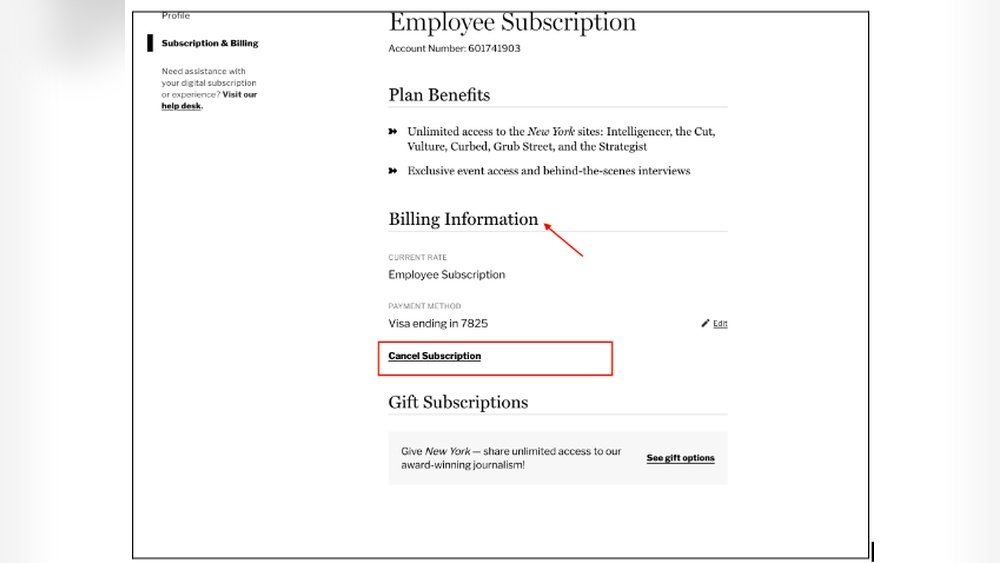
Canceling a magazine subscription is easier with the online account portal. Most publishers offer a digital platform where subscribers manage their orders. This method avoids phone calls and long waits. It also provides quick access to subscription details.
Using the online portal saves time. You can log in anytime and handle your subscription from home. The process is clear and simple, perfect for people who prefer digital communication.
Find The Magazine’s Website
Start by visiting the magazine’s official website. Look for sections like “My Account” or “Subscription.” These areas usually hold all subscription options. You may need your account number or email to log in.
Log Into Your Account
Enter your username and password to access your subscription. If you forget your password, use the “Forgot Password” link. After logging in, navigate to the subscription management page. This page shows your current subscription status.
Locate The Cancellation Option
On the subscription page, find the cancel button or link. It might say “Cancel Subscription,” “End Subscription,” or similar. Click it to start the cancellation process. Some sites ask why you want to cancel. Answer if you want, or skip the question.
Confirm The Cancellation
After clicking cancel, the site often asks for confirmation. Confirm your choice to proceed. You may receive an email confirming the cancellation. Keep this email as proof of the cancellation.
Check For Additional Steps
Some publishers require extra steps, like calling customer service. The website will mention if this is needed. Follow the instructions carefully to complete the cancellation. Otherwise, your subscription may continue.
Credit: www.poporganizing.com
Contact Publisher Directly
Reach out to the magazine publisher by phone, email, or their website to request subscription cancellation. Provide your subscription details clearly for faster processing. Direct contact often ensures your cancellation is recorded promptly.
Why Contact The Publisher Directly?
Contacting the publisher directly is the fastest way to cancel your subscription. The publisher controls your account and can stop future deliveries. This method avoids confusion caused by third parties or resellers.
You get clear confirmation that your subscription is canceled. It helps prevent being charged again. Direct contact also lets you ask about refunds or leftover issues.
How To Find Publisher Contact Information
Look on the magazine label or inside cover for contact details. Many magazines list phone numbers, email addresses, or mailing addresses there. You can also visit the magazine’s official website.
Search for terms like “customer service” or “subscription help.” These pages often include cancellation instructions and a way to reach the publisher quickly.
What To Say When You Contact The Publisher
Be clear and polite. State your name and subscription number. Tell them you want to cancel your subscription immediately. Ask for confirmation in writing or email.
Keep your tone simple. For example, say: “Please cancel my subscription. Send me a confirmation.” This makes the process smoother and faster.
Best Ways To Contact The Publisher
Phone calls often get quick responses. Have your subscription details ready before calling. If you prefer writing, send an email or a letter.
Some publishers offer online cancellation forms. These forms are easy to fill out and track. Choose the method that fits you best for fast results.
Send Written Cancellation Request
Send a written cancellation request to the magazine’s customer service address. Include your name, subscription details, and a clear statement to stop delivery. Keep a copy for your records to confirm the cancellation if needed.
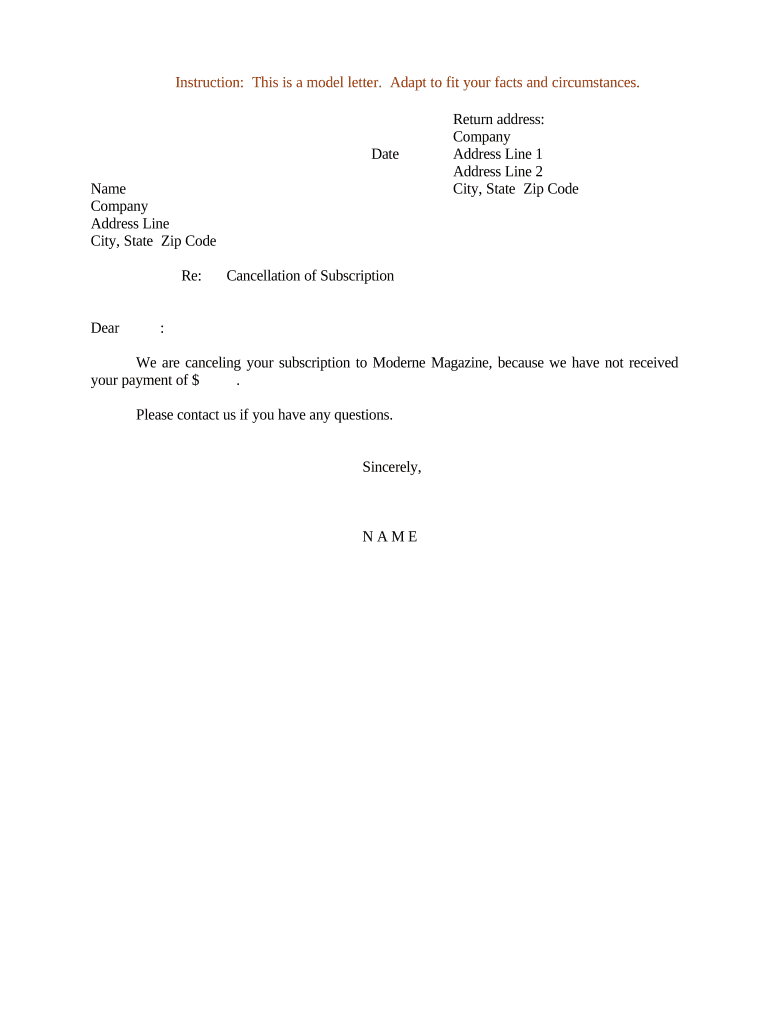
Write A Clear Cancellation Letter
Start by writing a clear cancellation letter. Include your name and subscription details. Mention the magazine’s name and your account number. State that you want to cancel your subscription. Keep the message short and direct.
Be polite but firm in your request. This helps avoid confusion and speeds up the process.
Send The Letter Via Certified Mail
Send your cancellation letter by certified mail. This method gives proof of delivery. You get a tracking number and a receipt. It protects you if the company denies receiving your request.
Keep the receipt until the cancellation is confirmed. It is your proof if any issue arises later.
Include All Necessary Details
Include all necessary details in your letter. Add your full name, address, and phone number. Provide your subscription ID or customer number. Mention the date you want the cancellation to take effect.
Clear details help the company process your request without delays.
Credit: www.signnow.com
Utilize Opt-out Services
Stopping unwanted magazines is easier with opt-out services. These websites help remove your name from many mailing lists. You avoid junk mail without contacting each company yourself.
Opt-out services save time and reduce paper waste. They work by sharing your request with multiple companies at once. This lowers the chance of getting unwanted magazine offers.
Dmachoice.org
DMAchoice.org is run by the Association of National Advertisers. It lets you register to stop most junk mail. This includes catalogs, credit card offers, and magazine ads.
You create an account and choose the types of mail to block. Some options may require a small fee. The site updates your preferences for five years.
DMAchoice.org targets mailers who follow the Direct Marketing Association rules. It helps reduce mail clutter and protects your privacy.
Catalogchoice.org
CatalogChoice.org is a free service that helps you unsubscribe from catalogs and magazine mail. It acts as a middleman between you and the companies.
You submit your unwanted mail details. The site contacts the companies to stop future mailings. This method is simple and does not cost anything.
CatalogChoice.org tracks your requests and shows you the results. It helps cut down on waste and unwanted subscriptions.
Mark Mail As Refused
Marking mail as refused is a simple yet effective way to stop unwanted magazine deliveries. This method sends a clear message to the sender without opening the package. It helps avoid unwanted charges and reduces clutter at home.
When you mark mail as refused, you tell the delivery service not to leave the magazine with you. The mail carrier returns it to the sender. This action can trigger the sender to remove you from their mailing list.
How To Mark Mail As Refused
Look at the magazine package carefully. Write “Refused” clearly on the front of the envelope or box. Do not open the package. Take it to your mailbox or hand it to your mail carrier. They will return it to the sender.
What Happens After Marking Mail As Refused
The sender receives the returned package. They know you do not want the magazine. Usually, they stop sending future issues. This step can speed up the cancellation process.
Why Mark Mail As Refused Works
Marking mail as refused avoids opening the package. This prevents any accidental acceptance or charges. It also shows the sender your clear refusal to receive the magazine.
Tips For Using The Refused Mail Method
Write “Refused” in large, clear letters. Do not open the package first. Use this method only for mail addressed to you. Keep track of which companies you mark as refused. Follow up with direct cancellation requests if needed.

Credit: www.amazon.com
Monitor Future Subscriptions
Monitoring future magazine subscriptions helps prevent unwanted deliveries. After canceling, new subscriptions might still arrive. Staying alert saves time and money. Watch for unexpected charges or mail. This step keeps your mailbox and budget clear.
Set Up Alerts For New Subscriptions
Use your bank or credit card alerts. Notify you of any new magazine charges. This helps catch subscriptions you forgot about. Immediate alerts allow quick action to cancel.
Review Your Mail Regularly
Check your mailbox often for new magazines. Note any unfamiliar titles or senders. This helps spot unwanted deliveries early. You can then contact the company to cancel.
Keep Track Of Your Subscription History
Maintain a list of all current subscriptions. Update it when you add or cancel one. This record helps avoid accidental renewals. It also shows which companies to watch closely.
Use Online Tools To Manage Subscriptions
Consider subscription management apps or websites. They organize your subscriptions in one place. Many send reminders before renewals. This tool helps you stay in control easily.
Be Careful With Personal Information
Limit sharing your address and email online. Avoid signing up for unknown offers. Protect your details to reduce unwanted magazine mail. This lowers the chance of accidental subscriptions.
Avoid Sharing Personal Info
Protecting your personal information is crucial when canceling a magazine subscription. Sharing too many details can lead to unwanted solicitations or data misuse. Stay cautious and limit the information you provide during the cancellation process.
Only share the details that are absolutely necessary. Avoid giving out sensitive data like your full address or payment information unless it is required to confirm your identity. This helps prevent your data from being used for marketing or sold to third parties.
Provide Minimal Personal Details
Give only the name and subscription ID if possible. This information is usually enough to identify your account. Avoid sharing your social security number or credit card details during cancellation.
Use Official Contact Channels
Always use the magazine’s official website or customer service number. Avoid third-party websites or unknown contacts. This lowers the risk of scams or data theft.
Opt Out Of Marketing Communications
Ask to be removed from all mailing lists after cancellation. This reduces the chance of receiving future ads or offers. Confirm your request in writing for better protection.
Confirm Cancellation And Refunds
Confirming your cancellation and understanding refund policies is crucial after canceling a magazine subscription. This step ensures the cancellation was successful and clarifies any money you might get back. Knowing what to expect saves time and avoids confusion.
How To Verify Your Subscription Cancellation
Check your email for a cancellation confirmation message. Most companies send this within a few days. If you do not receive confirmation, call customer service directly. Keep a record of the cancellation number or email. This proof helps if any issues arise later.
Understanding Refund Policies
Review the magazine’s refund policy on their website. Many subscriptions offer refunds for unused issues or full months. Some may only provide credit toward future purchases instead of cash refunds. Note deadlines for requesting refunds to avoid missing them.
What To Do If You Do Not Receive A Refund
Contact the company’s billing department first. Provide your cancellation confirmation and payment details. If the company refuses, check your payment method for dispute options. Credit card companies or banks can help recover funds in some cases.
Frequently Asked Questions
How To Stop Unwanted Magazine Subscriptions?
Use opt-out services like DMAchoice. org and CatalogChoice. org to remove your name from mailing lists. Contact companies directly through their unsubscribe pages or send written requests. Write “Refused” on unwanted mail and return it unopened. Avoid sharing your information to prevent future subscriptions.
How To Find And Cancel Magazine Subscriptions?
Find subscription details on the magazine’s website or label. Use opt-out services like DMAchoice. org and CatalogChoice. org. Contact companies directly via their unsubscribe page or mail. Write “Refused” on unwanted mail envelopes and return them unopened. Always opt-out when sharing personal information to avoid future subscriptions.
How Do I Cancel An Online Subscription?
To cancel an online subscription, log into your account and visit the subscription or billing section. Select “Cancel Subscription” and follow the prompts. You may also contact customer support for assistance. Confirm cancellation via email and check for any final charges.
How Do I Cancel My Magazine Direct Subscription?
To cancel your magazine direct subscription, visit the publisher’s website and locate the unsubscribe or cancellation page. Fill out the cancellation form with your subscription details. Alternatively, contact customer service by phone or email to request cancellation. Writing “Refused” on unopened mail also stops deliveries.
How Do I Cancel A Magazine Subscription Online?
Visit the publisher’s website and find the subscription or account section to cancel.
Can I Cancel A Magazine Subscription By Phone?
Yes, call the customer service number provided on the magazine or website to cancel.
What Information Is Needed To Cancel A Subscription?
You usually need your subscription number and personal details from the mailing label.
How Long Does It Take To Stop Delivery After Cancellation?
It often takes one to two billing cycles to stop magazine deliveries.
Can I Get A Refund After Canceling My Subscription?
Refund policies vary; check the publisher’s terms for possible refunds or credits.
Is There A Fee To Cancel A Magazine Subscription?
Most cancellations are free, but some publishers may charge a cancellation fee.
Conclusion
Canceling a magazine subscription does not have to be hard. Use online opt-out tools like DMAchoice. org or CatalogChoice. org. Contact the company directly and follow their cancellation steps carefully. Writing “Refused” on unwanted mail can stop deliveries too. Always watch where you share your information to avoid extra mail.
Going paperless also helps reduce junk mail. Taking these simple steps saves time and prevents unwanted magazines. Stay in control of your mailbox with easy, clear actions.





