Cancel a magazine subscription by checking your account, contacting the publisher, or stopping automatic payments.
I’ve helped dozens of people cancel subscriptions and I’ve done it myself many times. This guide explains how to cancel a magazine subscription step by step, what information you need, common pitfalls, and practical fixes. Read on to save time, avoid extra charges, and feel confident about the process.

Source: poporganizing.com
Why people cancel a magazine subscription
People stop subscriptions for many reasons. You might be cutting costs, switching to digital, or simply not reading the issues. Some subscriptions renew automatically and surprise you with a charge. Knowing why you want to cancel helps choose the right method and timing. It also helps when asking for refunds or credits.

Source: youtube.com
What you need before you cancel
Gather a few key items to speed the process and avoid confusion.
- Account details including username or subscriber number
- Email address or billing address used at sign-up
- Last four digits of the card used or the payment method on file
- Recent invoice, renewal notice, or subscription confirmation
- Any promotional or offer codes that applied to the subscription
Having these ready makes calls or chats shorter. If you don’t have an account, your billing statement often shows the publisher’s name and phone number.
Source: signnow.com
Step-by-step: How to Cancel a Magazine Subscription
Follow these clear steps to cancel smoothly. The exact path depends on where you subscribed.
- Check the magazine’s website
- Log in to your account under “My Subscriptions,” “Account,” or “Manage Subscription.”
- Look for cancel, pause, or auto-renew options.
- Confirm cancellation and save any confirmation number or email.
- Use the publisher’s customer service
- Call the publisher if online options fail. Keep your account info handy.
- Use live chat or email support if phone hold times are long.
- Ask for confirmation in writing and note the agent name and time.
- Cancel through the retailer or third party
- If you bought through a third party (Amazon, Apple, or a store), cancel with them.
- Check your Amazon Subscriptions, Apple Subscriptions, or retailer account for steps.
- Third-party cancellations sometimes take longer to reflect.
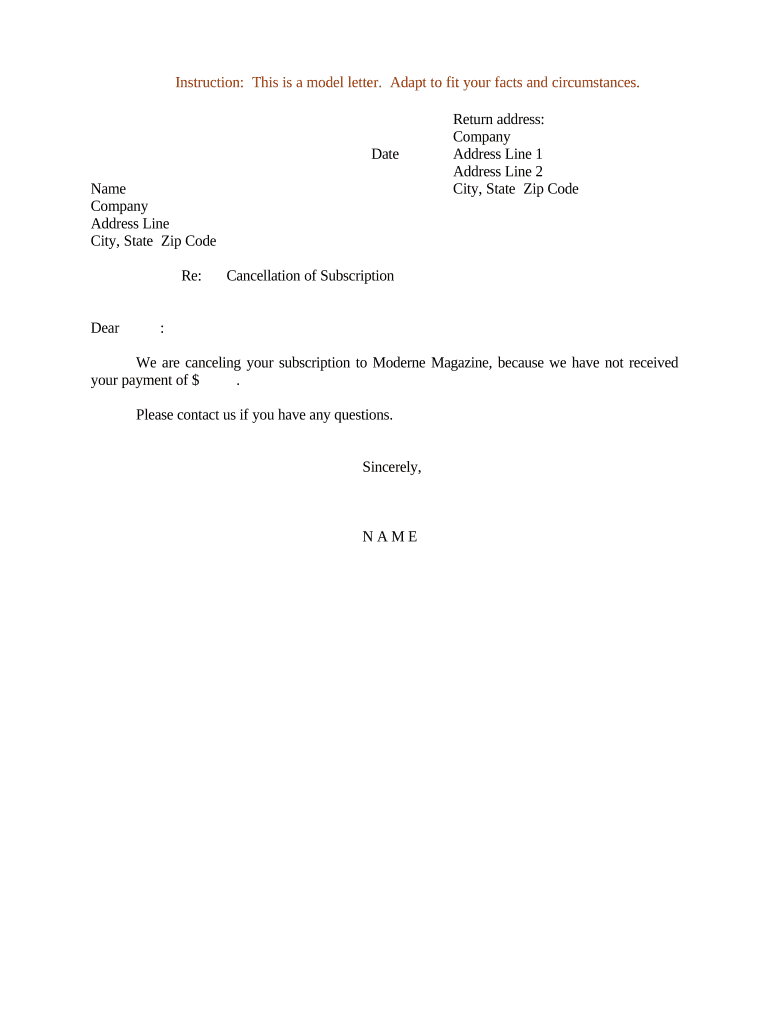
- Send written notice by mail (if required)
- Some publishers require written or signed cancellation by mail.
- Send it by certified mail and keep the receipt.
- Include subscriber name, account number, and request to stop future charges.
- Stop payments if necessary
- Contact your bank or card issuer to stop automatic payments only if the publisher ignores you.
- Use stop payment or dispute new charges if billing continues after a confirmed cancellation.
Each path often ends with a confirmation. Keep that confirmation until any outstanding issues are resolved.

Source: youtube.com
Stopping recurring payments and bank/card options
If charges keep coming after cancellation, these steps help.
- Contact the publisher again and ask for a written confirmation.
- Request a refund for any unauthorized charge.
- Call your bank or credit card to dispute the charge or stop recurring payments.
- Use third-party payment tools, like PayPal, to cancel permissions in your account settings.
Banks and card issuers have clear procedures. They can block future charges or issue chargebacks when the merchant won’t cooperate.
Source: x.com
Dealing with refunds, credits, and timing
Refund policies vary. Here’s what to expect and how to ask.
- Prorated refunds are possible if you cancel mid-term. Ask directly.
- Some publishers offer a partial credit toward other services instead of cash.
- Time your cancellation before the renewal date to avoid the new billing cycle.
- Keep documentation in case you need to escalate for a refund.
Be clear and polite. A calm request with evidence often gets a better result.

Source: youtube.com
Common problems and how to fix them
You may hit bumps. Here are quick fixes I’ve used.
- Can’t find your account: Search inbox for welcome emails or billing receipts.
- Auto-renew charge after cancellation: Send confirmation and ask for refund. Escalate to your bank if needed.
- Third-party billing confusion: Contact the third party (store or app) first; they often control billing.
- No online cancel button: Call customer service and request written confirmation.
I once had a renewal post-cancellation. I saved the chat transcript and showed it to my bank. That helped me get the refund.

Source: magazinesdirect.com
Legal rights, privacy, and consumer protections
Consumer rules vary by state and country. Know the basics.
- Many places require clear auto-renewal disclosures and simple cancellation methods.
- You have rights against unfair billing and misleading renewal notices.
- Keep proof of cancellation for potential disputes or chargebacks.
- Privacy: ask the publisher how they handle your personal data after cancelling.
If you suspect illegal billing, your state consumer agency or financial regulator can guide you.

Source: youtube.com
Personal tips and mistakes to avoid
From my experience, these tips save time and prevent stress.
- Don’t wait until the last minute. Cancel a few days before renewal.
- Save every confirmation email or chat transcript you get.
- Use the same channel you used to subscribe when possible.
- Avoid just deleting the app or account without confirming cancellation.
- If a promotional rate applied, ask how cancellation affects that rate or any future offers.
I learned to screenshot confirmations. That small habit made a refund claim painless later.

Source: magazinesdirect.com
Alternatives to canceling
If you’re unsure, try these softer options first.
- Pause the subscription for a few issues.
- Switch to a digital-only plan, which is often cheaper.
- Reduce the frequency from monthly to quarterly if offered.
- Gift or transfer the subscription to someone else.
- Put the subscription on hold while you try other formats.
These options can save money and keep access if you don’t want full cancellation.
Frequently Asked Questions of How to Cancel a Magazine Subscription
How long does it take to cancel a magazine subscription?
Cancellation timing varies. Online cancellations often process immediately, while phone or mail requests can take several days to reflect.
Will I get a refund if I cancel early?
It depends on the publisher’s policy. Some offer prorated refunds, others provide credits, and some do not refund prepaid periods.
Can I cancel a subscription purchased through Apple or Google Play?
Yes. Cancel through your Apple or Google account settings. The store controls billing and will stop future charges.
What if the publisher charges me after I cancelled?
Save your cancellation proof and contact the publisher first. If they won’t refund, dispute the charge with your bank or card issuer.
Do I need to return physical copies after cancelling?
No. Past issues are usually yours to keep. Check your agreement if there are unique return clauses, but this is rare.
Can I cancel via email or do I need to call?
Many publishers accept email cancellation, but some require a phone call or formal written notice. Check the publisher’s terms to be sure.
Is there a deadline to cancel to avoid the renewal fee?
Yes. Cancel before the renewal date. The exact deadline appears in your renewal notice or account settings.
Conclusion
Canceling a magazine subscription is simple when you know what to do and have the right info. Gather account details, try the online route first, ask for written confirmation, and use your bank if billing continues. These steps save time and often secure a refund when needed.
Take action now: check your account, note your renewal date, and follow the method that fits your case. If this guide helped, leave a comment or share your experience so others can learn from it.





