
Are you ready to boost your marketing game and reach more customers effortlessly? Google offers a powerful set of tools designed to help you grow your business, understand your audience, and create campaigns that truly work.
Whether you want to increase website traffic, track your results, or manage your online presence, these tools put you in control. Keep reading to discover how you can use Google’s marketing tools to save time, make smarter decisions, and get better results—starting today.
Credit: cognitiveseo.com
Google Ads For Campaigns
Google Ads is a powerful tool for creating and managing marketing campaigns. It helps businesses reach the right audience at the right time. You can design ads that appear on Google search results and partner websites. This increases visibility, drives traffic, and can boost sales.
The platform offers flexible options to control your budget and target specific groups. You can adjust your campaign settings anytime to improve performance. Google Ads supports many ad formats, making it easy to find one that fits your goals.
What Is Google Ads?
Google Ads is an online advertising service by Google. It allows businesses to display ads to users based on keywords and interests. Ads show up in Google search results and across millions of websites. This helps businesses connect with potential customers actively searching for their products or services.
Types Of Google Ads Campaigns
There are several types of campaigns to choose from. Search campaigns show text ads in Google search results. Display campaigns place banner ads on websites and apps. Shopping campaigns promote products with images and prices. Video campaigns run ads on YouTube. Each type suits different marketing needs and goals.
Setting Up Your Campaign
Creating a campaign starts with choosing a goal. You can select options like sales, leads, or website traffic. Then, set your budget and bid strategy. Next, pick your audience by location, language, and interests. Finally, write your ad copy and add visuals if needed. Google Ads will guide you through each step.
Monitoring And Optimizing Campaigns
Track your campaign’s performance using Google Ads reports. See how many people clicked your ads and how much you spent. Use this data to adjust bids, update keywords, or change ad text. Regular optimization helps improve results and lower costs.
Google Analytics Insights
Google Analytics Insights offers clear data to improve your marketing efforts. It helps track website visitors and their behavior. You can see which pages attract the most attention. This data guides better decisions to boost your site’s performance.
Understanding visitor patterns can increase engagement and sales. Google Analytics shows where visitors come from and how they interact. It highlights the strengths and weaknesses of your marketing strategies. These insights help refine campaigns for better results.
Understanding User Behavior
Google Analytics reveals how users navigate your site. It shows the most visited pages and time spent on each. You learn which content keeps visitors interested. This knowledge helps create more appealing content.
Tracking Conversion Goals
Set specific goals like purchases or sign-ups in Google Analytics. The tool tracks how many visitors complete these actions. It shows which marketing efforts lead to conversions. You can focus on strategies that bring results.
Audience Demographics And Interests
Insights include age, gender, and location of your audience. Google Analytics also reveals their interests and devices used. This data helps tailor marketing messages to target groups. It improves the relevance of your campaigns.
Real-time Data Monitoring
See live data about visitors currently on your site. Monitor how users respond to new content or campaigns instantly. Quick feedback allows fast adjustments to improve effectiveness. This feature keeps marketing efforts agile and responsive.
Custom Reports And Dashboards
Create reports that focus on the most important metrics. Customize dashboards to track key performance indicators at a glance. This saves time and highlights critical information. It keeps your marketing team aligned and informed.
Google Business Profile Benefits
Google Business Profile offers many benefits for businesses of all sizes. It helps companies appear in local search results and reach potential customers easily. This tool allows businesses to manage their online presence on Google Search and Maps. The profile includes important details like address, hours, photos, and customer reviews. It builds trust and attracts more visitors.
Using Google Business Profile can improve local SEO and increase visibility. It gives businesses a chance to engage with customers by responding to reviews and sharing updates. The profile also provides insights on how customers find and interact with the business. These features help business owners make informed marketing decisions.
Enhanced Local Visibility
Google Business Profile boosts your presence in local search results. It helps your business show up when people search for related services nearby. This can lead to more foot traffic and phone calls from local customers. Being visible on Google Maps also guides customers directly to your location.
Customer Engagement And Trust
The profile allows businesses to interact with customers by replying to reviews. Positive reviews build credibility and encourage others to choose your business. Sharing photos and posts keeps customers informed and interested. This engagement strengthens the relationship with your audience.
Valuable Insights And Analytics
Google Business Profile provides data on how customers find your business. You can see the number of views, clicks, and calls from your profile. These insights help you understand customer behavior and improve your marketing strategies. Tracking performance makes your efforts more efficient.
Easy Information Management
Updating business details is simple and quick. You can change hours, add special offers, or post news anytime. Accurate information helps customers trust your business. This reduces confusion and improves the overall customer experience.
Using Google Trends Data
Google Trends shows what people search for on Google. It helps marketers spot popular topics and changing interests fast. This tool reveals how often a term is searched over time.
Marketers use this data to plan content, choose keywords, and time campaigns for best impact. Trends also help find seasonal patterns and new opportunities.
Understanding Search Interest Over Time
Google Trends displays a graph of search volume for a term. You see whether interest is rising, falling, or steady. This helps decide if a topic is worth targeting.
Tracking search interest also shows how events affect public attention. Marketers can adjust strategies to match audience interest peaks.
Comparing Keywords For Better Seo
Google Trends lets you compare multiple keywords side by side. This shows which words get more searches and when. It guides keyword choices for SEO and ads.
Choosing the right keywords boosts website traffic and ad effectiveness. Comparing terms prevents wasting budget on low-interest words.
Finding Regional Interest And Targeting
The tool breaks down search data by location. You learn which cities or countries show more interest. This helps tailor marketing to specific regions.
Regional insights improve ad targeting and content relevance. Marketers can create campaigns that speak directly to local audiences.
Identifying Rising Topics And Seasonal Trends
Google Trends highlights fast-rising searches and seasonal spikes. Marketers spot emerging topics early to create timely content. Seasonal trends help plan campaigns ahead.
Using this data avoids missing chances to engage users during peak interest times. It keeps marketing fresh and aligned with user behavior.
Google Alerts For Monitoring
Google Alerts is a simple yet powerful tool for monitoring your online presence. It helps you track mentions of your brand, competitors, or industry trends. Staying informed about relevant news and updates can improve your marketing strategy.
This tool sends you notifications whenever new content matches your chosen keywords. It saves time by bringing important information straight to your inbox. You can adjust the settings to receive alerts as they happen, daily, or weekly.
How To Set Up Google Alerts
Setting up Google Alerts takes only a few minutes. Enter the keywords you want to monitor, such as your brand name or product. Choose how often you want to receive alerts and the sources to track. Finally, add your email address to get notifications.
Benefits Of Using Google Alerts For Marketing
Google Alerts helps you spot new opportunities and threats early. It allows you to respond quickly to customer feedback or negative comments. You can also discover content ideas by following industry news and trends. This keeps your marketing fresh and relevant.
Tips For Effective Google Alerts Monitoring
Use specific keywords to avoid irrelevant alerts. Combine your brand name with common misspellings or abbreviations. Set alerts for your competitors to keep an eye on their activities. Review your alerts regularly and act on the insights gained.
Credit: inmarketingwetrust.com.au
Google Marketing Platform Tools
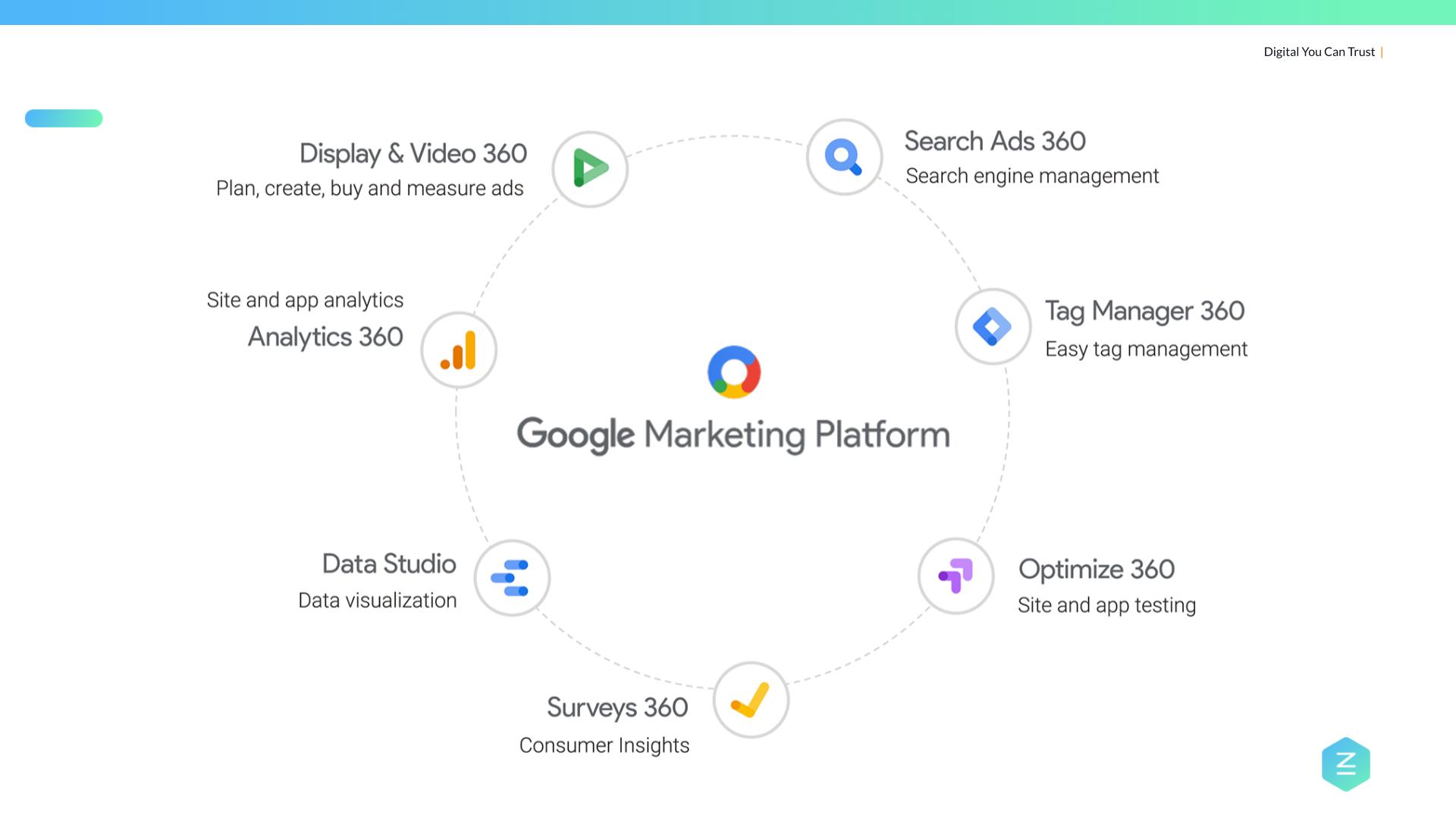
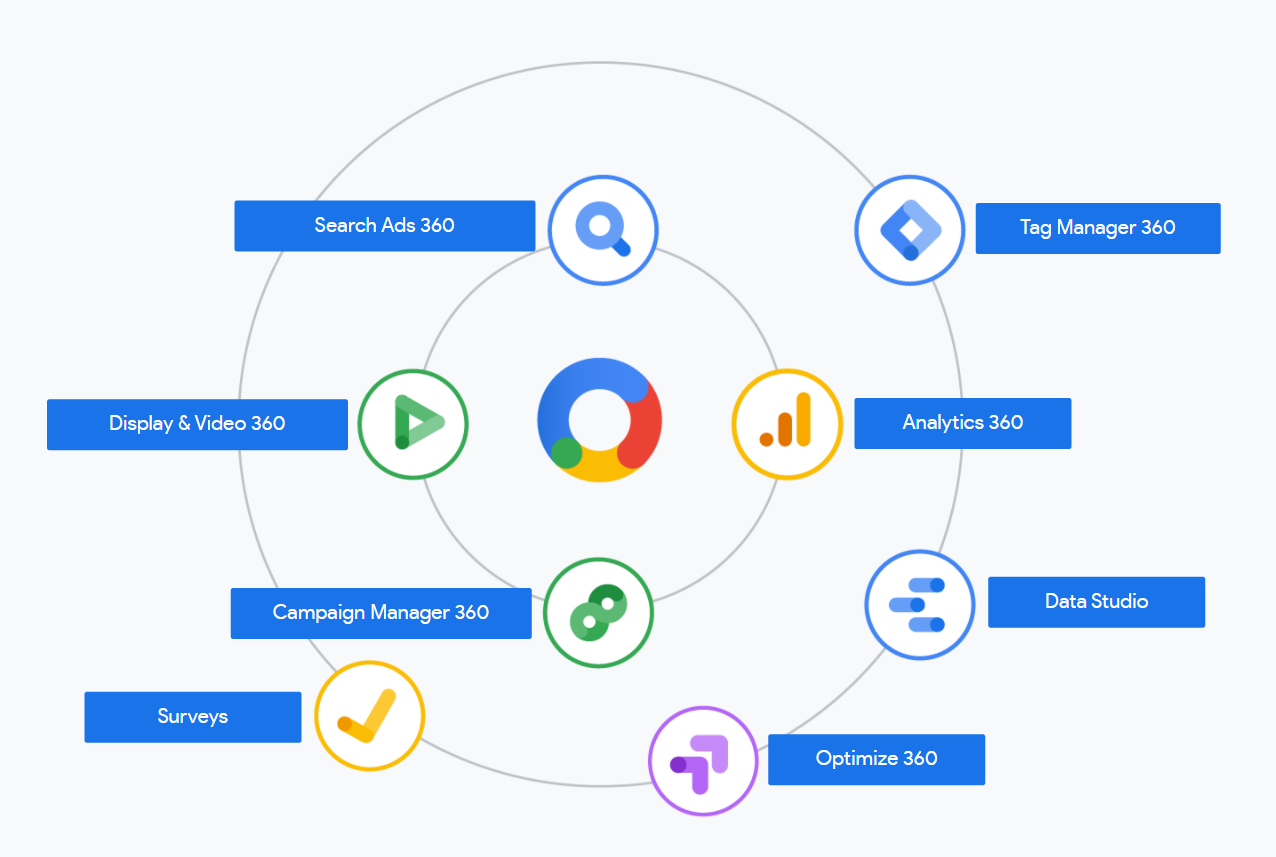
The Google Marketing Platform offers a suite of tools designed to help businesses manage their marketing campaigns efficiently. It combines advertising and analytics into one place. This integration allows marketers to plan, buy, measure, and optimize digital media and customer experiences.
These tools provide clear data insights and simplify campaign management. They support smarter decisions and improve marketing performance. Small and large businesses can benefit from this platform’s features.
Google Ads
Google Ads helps you create online ads to reach potential customers. It supports various ad types such as search, display, video, and shopping ads. You can control your budget and target specific audiences. The platform offers real-time data to track ad performance and adjust strategies quickly.
Google Analytics
Google Analytics tracks website traffic and user behavior. It shows how visitors find your site and what actions they take. This data helps improve website design and marketing strategies. You can set goals and measure conversions to understand your return on investment.
Google Tag Manager
Google Tag Manager lets you add and update website tags without changing the code. Tags are small pieces of code that collect data for analytics and marketing tools. This tool speeds up the process of managing tags and reduces errors. It works with Google and third-party services.
Google Data Studio
Google Data Studio turns data into easy-to-read reports and dashboards. You can connect data from different sources, including Google Ads and Analytics. Customizable visuals help communicate insights clearly. Sharing reports with teams or clients is simple and efficient.
Google Optimize
Google Optimize allows you to test website changes to improve user experience. You can run experiments like A/B tests to see which version performs better. This tool helps increase conversions and engagement on your site. It integrates smoothly with Google Analytics for deeper insights.
Boosting Performance With Google Optimize
Boosting performance with Google Optimize helps businesses improve website experiences. This tool allows easy testing of different page versions. The goal is to find what works best for visitors. Small changes can lead to higher engagement and more conversions.
Google Optimize uses A/B testing and personalization. Marketers can test headlines, images, and call-to-actions. It shows which versions perform better based on real user data. This helps make smart decisions backed by evidence.
Understanding A/b Testing With Google Optimize
A/B testing compares two or more webpage versions. Google Optimize lets you create these tests quickly. You can test headlines, buttons, or page layouts. The tool collects data on visitor interactions. Then, it shows which version drives better results.
This method reduces guesswork. Instead of guessing, you use real user behavior. This helps improve conversions step by step. Small improvements add up to big gains over time.
Personalizing User Experiences
Google Optimize allows personalized content for different visitors. You can show specific messages to certain user groups. For example, new visitors can see a welcome offer. Returning users might get a discount on their favorite product.
Personalization increases relevance. Visitors feel the site fits their needs. This often leads to longer visits and more sales.
Integrating Google Optimize With Other Google Tools
Google Optimize works well with Google Analytics. This integration provides detailed insights about visitor behavior. You can see which tests affect bounce rates or session duration. This data guides your marketing efforts.
Combining these tools creates a powerful feedback loop. Analytics data informs test ideas. Test results improve overall marketing strategies.
Collaboration Via Google Workspace
Collaboration plays a vital role in successful marketing campaigns. Google Workspace offers a suite of tools that help teams work together smoothly. These tools allow real-time sharing, editing, and communication. Marketing teams can stay connected no matter where they are located. This saves time and reduces errors.
Google Workspace integrates apps like Docs, Sheets, Slides, and Meet. Each tool supports different parts of the marketing workflow. Teams can create content, analyze data, and hold meetings all within one platform. This streamlines the entire process and improves productivity.
Google Docs For Real-time Content Creation
Google Docs allows multiple users to edit documents at the same time. Marketers can draft blog posts, emails, and ad copy together. Comments and suggestions help improve the content quickly. Version history tracks all changes, so nothing gets lost.
Google Sheets For Data Sharing And Analysis
Marketing teams use Google Sheets to organize campaign data. It supports real-time updates and formula calculations. Teams can track budgets, leads, and performance metrics easily. Sharing spreadsheets keeps everyone informed and aligned.
Google Slides For Collaborative Presentations
Google Slides lets teams build presentations together. Marketers can design slides for pitches or reports. Live editing and comments speed up feedback. It ensures presentations are ready on time and reflect the team’s ideas.
Google Meet For Seamless Communication
Google Meet provides video meetings for marketing teams. It supports screen sharing and recording. Teams can discuss strategies, review progress, and solve problems face-to-face. This tool keeps communication clear and direct.
Improving Speed With Google Pagespeed
Improving website speed is vital for better user experience and higher search rankings. Google PageSpeed is a free tool that helps analyze and improve site loading times. Fast websites keep visitors engaged and reduce bounce rates.
PageSpeed Insights evaluates your pages on both mobile and desktop devices. It provides clear suggestions to make your site faster and more efficient. This tool helps marketers optimize content and technical elements.
What Is Google Pagespeed?
Google PageSpeed is a tool that measures website speed and performance. It checks various factors like image sizes, server response time, and code efficiency. The tool scores your site from 0 to 100, showing how well it performs.
How To Use Pagespeed Insights Effectively
Start by entering your URL into the PageSpeed Insights website. The tool runs tests and gives a detailed report. Follow the recommendations step-by-step to improve your site’s speed.
Focus on fixing critical issues first, such as large images or slow server response. Regularly test your site after changes to track progress. This keeps your website fast and user-friendly.
Benefits Of Faster Websites For Marketing
Speed affects how users interact with your site. Faster sites lead to higher visitor retention and more conversions. Google also ranks faster websites better in search results.
Improved speed means customers find information quickly and trust your brand more. This can increase sales and boost marketing campaign results.
Credit: proficio.io
Leveraging Google Search Console
Google Search Console is a free tool that helps marketers track website performance on Google. It shows how Google views your site and reveals issues that affect your ranking. This data helps improve your site’s visibility in search results.
Using Google Search Console lets you monitor your site’s search traffic and performance. You can see which keywords bring visitors and how your pages rank. Fixing errors detected by Search Console improves user experience and boosts SEO.
Understanding Search Performance Metrics
Search Console reports clicks, impressions, click-through rate, and average position. These metrics help identify which keywords attract traffic. Tracking changes over time shows what content works best.
Submitting Sitemaps And Urls
Submit your sitemap to help Google crawl your site faster. You can also request indexing for new or updated pages. This speeds up the appearance of your content in search results.
Identifying And Fixing Website Errors
Search Console alerts you to crawl errors, broken links, and mobile usability issues. Fixing these problems ensures Google can access your site smoothly. It also improves the visitor experience.
Monitoring Backlinks And Internal Links
View which sites link to your pages and track your internal linking structure. Quality backlinks improve your site’s authority. Proper internal links help visitors and search engines navigate your site.
Using Search Console For Mobile Usability
Google Search Console highlights mobile usability issues. Mobile-friendly sites rank better and keep users engaged. Fixing mobile problems improves your site’s reach and performance.
Frequently Asked Questions
What Is The Google Ads Tool?
Google Ads is an online advertising tool to promote businesses, increase website traffic, and boost sales. Users create and manage campaigns anytime.
How Can Google Tools Be Used In Sales And Marketing?
Google tools boost sales and marketing by enabling targeted ads, analyzing customer data, tracking website traffic, and managing campaigns efficiently. Platforms like Google Ads, Analytics, and Marketing Platform help generate leads, optimize strategies, and improve brand visibility across digital channels.
What Are The 9 Types Of Google Ads?
The 9 types of Google Ads are Search, Display, Shopping, Video, App, Discovery, Local Services, Performance Max, and Smart campaigns. Each targets different audiences to boost visibility and sales effectively.
Is $20 A Day Good For Google Ads?
A $20 daily Google Ads budget can work well for small businesses testing ads. Results depend on industry, goals, and competition. Adjust spending based on performance data to maximize ROI.
What Are The Top Google Tools For Marketing?
Google Ads, Google Analytics, Google Trends, Google Business Profile, and Google Alerts are top tools.
How Does Google Ads Help In Marketing?
Google Ads lets you create ads to reach customers and drive traffic to your website.
What Is The Role Of Google Analytics In Marketing?
Google Analytics tracks website visitors and shows data to improve marketing strategies.
How Can Google Trends Improve Marketing Campaigns?
Google Trends shows popular search topics helping marketers target current interests.
What Is Google Business Profile Used For Marketing?
Google Business Profile helps local businesses appear in search and Google Maps.
How Does Google Alerts Support Marketing Efforts?
Google Alerts sends updates on chosen topics to monitor competitors and industry news.
Conclusion
Google offers many tools to help marketing efforts succeed. These tools provide data, ads, and insights all in one place. Marketers can track results and adjust strategies quickly. Using Google tools saves time and improves decision-making. Start with simple tools and explore others as you grow.
Consistent use leads to better understanding of your audience. Overall, Google’s marketing tools support smarter, clearer, and faster marketing choices.





