Looking to enhance your photos without spending a dime? You’re in the right place.
Whether you want to quickly brighten a selfie, remove unwanted backgrounds, or create stunning visuals for your social media, free photo editing websites make it simple and accessible. Imagine having powerful tools like cropping, filters, and even AI-driven features right at your fingertips—no downloads, no complicated software.
You’ll discover the best free photo editing websites that fit your needs, from beginner-friendly options to advanced editors that rival professional software. Ready to transform your images effortlessly? Keep reading to find the perfect tool for your creative journey.
Popular Free Editors
Many free photo editing websites offer excellent tools for all skill levels. These popular editors provide both simple and advanced features. Users can edit photos directly in their browsers without downloads. They suit quick fixes and creative projects alike. Below are some well-known free photo editors and their key features.
Pixlr Features
Pixlr offers two online editors: Pixlr X and Pixlr E. Pixlr X is easy for quick edits like cropping and filters. Pixlr E provides advanced tools such as layers and masks. It supports many file formats and works fast on most devices. The interface is clean and user-friendly, ideal for beginners and pros.
Canva Tools
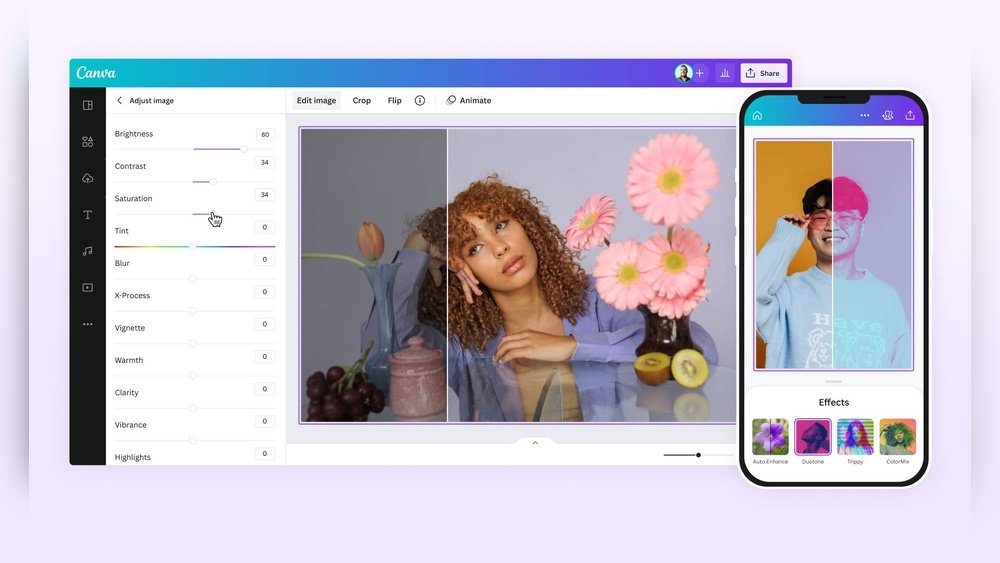
Canva is famous for design templates but has a strong photo editor too. Users can adjust brightness, contrast, and saturation easily. It offers background remover and many filters. Canva’s drag-and-drop tools help create social media posts and presentations. It also supports text and graphic overlays to enhance photos.
Adobe Express Benefits
Adobe Express has a smooth, simple interface for quick photo editing. It includes tools for cropping, resizing, and color correction. Users enjoy preset filters and easy text addition. Adobe Express also offers design templates for social media and marketing. It works well for users needing fast and professional edits.
Fotor Capabilities
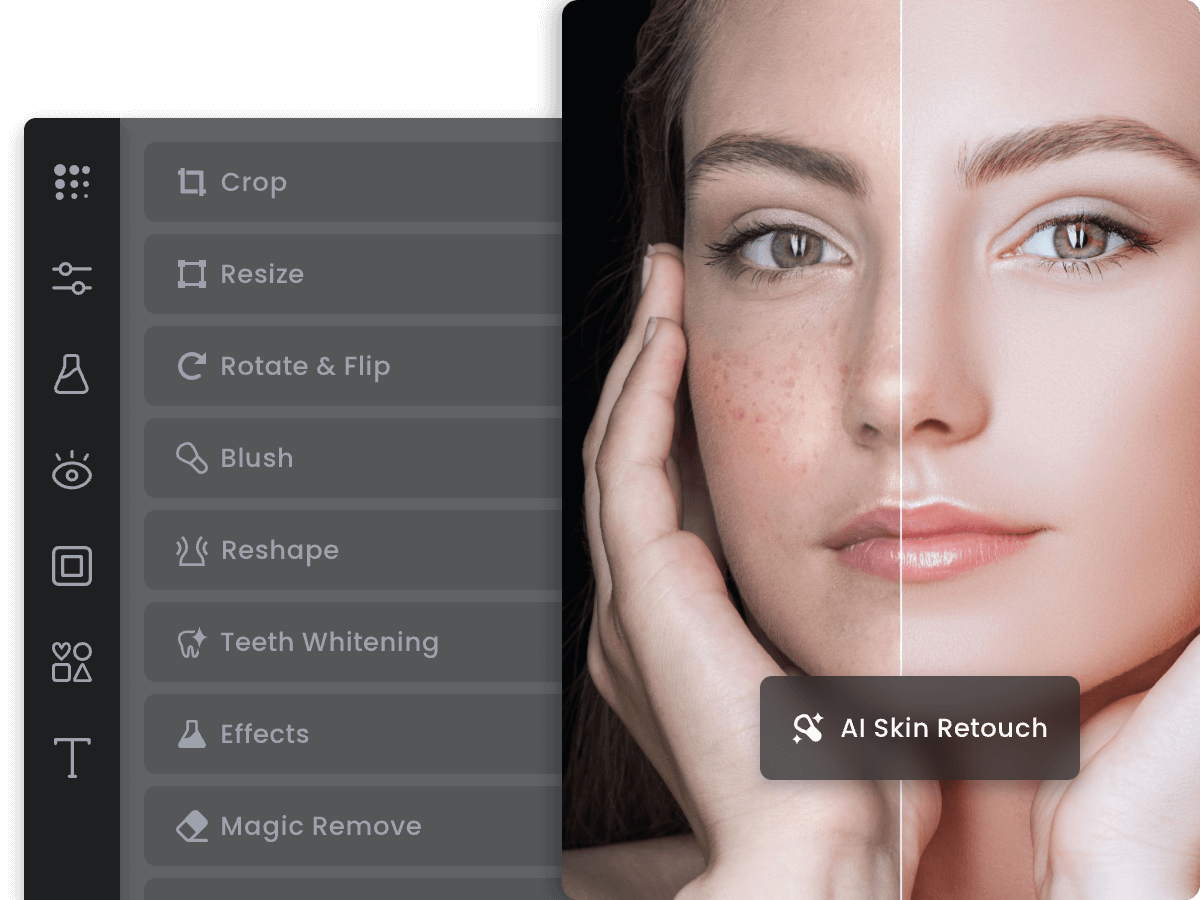
Fotor provides a wide range of editing tools and effects. It includes one-tap enhancement for fast improvements. Users can apply HDR effects and advanced retouching. Fotor supports batch processing to edit many photos at once. The site also offers design templates and collage making features.
Photopea Highlights
Photopea is a powerful browser-based editor similar to Photoshop. It supports PSD files and many other formats. Photopea offers layers, masks, and advanced selection tools. It is perfect for users familiar with professional editing software. Photopea runs smoothly without any software installation.
Advanced Online Editors
Advanced online photo editors provide tools that go beyond basic adjustments. They offer powerful features for detailed and creative image editing. These platforms are accessible via browsers, no installation needed. Users can perform tasks like working with layers, applying effects, and fine-tuning images.
These editors suit users who want more control over their photos. They often match some features found in desktop software. Despite their advanced tools, these editors remain user-friendly and free to use.
Gimp Overview
GIMP is a free, open-source photo editor. It offers many features similar to professional software. Users can edit photos using layers, masks, and filters. The interface is customizable to fit different workflows. GIMP supports many file formats, including PSD files. It works on Windows, Mac, and Linux platforms. This makes it a strong choice for advanced editing online.
Befunky Uses
BeFunky is an online editor for both simple and complex tasks. It provides tools for photo enhancement and graphic design. Users can add effects, frames, and textures easily. BeFunky also supports collage creation and digital art. Its interface is intuitive and easy to navigate. This editor works well for creative projects and photo retouching.
Ipiccy Advantages
iPiccy offers a straightforward editing experience with many features. It has tools for cropping, resizing, and color correction. Users benefit from filters, retouching, and drawing options. The site runs smoothly without annoying ads. iPiccy allows quick edits and detailed adjustments. It supports layers and blending modes for more control. This makes it a reliable choice for advanced online editing.
Beginner-friendly Options
Choosing a photo editing website can feel overwhelming for beginners. Simple tools help new users edit photos without confusion. These beginner-friendly sites offer easy features and clear layouts. You can quickly enhance images without learning complex software. Two popular options stand out for their ease and simplicity.
Picmonkey Simplicity
PicMonkey provides a clean and easy interface. It offers many filters and basic editing tools. You can crop, resize, and adjust colors with just a few clicks. The drag-and-drop feature makes adding text or graphics simple. Beginners find PicMonkey’s design intuitive and straightforward. It helps improve photos fast without advanced skills. The site also offers helpful tips to guide new users.
Fotoflexer Ease Of Use
FotoFlexer focuses on one-click fixes and simple edits. It allows users to remove red-eye, smooth skin, and add effects quickly. The layout is clear, so beginners can find tools easily. Advanced options are available but do not overwhelm the interface. FotoFlexer works well for quick improvements and fun edits. It supports multiple file types, making uploading photos hassle-free.
:max_bytes(150000):strip_icc()/photopea-online-picture-editor-5bead7d446e0fb00267a5ac1.png)
Credit: www.lifewire.com
Editing Features To Look For
Choosing the right free photo editing website depends on the features it offers. Some tools provide only basic adjustments, while others include advanced options and AI-powered enhancements. Knowing which features matter helps you pick a tool that fits your needs and skill level. This section breaks down key editing features to consider.
Basic Adjustments
Basic adjustments form the foundation of photo editing. Look for tools that let you crop, resize, and rotate images easily. Brightness, contrast, and saturation controls help improve color and lighting. Simple filters can enhance the mood of your photos without overwhelming the image. These features are essential for quick fixes and everyday edits.
Advanced Tools
Advanced tools give you more control over your edits. Layer support allows combining multiple elements in one project. Look for options like masking and blending to create complex effects. Some editors include healing brushes to remove blemishes and unwanted objects. These features suit users who want to go beyond basic changes and create polished results.
Ai-powered Enhancements
AI-powered features speed up editing and improve quality. Auto-enhance can adjust exposure and color balance with one click. Background removal uses AI to separate subjects from backgrounds easily. Some editors offer AI filters that mimic professional effects. These tools help save time and make editing accessible for beginners.
Comparing User Interfaces
Comparing user interfaces is essential when choosing a free photo editing website. A clear and simple interface helps users edit photos without confusion. It saves time and reduces frustration, especially for beginners. Different websites offer varying designs and tools. Understanding these differences guides users to pick the best fit for their needs.
Ease Of Navigation
Easy navigation lets users find tools quickly. Many free editors use clear menus and icons. Pixlr and Canva offer straightforward navigation with visible buttons. Photopea mimics Photoshop, which can feel complex for new users. Simple navigation improves the editing experience and helps users work faster.
Design Layouts
Design layout affects how comfortable users feel. Some sites place tools on the side, while others use top menus. Fotor has a clean, minimal layout with large icons. Adobe Express uses a grid style, making it easy to select options. Good layouts reduce clutter and focus on important tools.
Customization Options
Customization allows users to adjust the interface to their liking. Canva lets users resize and move tool panels. Pixlr offers different workspace modes for quick or detailed edits. Photopea has flexible panels but may overwhelm beginners. Customization helps users work in their preferred way.
File Formats And Compatibility
Understanding file formats and compatibility is crucial for effective photo editing. The right format ensures your images look great and work well across different platforms. Free photo editing websites support various file types to meet diverse user needs.
Choosing an editor that handles multiple formats saves time and prevents frustration. Compatibility affects how well your edits are preserved and shared. Some sites offer advanced format support, ideal for more detailed work.
Supported Image Types
Most free photo editors support common formats like JPEG, PNG, and GIF. These cover everyday photo needs, including web and social media use. Some tools also accept TIFF and BMP for higher quality images.
PNG is popular for images requiring transparency. JPEG works best for photos with many colors. GIF is suitable for simple animations but less common for still photos.
Psd And Layer Support
PSD files come from Adobe Photoshop and include layers for complex editing. Few free editors fully support PSD layers, but some do a good job. Photopea is a top choice for PSD compatibility online.
Layer support allows non-destructive edits and easy adjustments. Without layers, edits flatten, making changes harder to reverse. Check if your chosen editor reads and saves layered files properly.
Export Options
Export flexibility matters for sharing and printing your images. Free editors usually offer saving in JPEG and PNG formats. Some provide options for PDF or SVG files for special uses.
Look for export settings that let you control image quality and size. This helps balance file weight and visual clarity. Good export options ensure your final image fits your project needs.
Creative Design Integration
Creative design integration enhances the power of free photo editing websites. It allows users to blend images with design elements easily. This makes photos stand out with a professional touch. These platforms offer tools that go beyond simple editing. They help create unique visuals that tell a story or promote a brand.
Many free editors provide built-in creative tools. These tools help users craft polished images quickly. Users can design content that fits various needs. From personal projects to business marketing, creative integration plays a key role.
Templates And Layouts
Templates simplify the design process for all users. They come in various styles for different occasions. Users can pick a template and customize it fast. Layouts help organize photos and text in a clean way. This saves time and ensures a balanced design. Templates often include preset fonts, colors, and graphics. This helps maintain a consistent look across projects.
Graphic Design Tools
Graphic design tools add creativity to photo edits. They let users insert shapes, icons, and illustrations. Some tools offer drawing or painting options. Layer management allows combining multiple design elements easily. Filters and effects enhance the visual appeal. These tools help create eye-catching images without extra software. Users can experiment with styles to match their vision.
Social Media Ready Edits
Many websites offer social media presets for photos. These presets adjust size and format for platforms like Instagram or Facebook. Users can add text overlays or stickers suited for social sharing. Ready-made templates focus on engagement and clarity. This helps posts gain more attention and interaction. Export options often include high-quality files optimized for fast loading. Social media ready edits make content creation smooth and effective.
Credit: www.fotor.com
Performance And Speed
Performance and speed play a vital role in choosing a free photo editing website. Fast loading and smooth operation enhance the editing experience. Slow tools can frustrate users and reduce productivity. Reliable performance ensures that edits happen quickly without delays. Let’s explore key aspects like load times, browser compatibility, and mobile access.
Load Times
Load times affect how fast the editor opens and processes images. Top free photo editing sites load within seconds. They use efficient coding and optimized servers. Quick load times save users from waiting and interruptions. Editors that handle large files swiftly improve workflow. Websites with slow load times may cause users to leave.
Browser Compatibility
Browser compatibility ensures the editor works well on different web browsers. Popular free editors support Chrome, Firefox, Safari, and Edge. They use standard web technologies to avoid glitches. Compatibility prevents crashes and missing features. Users can edit photos from their favorite browsers without hassle. Cross-browser support increases accessibility and user satisfaction.
Mobile Access
Mobile access lets users edit photos on smartphones and tablets. Many free photo editors offer responsive designs for mobile screens. Some provide dedicated mobile apps for better performance. Mobile editing is perfect for quick fixes on the go. Fast and smooth mobile access boosts convenience and flexibility. It allows users to work anytime, anywhere without delays.
Privacy And Security
Privacy and security are crucial when using free photo editing websites. Users upload personal images that need protection. Understanding how these sites manage data helps avoid risks. Safe use ensures your photos stay private and secure.
Data Handling
Free photo editors often store images on their servers. Some keep files only during editing sessions. Others may save copies longer for backups or improvements. Check if the site encrypts your data during transfer. Encryption stops hackers from stealing files.
User Privacy Policies
Privacy policies explain how sites use your information. They reveal if images are shared with third parties. Look for sites that clearly state they do not sell your data. Avoid editors that require excessive personal details. Trustworthy policies help protect your privacy.
Safe Editing Practices
Always use strong passwords for your accounts. Avoid editing sensitive images on public Wi-Fi networks. Clear browser cache and history after sessions. Use editors that offer secure connections (HTTPS). These steps reduce chances of data leaks and hacking.
Tips For Stunning Edits
Creating stunning photo edits takes more than just basic adjustments. You need to know simple tricks that enhance your images beautifully. These tips help you improve colors, sharpen details, and apply filters smartly. Even beginners can use free photo editing websites to make eye-catching photos.
Color Correction Tricks
Fixing colors can change a dull photo into a vibrant one. Start by adjusting brightness and contrast for balance. Use the white balance tool to remove unwanted color tones. Slight tweaks to saturation make colors pop without looking fake. Keep changes subtle to keep natural looks.
Enhancing Details
Sharpening your photo brings out textures and fine details. Use the sharpen or clarity tool carefully. Too much sharpening creates noise or harsh edges. Zoom in to check details before saving. Also, use the dodge and burn tools to brighten or darken areas for depth.
Using Filters Effectively
Filters add mood and style to your pictures. Choose filters that match your photo’s theme. Lower the filter intensity to avoid over-editing. Combine filters with other edits like brightness or contrast for better results. Try different filters but keep your photo’s natural feel.

Credit: www.youtube.com
Frequently Asked Questions
What Are The Best Free Photo Editing Websites Available?
Popular free sites include Pixlr, Canva, Adobe Express, Fotor, and Photopea for various editing needs.
Can I Edit Photos Online Without Downloading Software?
Yes, many free websites like Photopea and Pixlr allow full editing directly in your browser.
Which Free Photo Editor Is Best For Beginners?
Canva and PicMonkey are great for beginners with easy tools and ready-made templates.
Do Free Online Editors Support Advanced Features Like Layers?
Photopea and Pixlr offer advanced tools including layers, filters, and detailed adjustments.
Are Free Photo Editing Websites Safe To Use?
Most reputable sites use secure connections and don’t store images without permission.
Can I Edit Photoshop Files (psd) For Free Online?
Photopea supports PSD files and lets you edit them fully without software installation.
What Photo Formats Do Free Editors Usually Support?
Common formats like JPG, PNG, BMP, and PSD are widely supported by free editors.
Is It Possible To Remove Backgrounds Using Free Tools?
Yes, Canva and Fotor provide easy background removal features at no cost.
Do Free Online Editors Have Watermark-free Downloads?
Many free editors allow watermark-free downloads, but some may add watermarks on certain features.
How Do Free Photo Editors Compare To Paid Software?
Free editors cover most basic and some advanced needs, though paid software offers more depth.
Conclusion
Free photo editing websites offer great tools for all skill levels. You can crop, resize, add filters, or create designs easily. Many sites work right in your browser without downloads. Choose a platform that fits your needs and try it out today.
Editing photos can be simple, fun, and free. Start enhancing your images with these user-friendly online editors now.





