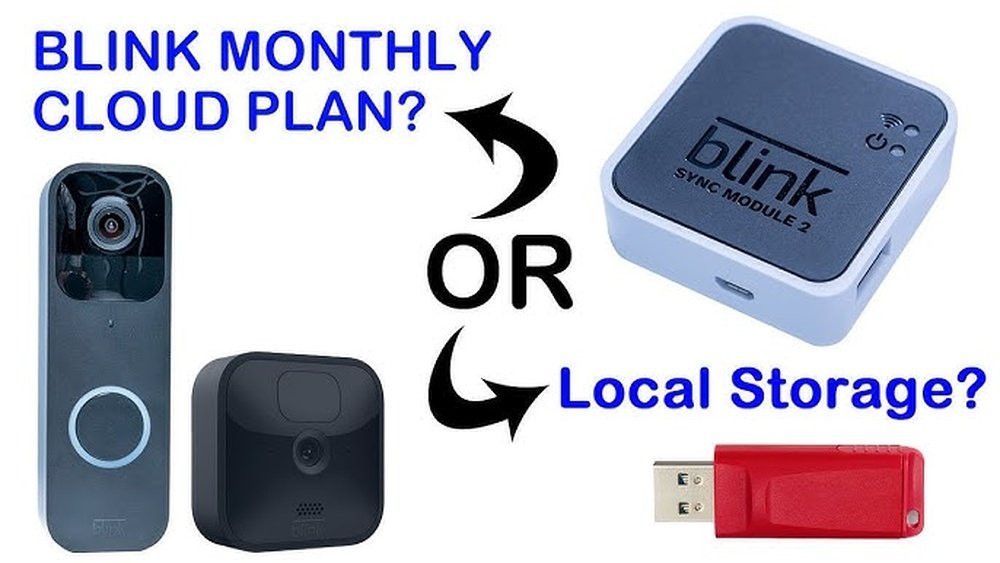
Are you wondering if you really need a subscription to use your Blink camera? You’re not alone.
Many people ask whether Blink’s security cameras work without signing up for a monthly plan—and what features you might miss if you skip the subscription. If you want to keep your home safe without extra fees or just want to understand how Blink’s system works, this article is for you.
Keep reading to find out how Blink operates with and without a subscription, what options you have for storing your videos, and how to make the most of your camera without paying a dime. Your peace of mind might be easier and more affordable than you think.
Subscription Options For Blink
Blink offers flexible subscription options for users who want extra features and cloud storage. Subscriptions help save video clips securely online. They also add useful functions like person detection and extended live view. Not every Blink camera user needs a subscription. Many features still work without one.
Understanding the subscription plans can help decide what suits your needs. Below are the main Blink subscription options available.
Basic Plan
The Basic Plan covers one Blink camera. It allows cloud storage of video clips for easy access anytime. This plan offers motion alerts with saved videos. Users get 60 days of video history. It is ideal for single-camera setups.
Plus Plan
The Plus Plan covers all Blink devices on one account. It includes everything from the Basic Plan. Plus users get extended warranty coverage on their devices. This plan also offers discounts on future Blink products. It suits homes with multiple cameras.
Local Storage Option
Some Blink cameras support local storage without a subscription. Users can save clips on a USB drive via the Sync Module. This method avoids monthly fees. Clips are accessible by plugging the drive into a computer. It is a good choice for those who prefer offline storage.
No Subscription Use
Blink cameras can still record without a subscription. Live view and motion alerts work, but video clips do not save to the cloud. Users cannot access advanced features like person detection. This option keeps costs low while maintaining basic security.
Using Blink Cameras Without Subscription
Blink cameras can work without a subscription. You still get basic functions to keep your home safe. This option suits users who want simple monitoring without extra costs. The camera records video clips, but storage and some features are limited.
Using Blink cameras without a subscription means you rely on local storage. This method keeps your videos saved on a device you control. It avoids monthly fees but has some trade-offs in convenience and advanced features.
Recording Without A Subscription
Without a subscription, Blink cameras record videos when motion is detected. Clips save to local storage, like a USB drive connected to the Sync Module. You must check and manage these clips manually. Cloud storage and automatic saving are not available.
Camera Models That Support Local Storage
Most Blink cameras support local storage with a Sync Module 2 or Blink Sync Module. Older models may not have this option. Verify your camera type before setting up local storage. This ensures you can record videos without a subscription.
Features Lost Without A Subscription
You lose cloud storage and extended live view access. Advanced alerts, such as person detection, are also unavailable. Basic motion detection alerts remain active. These limits reduce some smart features but keep essential security functions.
Setting Up Local Storage
Connect a USB drive to the Blink Sync Module 2. Use the Blink app to enable local storage settings. The camera saves clips directly to the USB drive. To view videos, remove the USB and plug it into a computer. This process keeps your data private and under your control.
Features Lost Without Subscription
Using Blink without a subscription limits many key features. The camera still works, but you miss out on cloud storage and advanced functions. This section explains what features are lost without subscribing.
Understanding these limits helps you decide if a subscription fits your needs. Blink cameras offer basic security without a plan, but some benefits disappear.
Cloud Storage Access
Without a subscription, Blink cannot save videos to the cloud. You cannot review past footage online or on your phone. This means no secure backup for your recordings.
Videos only save locally if you use a Sync Module with USB storage. Otherwise, no video clips are stored for future viewing.
Advanced Motion Detection
Subscription plans provide smarter alerts, like person detection. Without it, you get generic motion alerts from your camera. These can lead to more false alarms and less useful notifications.
You lose the ability to filter alerts for people, pets, or vehicles. This makes monitoring less precise and more time-consuming.
Extended Live View
Live view lets you watch real-time video from your camera. Blink’s subscription adds extended live view time. Without a plan, live viewing is limited to short sessions only.
This reduces your ability to monitor events as they happen for long periods. Watching live video continuously requires a subscription.
Video History And Playback
Subscriptions store your video clips in the cloud for days or weeks. Without this, you cannot access older videos after the event ends. Playback options are very limited without a subscription.
This restricts your ability to review incidents or save important footage for later use.
Customer Support And Warranty
Some Blink subscription plans include extra warranty coverage and priority support. Without subscribing, you get standard customer service and limited warranty benefits. This may affect repairs or replacements.
Subscription perks add peace of mind beyond just video features.

Credit: support.blinkforhome.com
Benefits Of Blink Subscription Plans
Subscriptions for Blink add cloud storage and advanced alerts. Without one, cameras still record but save videos locally. Choosing a plan depends on your need for extra features and cloud access.
Blink subscription plans offer several useful benefits for users. They provide cloud storage to save video clips safely online. This means you can access your footage anytime from any device. The plans also include advanced features that improve your home security experience.
Subscriptions help you keep important videos without worrying about losing them. They add convenience by allowing extended live view times. This lets you watch longer video streams in real time. With these plans, Blink cameras become more effective and easier to use.
Cloud Storage For Video Clips
Blink subscription plans store your video clips on the cloud. This protects your recordings from being lost or deleted. You can view past videos anytime through the Blink app. Cloud storage also frees up space on your camera devices.
Advanced Motion Detection
Subscribers get access to enhanced motion detection features. The system can recognize people and reduce false alerts. This improves security by sending smarter notifications. You will only get alerts for real events, not every small movement.
Extended Live View Access
Subscriptions allow longer live viewing sessions. Instead of short bursts, you can watch live video for extended periods. This is useful during emergencies or to check your home in detail. Longer live view time gives better control over your security.
Warranty And Support Benefits
Higher-tier plans include extended warranty coverage. This gives peace of mind in case of device issues. You also get priority customer support for faster help. These benefits add value and reliability to your Blink system.
Monthly Costs For Blink Subscriptions
Understanding the monthly costs for Blink subscriptions helps you decide what fits your needs and budget. Blink offers options that range from free use without a subscription to paid plans with extra features. Each plan varies in price and benefits, so knowing these details is important.
Basic Plan Monthly Cost
The Basic Plan covers one Blink camera. It costs around $3 per month or $30 per year. This plan allows cloud storage for video clips. You can save and review videos remotely anytime. It also includes motion detection alerts.
Plus Plan Monthly Cost
The Plus Plan covers all Blink devices on your account. It costs about $10 per month or $100 per year. This plan includes everything in the Basic Plan. It adds extended warranty coverage for your devices. You also get more advanced features like longer video storage.
No Subscription Option
Using Blink without a subscription is possible. You lose cloud storage but can still see live video. Some cameras let you save clips to local storage. This means you keep videos on a USB drive or similar device. It’s a good choice if you want to avoid monthly fees.

Credit: wasserstein-home.com
Local Storage Setup For Blink
Setting up local storage for Blink cameras gives users a way to save video clips without paying for a subscription. This setup stores recordings on a USB drive connected to the Blink Sync Module. It helps users keep important footage safe and accessible at home.
Local storage offers a simple and cost-effective method for video saving. You control the videos directly, without relying on cloud services. This option suits those who prefer privacy and want to avoid monthly fees.
How To Set Up Local Storage For Blink
First, connect a USB flash drive to the Blink Sync Module. The drive should be formatted to FAT32 or exFAT for best compatibility. Next, open the Blink app and go to the Sync Module settings. Select the option to enable local storage. The app will prepare the drive to save video clips.
Accessing Videos Stored Locally
To watch videos saved on the USB drive, remove it from the Sync Module. Plug the drive into a computer or compatible device. You can then view or copy the video clips as needed. The files are saved in a standard video format that most players support.
Limitations Of Local Storage
Local storage works only with Blink Sync Module 2 and higher. It does not support live video streaming without a connection. Also, video clips are stored only while the USB drive has space. Older Blink models may not support this feature fully.
How To Access Clips Without Subscription
Accessing Blink clips without a subscription is possible but comes with limits. You can still use your Blink camera and save videos locally. This way, you avoid monthly fees while keeping some security functions active.
Learning how to save and view clips without paying helps you use Blink more freely. Below are simple steps and tips to access your recordings without a subscription plan.
Using Local Storage With Sync Module
Blink cameras support local storage through a Sync Module. This device connects to your camera and stores clips on a USB drive. Insert a USB drive into the Sync Module to save videos automatically.
This method does not require a cloud subscription. It keeps your recordings safe within your home. You can remove the USB drive anytime to watch or backup clips on a computer.
Setting Up Your Blink Camera Without Subscription
Open the Blink app and connect your camera to the Sync Module. Insert a USB drive in the Sync Module’s port. The app will guide you to enable local storage.
Once set up, your camera records clips and sends them to the USB drive. You can access these clips anytime without needing Blink’s cloud service.
Limitations Of Using Blink Without A Subscription
Without a subscription, cloud storage is unavailable. Clips save only on the USB drive connected to the Sync Module. Remote access to older clips may be limited.
Features like extended live view and person detection will not work without a subscription. Still, basic recording and playback remain functional with local storage.

Credit: www.youtube.com
Linking Devices To Subscription Plans
Connecting your Blink devices to a subscription plan changes how you store and access video footage. Without a subscription, your camera still works, but recording and saving options are limited.
Subscribing allows you to save video clips to the cloud. This means your recordings are safe even if the camera is damaged or stolen. It also gives you access to extra features that improve security and convenience.
How To Link Your Blink Device To A Subscription
Start by opening the Blink app on your smartphone. Navigate to the “Subscription” section in the app menu. Choose the plan that fits your needs and follow the prompts to subscribe.
After subscribing, select the device you want to link. The app will then connect your camera to your chosen subscription plan. This step activates cloud recording and advanced features on your device.
Benefits Of Linking Multiple Devices
Linking several Blink cameras to one subscription plan saves money. You can manage all devices from a single app account. This setup offers a unified view of all your cameras in one place.
Multiple linked devices share cloud storage space. This ensures that video clips from all your cameras are safely stored online. You also get consistent access to alerts and advanced detection features across all devices.
What Happens If You Don’t Link Your Device
Devices not linked to a subscription record only basic video clips. These clips are stored locally and require manual transfer to your computer. Live view and advanced notifications may be limited or unavailable.
Without a subscription, video storage is temporary. Recordings can be lost if the device is damaged or removed. Linking to a subscription enhances security by keeping your videos safe in the cloud.
Trial Period And Subscription Renewal
Blink offers a trial period that lets users test its subscription service. This trial period is a good way to explore cloud storage and advanced features without paying. After the trial ends, the subscription renews automatically unless canceled. Understanding the renewal process helps avoid unexpected charges.
Trial Period Details
The trial usually lasts 30 days and covers one or more Blink cameras. During this time, users get full access to cloud storage and notifications. This lets you see the benefits of subscribing. No payment is required to start the trial. You can cancel anytime before it ends without paying.
Subscription Renewal Process
After the trial, the subscription renews automatically. The fee is charged based on the plan chosen. Blink offers monthly and yearly plans. To avoid unwanted charges, cancel before the trial expires. You can manage or cancel your subscription in the Blink app. Notifications about renewal are sent by email to remind users.
What Happens If You Cancel
Cancelling the subscription stops the renewal. You lose access to cloud storage and advanced alerts. Your camera still works but with limited features. Clips no longer save in the cloud after cancellation. Local storage might still be available depending on your device. This option suits users who want basic camera functions without extra cost.
Alternatives To Blink Subscription Storage
Blink cameras offer subscription plans for cloud storage and extra features. Some users prefer not to pay monthly fees. There are other ways to save your video clips without a Blink subscription. These alternatives give you control over your recordings and reduce costs.
Local Storage With Sync Module
Blink supports local storage using a Sync Module 2. You can add a USB drive to this module. Your videos save directly to the USB, not the cloud. This method keeps your footage private and accessible anytime. It also works without an active subscription. You must set up the Sync Module properly in the Blink app.
Using A Usb Drive For Offline Recording
Offline recording is possible by connecting a USB drive to the Sync Module 2. Cameras send video clips to the drive automatically. You can remove the USB and watch clips on your computer. This option avoids monthly fees and keeps your data local. It requires purchasing a Sync Module and a USB drive separately.
Third-party Storage Solutions
Some users prefer third-party storage devices like network-attached storage (NAS). These devices store video files from Blink cameras via local network setups. This approach offers large storage space and no cloud dependency. It needs some technical skills to configure properly. Blink does not officially support this method but many users find it effective.
Manual Clip Saving On Your Phone
You can save video clips manually through the Blink app. When motion triggers the camera, view the live feed or recorded clip. Save important clips directly to your phone’s gallery. This method does not require any subscription or extra hardware. It is simple but relies on manual action and phone storage space.
Frequently Asked Questions
Will Blink Record Without A Subscription?
Blink cameras record without a subscription by saving clips locally via a USB drive. Cloud storage and advanced features require a subscription.
Does Blink Camera Have A Monthly Fee?
Blink cameras do not require a monthly fee. You can use local storage without a subscription. Subscriptions offer cloud storage and advanced features.
Is It Necessary To Have A Blink Subscription?
A Blink subscription is not necessary. You can use local storage to save videos without cloud features. Subscriptions enable cloud storage and advanced alerts.
How To View Blink Camera Clips Without Subscription?
View Blink camera clips without a subscription by using local storage with a Sync Module and USB drive. Access clips by plugging the USB into a computer. Without subscription, Blink saves clips locally but lacks cloud storage and advanced features.
Do You Need A Subscription To Use Blink Cameras?
No, Blink cameras work without a subscription but with limited features.
What Features Come Without A Blink Subscription?
You get live view and local storage but no cloud recording.
How Does Blink Cloud Storage Subscription Work?
It saves video clips automatically to the cloud for easy access.
Can Blink Cameras Record Without A Subscription?
Yes, but recordings save only to local storage like a USB drive.
What Is Included In Blink’s Basic Subscription Plan?
It covers one camera with cloud storage and video clip saving.
How Much Does A Blink Subscription Cost Monthly?
Blink’s Basic plan starts at a low monthly fee per camera.
Conclusion
You do not have to buy a subscription to use Blink cameras. Basic recording works without a plan, saving clips locally with a USB drive. Subscriptions add benefits like cloud storage and advanced alerts. Choose what fits your needs and budget.
Blink offers flexibility for both casual users and those wanting extra features. This way, you stay in control of your home security costs and options.





