
Want to get more out of ChatGPT? Whether you use it for work, study, or just for fun, knowing a few smart hacks can save you time and boost your results.
Imagine turning simple questions into clear, detailed answers or having ChatGPT help you write emails, brainstorm ideas, and solve problems like a pro. You’ll discover easy tricks that anyone can use to unlock ChatGPT’s full potential. Ready to become a ChatGPT power user?
Let’s dive in and transform the way you interact with AI!
Crafting Precise Prompts
Crafting precise prompts is key to getting helpful answers from ChatGPT. Clear and specific prompts guide the AI to understand your needs better. This saves time and avoids confusion. Simple language and direct instructions make a big difference.
Precise prompts help ChatGPT focus on the exact topic. They reduce vague or off-topic replies. Giving context and details improves the quality of the response. It also allows the AI to match the tone and style you want.
Be Specific And Clear
Vague prompts cause vague answers. State exactly what you want from ChatGPT. Mention the format, style, or length if needed. For example, ask for a short summary or a detailed list. Clear instructions make ChatGPT more accurate.
Assign A Role
Tell ChatGPT to act as an expert or a certain persona. For example, say “You are a friendly teacher” or “You are a professional writer.” This helps shape the response tone and style. It makes answers more relevant and engaging.
Provide Context
Context helps ChatGPT understand your question better. Add background information or explain the situation. For example, say “Write an email about a project delay” instead of just “Write an email.” Context avoids confusion and improves results.
Specify The Output Format
Tell ChatGPT how to present the answer. Ask for bullet points, tables, or summaries. This saves time and makes the output easier to use. Clear format requests help organize the information well.
Use An Iterative Approach
Start with a simple prompt and refine it based on the answer. Add details or ask for changes to improve the result. This step-by-step method helps reach the desired output. It makes the process flexible and efficient.
Ask For Simplification Or Explanation
Request ChatGPT to explain complex ideas simply. Use prompts like “Explain like I am 10 years old” or “Simplify this topic.” This helps understand difficult subjects easily. Clear and simple language aids learning.
Provide Examples
Show ChatGPT examples of the output you want. Include sample text or formats in your prompt. Examples guide the AI to match your style and structure. This reduces errors and improves accuracy.
Break Down Complex Requests
Divide big tasks into smaller, simple steps. Ask ChatGPT to complete each step one by one. This approach makes complex tasks manageable. It also ensures better and clearer answers.
Assigning Roles To Chatgpt
Assigning roles to ChatGPT helps tailor its responses to fit your needs. This technique guides the AI to adopt a specific persona or expertise. It makes interactions more relevant and focused.
By giving ChatGPT a clear role, you get answers with the right tone and style. This approach improves the quality and usefulness of the information. It also saves time by reducing the need for extra edits.
What Does Assigning Roles Mean?
Assigning roles means telling ChatGPT who it should act like. You can ask it to be a teacher, a doctor, a programmer, or any expert. This sets the context for the conversation.
For example, saying “You are a travel guide” will make ChatGPT suggest places and tips for travelers. This role-playing helps ChatGPT focus on the right details.
How To Assign A Role To Chatgpt
Start your prompt with a clear role statement. Use simple language like “Act as” or “You are.”
Example: “You are a professional chef. Explain how to make a simple pasta.” This directs ChatGPT to give cooking advice only.
Keep the role specific but short. Avoid confusing or mixed roles. Clear roles lead to better answers.
Benefits Of Using Roles In Chatgpt
Roles help ChatGPT match your expectations. You get answers in the style or tone you want.
This method also helps ChatGPT focus on the topic. It reduces irrelevant or off-topic replies.
Assigning roles makes it easier to ask complex questions step-by-step. ChatGPT stays consistent in its role throughout the chat.
Using Context For Better Answers
Giving ChatGPT clear background helps it give better answers. Context means the details or facts you share in your question.
More context guides ChatGPT to understand your needs clearly. This reduces confusion and improves the quality of the response.
Provide Clear Background Information
Start with a brief explanation of your topic. For example, say what the subject is or what you want to achieve.
Simple background lets ChatGPT focus on the right details. This avoids generic or off-topic replies.
Use Examples To Show What You Want
Adding examples helps ChatGPT see the style or format you prefer. You can paste a sample text or describe your desired output.
Examples make the AI’s work more precise and relevant to your needs.
Break Down Complex Questions
Split difficult questions into smaller parts. Ask one thing at a time to avoid confusion.
This step-by-step approach helps ChatGPT give clear and accurate answers for each part.
Set A Role Or Perspective
Tell ChatGPT to act like an expert or a specific person. For example, say “You are a teacher” or “You are a travel guide.”
This role setting shapes the tone and detail level of the reply.
Specify The Output Format
Explain how you want the answer presented. Request lists, bullet points, summaries, or detailed paragraphs.
Clear format instructions make the response easier to read and use.

Credit: www.amazon.co.jp
Specifying Output Formats
Specifying output formats helps you get clear and useful results from ChatGPT. It guides the AI to present information in the way you want. This makes the responses easier to read and use.
Clear output formats save time and reduce confusion. You can ask for lists, tables, summaries, or code blocks. This control improves the quality of the AI’s answers.
Using Bulleted And Numbered Lists
Bulleted and numbered lists organize information clearly. They break down complex ideas into simple points. Ask ChatGPT to list steps, tips, or features in a bullet or number format. This helps you scan the content fast and understand it better.
Requesting Tables For Data
Tables show data in rows and columns. They work well for comparisons and structured details. You can ask ChatGPT to create tables for schedules, prices, or pros and cons. This format makes it easy to compare information side-by-side.
Generating Summaries And Explanations
Summaries give a quick overview of long texts. Ask ChatGPT to summarize articles, reports, or stories in a few sentences. You can also request simple explanations for hard topics. This helps you grasp key points quickly without reading too much.
Formatting Code And Technical Outputs
Code blocks show programming code or commands clearly. Use this format when you need scripts or technical instructions. ChatGPT can format code in languages like Python or HTML. This keeps the code readable and easy to copy.
Iterative Prompt Refinement
Iterative prompt refinement means improving your questions step by step. You start with a simple prompt and adjust it based on the answers you get. This process helps you get clearer and more useful responses from ChatGPT.
Instead of asking once and stopping, you keep refining your prompts. Each new prompt builds on the previous answer. This method saves time and improves accuracy.
Start Simple And Build Up
Begin with a basic question or request. See what ChatGPT replies. Then, add details or change wording to guide the AI better. Small changes can make a big difference.
For example, ask for a summary first. Next, ask for a summary with key points. Then, request examples or explanations. Step by step, the response grows richer.
Use Follow-up Questions
Follow-up questions help clarify or expand answers. They let you dig deeper into the topic. ChatGPT can give more precise information this way.
Try asking “Can you explain that more?” or “What are the pros and cons?” after the first answer. This keeps the conversation focused and productive.
Test Different Phrasings
Changing how you phrase a prompt often changes the output. Try synonyms or simpler words. Ask questions in different ways to see which works best.
This helps find the most effective way to communicate with ChatGPT. You learn how the AI understands your requests.
Set Clear Goals For Each Prompt
Know what you want from each prompt. Clear goals guide your refinements. They keep your questions focused and on track.
For example, decide if you want facts, opinions, or creative ideas. Tell ChatGPT exactly how you want the answer formatted. This reduces confusion and improves results.
Simplifying Complex Requests
ChatGPT can handle many tasks at once. But complex requests may confuse it. Breaking them down helps get clear answers. You get better results with simple instructions.
Clear and simple prompts guide ChatGPT to understand your needs. Avoid long, mixed questions. Instead, split your request into small parts. This makes it easier for ChatGPT to follow.
Break Down Your Request
Divide your big question into smaller steps. Ask one thing at a time. For example, instead of “Explain climate change and its effects,” ask “What is climate change?” then “What are its effects?”
Use Clear And Specific Language
Choose simple words. Avoid jargon or slang. Say exactly what you want. For example, “List three causes of air pollution” works better than “Talk about pollution.”
Provide Context And Examples
Give background information if needed. This helps ChatGPT focus. Show an example if possible. For instance, say “Write a short email like this: [example].”
Ask For Step-by-step Answers
Request detailed, stepwise explanations. For example, “Explain how to bake a cake step by step.” ChatGPT then breaks the task into easy steps.
Incorporating Examples In Prompts
Incorporating examples in prompts helps ChatGPT understand your request better. Examples guide the AI to produce responses closer to what you want. This technique improves clarity and reduces misunderstanding in replies.
Examples show the style, format, or content you expect. They act as a model for ChatGPT to follow. Using clear examples makes your prompts more precise and effective.
How To Provide Clear Examples
Choose examples that match your desired output closely. Use simple sentences or short paragraphs. Avoid complex or unrelated samples that confuse the AI. Place examples right after your instructions for easy reference.
Benefits Of Using Examples In Prompts
Examples help ChatGPT deliver accurate and relevant answers. They reduce vague or generic responses. This saves time by minimizing the need for follow-up questions. Examples also improve the overall quality of generated content.
Examples In Different Use Cases
For writing tasks, include a sample paragraph or sentence style. For coding, show a snippet or output format. For summaries, provide a brief example of the summary style you want. Tailoring examples to your task improves results.
Leveraging Plugins And Tools
Plugins and tools expand ChatGPT’s abilities beyond basic chat. They help tailor responses to fit many needs. Using these add-ons saves time and improves results. Many plugins connect ChatGPT to other software. This makes tasks like writing, coding, and research easier.
Choosing the right tool can boost productivity. It allows users to get specific answers quickly. Plugins also enable ChatGPT to handle complex jobs. This section explains how to use these features well.
Integrating Chatgpt With Third-party Plugins
Third-party plugins link ChatGPT to apps like calendars or email. This connection lets ChatGPT access real-time information. For example, it can schedule meetings or send reminders. These plugins increase ChatGPT’s usefulness in daily work. Setup is usually simple and requires few steps.
Using Custom Tools For Specialized Tasks
Custom tools can focus ChatGPT on specific jobs. This includes coding helpers or content planners. They guide ChatGPT to produce targeted outputs. Using them reduces errors and streamlines workflows. Many tools offer templates or presets for quick use.
Enhancing Chatgpt With Automation Scripts
Automation scripts let ChatGPT perform repeated actions fast. They handle tasks like data entry or report generation. Scripts save effort by running commands automatically. Users can create simple scripts without coding skills. This technique boosts efficiency on complex projects.
Renaming And Organizing Chat Logs
Keeping track of your ChatGPT conversations helps save time and stay efficient. When chat logs are well-named and organized, finding past discussions becomes quick. This practice prevents confusion and clutter in your workspace.
Clear titles make it easy to remember the chat content. Good organization improves workflow and boosts productivity. It also helps when reviewing ideas or sharing chats with others.
Why Rename Your Chat Logs?
Default chat names are often vague or generic. Renaming chats with specific titles clarifies their purpose. It helps identify key topics at a glance. This simple step reduces time spent searching for information.
For example, naming a chat “Marketing Plan April 2024” is clearer than “Chat 1”. This way, you can quickly find the relevant conversation later.
Best Practices For Naming Chats
Use short, descriptive titles that reflect the chat’s main topic. Include dates or keywords if needed. Avoid long or complicated names. Keep it consistent to maintain order across all logs.
Try formats like “ProjectName – Topic – Date” or “ClientName – Task”. This method helps create uniformity and easy scanning through your list.
Organizing Chats Into Folders Or Categories
Group related chats into folders or categories. Separate work, personal, and study topics for clarity. Organizing by project or theme keeps similar conversations together.
This structure allows fast access and reduces clutter. It also helps prioritize important chats and archive old ones efficiently.

Credit: firebrand.training
Knowing Chatgpt’s Limitations
ChatGPT is a powerful tool but it has clear limits. Understanding these helps you get better results.
It does not know everything and can make mistakes. Knowing what it can and cannot do saves time and frustration.
Chatgpt’s Knowledge Cutoff Date
ChatGPT only knows facts up to a certain date. It cannot provide information on events after that time.
This means recent news or new technology may be missing or incorrect in its responses.
Not Always Factually Accurate
ChatGPT sometimes gives wrong or made-up answers. It can sound very confident but still be incorrect.
Verify important facts with trusted sources before using the information.
Understanding Complex Contexts
ChatGPT may struggle with complex or unclear questions. It works best with clear, simple instructions.
Breaking down hard questions into smaller parts helps get better answers.
Handling Sensitive Or Personal Data
ChatGPT does not store personal data from chats, but avoid sharing sensitive info. It is not a secure platform for private details.
Use caution and protect your privacy when interacting with AI tools.
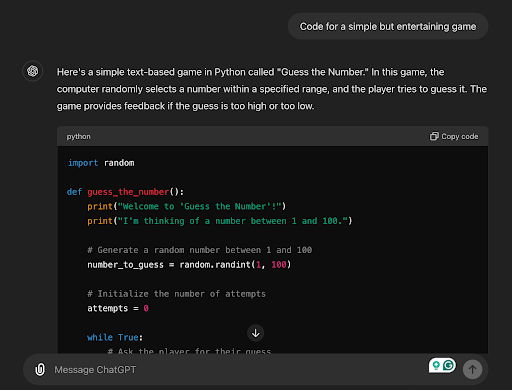
Credit: studyonline.sunwayuniversity.edu.my
Frequently Asked Questions
Can You Trick Chatgpt?
You can try to trick ChatGPT, but it often detects and corrects misleading inputs. It aims to provide accurate, safe responses.
How Do I Use Chatgpt More Effectively?
Use clear, specific prompts with context and desired format. Assign roles to ChatGPT and refine answers iteratively. Break complex tasks into steps. Provide examples and ask for simplifications to improve responses.
What Are Some Good Chatgpt Prompts?
Good ChatGPT prompts are clear, specific, and provide context. Use role-playing, examples, and step-by-step tasks to get precise answers. Specify output format and refine prompts iteratively for best results.
How To Get Secret Key Chatgpt?
To get a ChatGPT secret key, sign up on OpenAI’s platform. Then, generate an API key in your account dashboard. Keep it private and secure for safe use.
What Are The Best Chatgpt Hacks For Beginners?
Start with clear, simple prompts and use follow-up questions to refine answers.
How Can I Improve Chatgpt Responses Quickly?
Give specific details and ask for examples or step-by-step instructions.
Can Chatgpt Handle Complex Tasks Easily?
Yes, by breaking tasks into smaller parts, ChatGPT gives better results.
What Prompt Styles Work Best With Chatgpt?
Role-playing, clear context, and specifying output format improve response quality.
How Do I Use Chatgpt For Writing Emails?
Ask for professional tone, provide key points, and request a clear structure.
Is It Possible To Customize Chatgpt Answers?
Yes, by setting a persona or tone in the prompt, you guide responses.
Conclusion
Using ChatGPT well takes practice and clear prompts. Keep questions simple and direct. Give enough details for better answers. Try breaking big tasks into smaller steps. Ask ChatGPT to explain or simplify ideas. Change your prompts based on its replies.
This helps get closer to what you want. Use these tips to make ChatGPT more helpful every day. Keep exploring and improving your skills little by little. ChatGPT can assist with many tasks when used right.





