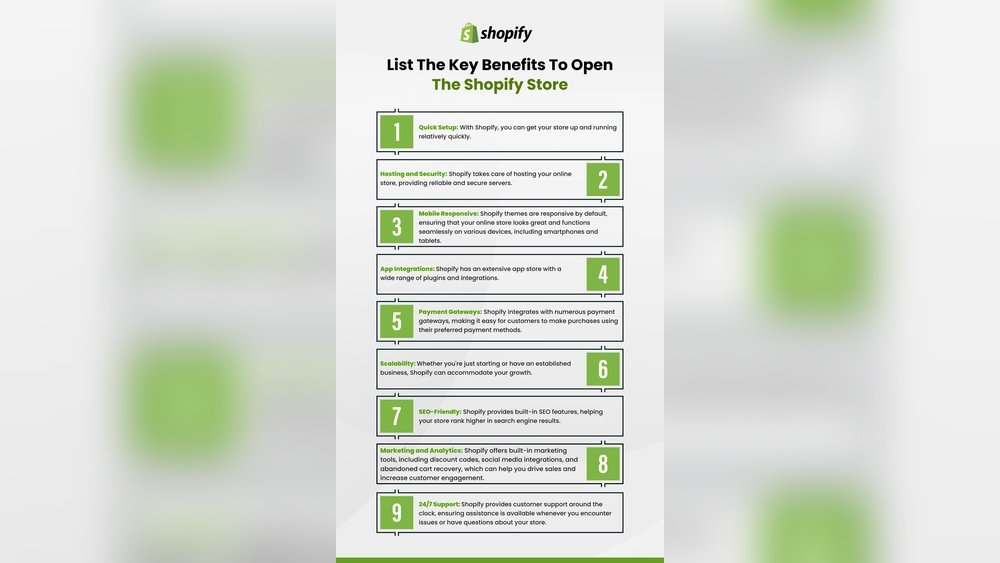
Ready to turn your ideas into a thriving online business? Starting a Shopify store is one of the smartest ways to sell products online without the hassle of managing complex websites.
But where do you begin? What costs should you expect? And how can you set up your store so it attracts customers and makes sales? In this guide, you’ll find simple, clear steps to launch your Shopify store confidently, with tips that save you time and money.
Whether you’re starting from scratch or want to improve your existing setup, keep reading to discover everything you need to get your Shopify store up and running successfully. Your online business journey starts here.

Credit: dodropshipping.com
Choosing Your Niche
Choosing your niche is a crucial step when starting a Shopify store. It sets the foundation for your business and shapes your brand identity. Picking the right niche helps attract the right customers and makes marketing easier.
Focus on finding a niche that matches your interests and has enough demand. Researching popular products and trends can guide your decision. A clear niche helps you stand out in a crowded market.
Identifying Your Interests And Strengths
Start by listing topics or products you enjoy. Your passion can keep you motivated. Also, think about your skills and knowledge. Selling products you understand improves customer trust.
Researching Market Demand
Check what people want by using tools like Google Trends or keyword research. Look for niches with steady or growing interest. Avoid markets that are too small or too crowded.
Analyzing The Competition
Study other Shopify stores in your chosen niche. Note their products, prices, and customer reviews. Find gaps where you can offer something different or better.
Considering Profitability
Calculate costs such as sourcing, shipping, and marketing. Choose products with good profit margins. Avoid niches with very low prices or high fees.

Credit: www.youtube.com
Setting Up Your Shopify Account
Setting up your Shopify account is the first step to launching your online store. The process is simple and does not take long. This section guides you through creating an account and preparing your store for sales.
Creating Your Shopify Account
Go to Shopify’s homepage and click “Start free trial.” Enter your email address, password, and store name. Choose a store name that reflects your brand and is easy to remember. Shopify will check if the name is available.
Entering Your Store Details
Provide basic information like your name, address, and phone number. These details help set up payments and shipping options. Make sure your information is accurate to avoid issues later.
Choosing Your Shopify Plan
Select a plan that fits your budget and business needs. Shopify offers different plans with varying features. You can start with the Basic plan and upgrade as your store grows.
Setting Up Payment Methods
Configure how customers will pay for your products. Shopify Payments is the easiest to use and has no extra fees. You can also add third-party payment gateways like PayPal or Stripe.
Configuring Your Store Preferences
Adjust settings such as currency, time zone, and checkout options. These settings affect how your store operates and how customers experience it. Take time to review and customize these preferences.
Picking The Right Theme
Picking the right theme is a key step in starting a Shopify store. The theme shapes how your store looks and feels to visitors. It helps create a strong first impression. A good theme improves user experience and boosts sales. Choosing the best theme takes time and thought.
Focus on themes that match your brand and products. The right theme should be easy to use and mobile-friendly. It must load quickly to keep customers engaged. A clean design helps visitors find products fast. Select a theme that supports your store’s features.
Choose Between Free And Paid Themes
Shopify offers both free and paid themes. Free themes save money but have fewer features. Paid themes cost more but offer more design options. They often include better support and updates. Pick a theme that fits your budget and needs.
Check Theme Responsiveness
Many people shop on phones or tablets. A responsive theme adjusts to different screen sizes. This keeps your store easy to use on any device. Test themes on mobiles before deciding. A responsive theme can improve sales and search rankings.
Look For Fast Loading Times
Slow themes cause visitors to leave quickly. Choose themes optimized for speed. Fast loading improves user experience and SEO. Avoid themes with too many heavy images or scripts. A quick theme helps keep customers on your site longer.
Consider Customization Options
Good themes allow easy changes to colors, fonts, and layout. This helps make your store unique. Avoid themes that need coding to customize. Pick themes with simple settings and drag-and-drop features. Customization helps your store stand out.
Read Reviews And Ratings
Reviews show real user experiences with themes. Check ratings on the Shopify theme store. Look for themes with positive feedback and active support. Avoid themes with many complaints or bugs. Reviews help you choose a reliable theme.
Adding Products Effectively
Setting up payments and shipping is vital for your Shopify store. Customers need smooth payment options and clear shipping rules. These settings affect sales and customer trust. Proper setup helps your store run efficiently and keeps buyers happy.
Configuring Payment Methods
Choose payment gateways that fit your business. Shopify Payments is easy and integrates well. It supports credit cards and digital wallets. Add other gateways like PayPal or Stripe for more options. Enable multiple payment methods to suit different buyers. Check fees and payout times for each gateway.
Setting Up Shipping Rates
Define shipping zones based on where you deliver. Set rates by weight, price, or location. Offer free shipping for orders above a limit to encourage sales. Use carrier-calculated shipping for real-time rates. Make sure your shipping prices cover your costs without scaring customers away.
Managing Shipping Options
Offer various delivery speeds like standard and express. Allow local pickup or delivery if possible. Display clear shipping times at checkout to set customer expectations. Use Shopify’s shipping labels to save time and money. Keep shipping policies simple and easy to find on your site.
Configuring Payments And Shipping
Customizing your Shopify store pages shapes how visitors see your brand. It helps create a unique shopping experience. Each page can reflect your style and message clearly.
Shopify offers tools to change layouts, colors, and content easily. Custom pages keep customers interested and encourage sales. Small changes can make a big difference.
Editing Your Homepage Layout
The homepage is the first thing visitors see. Use Shopify’s drag-and-drop editor to arrange sections. Add banners, featured products, and collections. Keep it simple and clean for easy navigation.
Personalizing Product Pages
Product pages must show clear images and descriptions. Add custom text to explain features and benefits. Include customer reviews and FAQs to build trust. Use Shopify apps to add extra details if needed.
Customizing The About And Contact Pages
Tell your brand story on the About page. Use friendly language and share your mission. The Contact page should have easy-to-use forms. Add phone numbers, emails, and social media links for support.
Using Themes And Templates
Themes control your store’s overall look. Choose a free or paid theme that fits your style. Customize fonts, colors, and buttons in the theme settings. Templates help create consistent page designs.
Adding Custom Code For Advanced Changes
Shopify allows editing HTML and CSS for deeper customization. Use this to change layouts or add special features. Be careful with code changes to avoid errors. Backup your store before making edits.
Customizing Store Pages
Selecting a domain name is a crucial step when starting a Shopify store. It is the first impression customers get. A good domain name makes your store easy to find and remember.
Choose a domain that matches your brand. It should be short, simple, and clear. Avoid using numbers or special characters. These can confuse customers.
Think about keywords related to your products. Including keywords can help your store rank better in search engines. Make sure the domain sounds natural and not forced.
Select A Domain That Reflects Your Brand
Your domain name should show what your store is about. Use your store name or main product in the domain. This builds trust and helps customers recall your site.
Keep It Short And Easy To Spell
Short domains are easier to type and less likely to be misspelled. Avoid long or complicated words. Simple domains improve user experience and reduce errors.
Use A .com Extension For Credibility
.com is the most popular domain extension. It looks professional and is easy to remember. Other extensions like .net or .store are options but less common.
Check Domain Availability And Trademark Issues
Before buying, verify if the domain is free to use. Use domain search tools on Shopify or other registrars. Avoid names that might infringe on trademarks.
Consider Future Growth And Expansion
Pick a domain that works even if your product line expands. Avoid names tied to one product only. This helps keep your branding flexible.
Selecting A Domain Name
Estimating startup costs helps plan your budget for a Shopify store. Knowing expenses early avoids surprises and keeps your business on track.
Costs include initial setup, monthly fees, and extras like apps or marketing. Each element affects your overall investment.
Initial Setup Costs
Starting a Shopify store usually costs between $10 and $350. This includes domain registration, logo design, and themes.
Choose a free theme to save money or pay $100-$180 for a premium design. Domain names often cost around $10 to $30 per year.
Monthly Recurring Costs
Shopify plans start at $29 per month for basic features. Higher plans cost $79 or $299 per month with more tools.
Transaction fees apply if you use payment gateways outside Shopify Payments. Fees usually range from $0.30 per sale plus a percentage.
Apps and add-ons can add $5 to $100 monthly, depending on your store’s needs. Marketing costs vary widely based on strategies used.
How To Estimate Your Costs
List all expected expenses, including Shopify fees and apps. Budget for a paid theme or use a free one to reduce initial costs.
Include monthly app subscriptions and transaction fees in your calculations. Factor in marketing budgets for ads or promotions.
Review your list regularly to adjust spending as your store grows. Clear estimates help keep your Shopify business profitable.

Credit: www.youtube.com
Estimating Startup Costs
Managing Shopify fees is essential for running a profitable online store. These fees affect your overall costs and profit margins. Understanding each fee helps you plan your budget better.
Shopify fees include monthly plans, transaction fees, and app costs. Keeping track of these fees avoids surprises and keeps your store running smoothly.
Understanding Shopify Monthly Plans
Shopify offers several monthly plans. The basic plan starts at $29 per month. Other plans like Shopify and Advanced Shopify cost $79 and $299 respectively. Each plan has different features suitable for various business sizes.
Choose a plan based on your store needs. Upgrading plans gives you more tools and lower transaction fees.
Transaction Fees And Payment Processing
Shopify charges transaction fees on every sale. Using Shopify Payments removes extra fees, but other payment gateways add fees up to 2%. Each transaction also has a fixed fee, usually $0.30.
Calculate fees carefully. These costs add up with each sale and impact your profits.
Costs Of Shopify Apps And Add-ons
Apps add extra features to your store but often come with monthly charges. Some apps cost $5 to $100 each month. Choose only necessary apps to control expenses.
Test free apps before buying. Review app costs regularly to avoid overspending.
Tips To Estimate Your Shopify Costs
Start with the basic plan to save money. Add costs of paid themes if you want a custom look. Estimate app fees based on your store needs. Include transaction fees in your pricing model.
Keep a clear budget for all Shopify fees. This helps you set prices that cover costs and earn profits.
Managing Shopify Fees
Launching marketing strategies is a crucial step after setting up your Shopify store. It helps attract visitors and turns them into customers. Without marketing, your store might stay hidden from potential buyers.
Effective marketing builds brand awareness and drives sales. Start with clear goals and a plan that fits your budget. Focus on methods that reach your target audience directly and quickly.
Creating Social Media Campaigns
Social media platforms connect you with millions of users. Choose platforms where your audience spends time. Post regularly with engaging content and product highlights. Use paid ads to increase reach and target specific groups. Track performance to improve future campaigns.
Using Email Marketing
Email marketing keeps customers informed and interested. Collect emails through sign-up forms or discounts. Send newsletters, product updates, and special offers. Personalize messages to make customers feel valued. Monitor open rates and clicks to refine your approach.
Implementing Search Engine Optimization (seo)
SEO helps your store appear in search engine results. Use keywords relevant to your products in titles and descriptions. Write clear, helpful content that answers customer questions. Optimize images with descriptive tags. A well-optimized store attracts free, organic traffic.
Running Paid Advertising
Paid ads bring fast traffic to your store. Use Google Ads or social media ads to target buyers actively searching for products. Set a daily budget to control costs. Test different ads to see which performs best. Adjust your strategy based on results.
Collaborating With Influencers
Influencers can introduce your products to a wider audience. Find influencers who match your brand style and have engaged followers. Offer free products or pay for promotions. Authentic reviews build trust and encourage purchases. Track the impact of each collaboration.
Frequently Asked Questions
How Much Does It Cost To Open A Shopify Store?
Opening a Shopify store costs $29/month for the basic plan. Additional expenses include themes, apps, and transaction fees. Initial setup can range from $0 to $500+, depending on choices. Budget for marketing and potential app subscriptions to ensure smooth operation.
Is Shopify Profitable For Beginners?
Yes, Shopify can be profitable for beginners with low startup costs and effective marketing. Success depends on product selection and effort.
How Much Does Shopify Take From A $100 Sale?
Shopify charges a 2. 9% payment processing fee plus $0. 30 per $100 sale on the Basic plan. Total fee: $3. 20.
What Are The Requirements To Open A Shopify Store?
To open a Shopify store, you need a valid email, a product or service to sell, and a payment method. Choose a Shopify plan and set up your store details.
How Much Does It Cost To Start A Shopify Store?
Starting a Shopify store costs $29 per month for the basic plan, plus transaction fees and optional app costs.
What Are The First Steps To Create A Shopify Store?
Sign up for Shopify, choose a store name, select a theme, and add your products.
Can I Start A Shopify Store Without Technical Skills?
Yes, Shopify is user-friendly and designed for beginners without coding knowledge.
How Do I Choose The Right Shopify Plan?
Pick a plan based on your budget and business size; start with the Basic plan if unsure.
What Payment Methods Can I Use On Shopify?
Shopify supports credit cards, Shopify Payments, PayPal, and many other payment gateways.
Do I Need To Buy A Domain For My Shopify Store?
You can buy a domain through Shopify or use a free myshopify. com domain.
Conclusion
Starting a Shopify store is simple with clear steps and planning. Choose your products, set up your store, and pick the right plan. Keep an eye on costs like themes, apps, and transaction fees. Promote your store to reach customers and grow sales.
Stay patient and learn from each step you take. Your online business can grow with time and effort. Now is the time to begin your Shopify journey confidently.





