Ready to get your business noticed online without spending a dime? You don’t need to be a tech expert or hire expensive developers to create a professional website.
Imagine having a sleek, easy-to-navigate site that showcases your products or services, builds trust with customers, and drives sales—all built by you, for free. In this guide, you’ll discover simple steps and powerful tools that let you make a business website without any upfront costs.
Stick with me, and you’ll have your online presence up and running faster than you thought possible. Let’s dive in!
Choose The Right Platform
Choosing the right platform is the first important step to create a free business website. The platform you pick affects how easy it is to build and manage your site. It also impacts the look and features your website can have. Some platforms focus on simple design, while others offer more tools for growth.
Selecting the right platform saves time and effort. It helps you create a website that fits your business needs and style. Many free platforms offer templates, drag-and-drop editing, and hosting. These make website building fast and easy, especially for beginners.
What To Look For In A Website Platform
Find a platform that is simple to use. It should have a clear interface and tools to help you build your site. Templates should match your business type. Check if the platform offers mobile-friendly designs. Mobile use is growing fast, so your site must look good on phones and tablets.
Consider the storage space and bandwidth limits. Free plans often have restrictions. Make sure these limits meet your needs. Also, look at any ads or branding the platform might add to your site. Some platforms place their logos or ads on free websites.
Popular Free Website Builders
Wix is a popular choice with many templates and easy editing. It uses drag-and-drop tools and offers a free subdomain. Canva allows simple website creation with a focus on design. It is great for sites that need strong visuals. Google Sites is very basic but totally free with no ads. It works well for simple business sites or portfolios.
Each platform has unique features. Wix gives more design freedom. Canva focuses on stylish, visual content. Google Sites is best for straightforward websites without extra features.
Upgrade Options And Limitations
Free plans usually come with limits. You may not get a custom domain name. The platform’s name will appear in your web address. Storage and bandwidth might be low. Some advanced features are locked behind paid plans.
Look at upgrade options if you want to grow your website. Paid plans often remove ads and allow custom domains. They offer more storage and better support. Start with a free plan to learn the platform. Upgrade only if your business needs more features.

Credit: www.youtube.com
Create A Free Account
Creating a free account is the first step to building your business website. It gives you access to website builders and their tools.
Most platforms ask for a few basic details like your name, email, and a password. This process takes only a couple of minutes.
Once your account is ready, you can start designing your site without any cost.
Create Your Account On A Website Builder
Choose a website builder that offers free plans, such as Wix, Weebly, or Google Sites. Visit their homepage and find the sign-up button.
Fill in the registration form with your information. Use an email you check often to receive important updates.
Verify Your Email Address
After registration, check your email inbox for a verification message. Click the link inside to confirm your account.
Email verification helps protect your account and ensures you can recover it if needed.
Set Up Your Profile
Once logged in, update your profile settings. Add details like your business name and contact info.
This step personalizes your experience and helps your website look more professional.
Pick A Template
Picking the right template is a key step in making a business website for free. A template sets the look and feel of your site. It helps you start with a professional design without building from scratch. Templates save time and make your website look good on any device.
Choose a template that matches your business style. It should reflect your brand colors and tone. A clear layout helps visitors find important information fast. The template should also work well with your website builder’s tools.
Understand Your Business Needs
Think about what your website must do. Sell products, show services, or share contact info? Pick a template made for your type of business. This makes it easier to add the right sections and content later.
Look For Mobile-friendly Templates
Many people use phones to visit websites. Choose a template that looks good on small screens. Mobile-friendly templates improve user experience and help your site rank better on Google.
Check Customization Options
Not all templates offer the same changes. Select one you can easily edit. Change colors, fonts, and images to match your brand. A flexible template lets you create a unique look without coding.
Preview Templates Before Choosing
Most website builders let you preview templates. Use this feature to see how your content will appear. Check all pages and features. This helps avoid surprises after you start building.
Customize Your Design
Customizing your website design is key to making your business site unique and inviting. A well-tailored design helps visitors understand your brand and message quickly. It also improves user experience and keeps people engaged longer.
Many free website builders offer easy tools to change colors, fonts, and layouts. These options let you match your site to your business style without coding skills. Focus on clear navigation and a clean look to make your site professional and easy to use.
Choose A Template That Fits Your Brand
Start by selecting a template that matches your business theme. Templates are pre-made designs that you can adjust. Pick one with the right color scheme and layout. This saves time and gives your site a consistent feel.
Modify Colors And Fonts
Colors and fonts set the mood of your website. Use your brand colors to create trust and recognition. Choose simple fonts that are easy to read on all devices. Keep font sizes large enough for comfortable reading.
Arrange Your Layout For Easy Navigation
Place important elements like menus, contact info, and calls to action where visitors see them first. Avoid clutter by spacing out text and images. A clean layout helps visitors find information quickly and reduces bounce rates.
Add Your Own Images And Logo
Use high-quality images that relate to your business. Your logo should be clear and placed prominently. Personalized visuals make your site memorable and build credibility with visitors.
Preview And Test Your Design
Check how your website looks on desktop and mobile devices. Make sure all links work and pages load fast. Testing helps you fix issues before publishing your site live.
Add Essential Pages
Adding essential pages is a key step in creating a business website. These pages provide visitors with important information about your company. They help build trust and guide users through your site. Essential pages also improve your site’s SEO by organizing content clearly. Focus on pages that explain who you are, what you offer, and how people can contact you.
About Us Page
The About Us page tells your story. Share your mission, values, and background. Introduce your team or founder to create a personal touch. Use simple language to explain why your business exists. This page helps visitors connect with your brand and understand your purpose.
Products Or Services Page
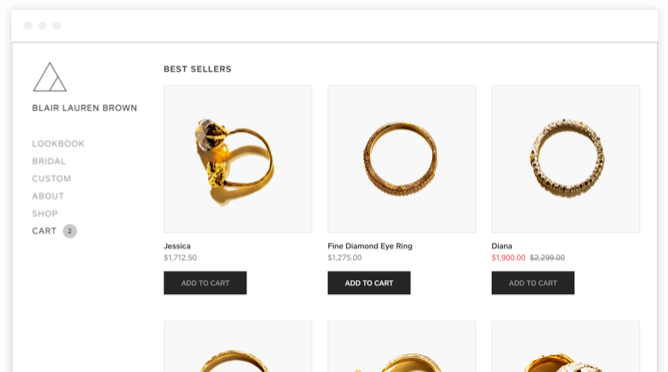
Showcase your products or services clearly. List each item with a short description. Include prices or how customers can get a quote. Use images to make this page attractive. This page guides visitors to understand what you offer and why they should choose you.
Contact Page
The Contact page must be easy to find. Include your phone number, email, and physical address if available. Add a contact form for quick messages. Make sure visitors know how to reach you for questions or support. This page builds trust and encourages communication.
Faq Page
Answer common questions on your FAQ page. Cover topics like shipping, returns, or service details. Keep answers brief and clear. This page saves time by reducing repeated inquiries. It also helps visitors feel confident about your business.
Credit: www.weebly.com
Optimize For Mobile
Optimizing your business website for mobile is essential. Most users now visit sites using smartphones or tablets. A mobile-friendly site ensures visitors have a smooth experience. This can increase engagement and help your site rank better on search engines.
Use A Responsive Design
Choose a website builder that offers responsive templates. These templates adjust automatically to any screen size. Responsive design prevents users from zooming or scrolling sideways. It makes your site look good on phones, tablets, and desktops.
Keep Navigation Simple
Mobile screens are small. Use a simple menu that is easy to tap. Avoid too many buttons or links close together. Clear navigation helps visitors find information quickly without frustration.
Optimize Images And Media
Large images slow down your site on mobile. Compress images before uploading them. Use formats like JPEG or WebP for faster loading. Avoid auto-playing videos or heavy animations that drain data.
Test Your Site On Multiple Devices
Check how your website looks on different phones and tablets. Use free online tools or the preview feature in your website builder. Testing helps you spot layout issues and fix them early.
Connect A Free Subdomain
Connecting a free subdomain is a smart step to get your business website online without any cost. A subdomain is a web address that includes the name of the website builder or hosting platform. It lets you publish your site quickly while keeping expenses low.
Many free website builders offer a subdomain as part of their free plan. This means you do not need to buy a domain name right away. Your website address will look something like yourbusiness.buildername.com.
Choose A Website Builder Offering Free Subdomains
Select a platform that provides free subdomains. Popular options include Wix, Weebly, Google Sites, and Canva. Each one gives you a unique subdomain tied to their brand.
Sign up for a free account on your chosen platform. No payment or credit card is required to get started. This keeps the process simple and accessible.
Customize Your Subdomain Name
Most builders allow you to pick a custom subdomain name. Choose a name that matches your business or brand. Keep it short, clear, and easy to remember.
This helps visitors find your site easily. A relevant subdomain looks more professional and builds trust.
Publish Your Website On The Free Subdomain
After building your website, publish it using the free subdomain provided. Your site becomes live on the internet without any hosting fees.
This method is perfect for startups or small businesses testing their online presence. You can upgrade to a custom domain later as your business grows.
Publish Your Website
Publishing your website is the final step to make it accessible online. After designing and editing, the site needs to go live. This allows visitors, customers, and search engines to find your business.
Most free website builders offer easy publishing options. You simply click a button, and your site appears on the web. The process takes just a few minutes and requires no technical skills.
Choose Your Publishing Platform
Select a website builder that fits your business needs. Popular free options include Wix, Weebly, Google Sites, and Canva. Each platform provides hosting and a free subdomain.
The subdomain usually looks like this: yourname.platformname.com. It helps you get online quickly without buying a domain.
Review Your Website Before Publishing
Double-check all content, images, and links on your website. Make sure everything loads correctly and looks good on desktop and mobile. Preview your site in the builder to catch errors.
Correct typos and broken links to improve user experience. A clean, professional site attracts more visitors and builds trust.
Click the “Publish” button in your website builder’s editor. Your site will be live on the internet instantly. Share your website address with customers and on social media.
Remember, free plans may show the builder’s branding or ads on your site. These do not affect your content but signal the site is created using a free service.
Promote Your Site Online
Promoting your website online is essential to attract visitors and grow your business. Without promotion, even the best website can remain unseen. Use simple methods to share your site and reach potential customers quickly. Focus on clear, easy steps that anyone can follow.
Optimize For Search Engines
Use keywords related to your business throughout your site. Add clear titles and descriptions for each page. This helps search engines show your website in relevant searches. Write simple, helpful content that answers common questions. This improves your site’s ranking and visibility.
Share On Social Media
Create accounts on popular social media platforms like Facebook and Instagram. Post regularly about your products or services. Include your website link in every post. Engage with followers by answering comments and messages. Social media helps you reach a wider audience quickly.
List Your Business Locally
Register your website on local business directories. Google My Business is a free tool to appear in local searches. Add your address, phone number, and website link. Positive reviews from customers improve trust and attract more visitors. Local listings help nearby customers find your business easily.

Credit: www.canva.com
Consider Upgrading Options
After creating a free business website, consider upgrading options. Free plans work well to start. They have limits like storage, features, and custom domains. Upgrading can improve your website’s look and function. It helps build trust with visitors and grow your business.
Choosing the right upgrade depends on your business goals. Think about what features you need next. Upgrades often include removing ads, adding a custom domain, and more support. These changes give your site a professional edge and better usability.
Custom Domain Benefits
A custom domain makes your website address simple and memorable. Instead of a long subdomain, you get a unique name like www.yourbusiness.com. This looks professional and builds trust with customers. It also helps with search engine ranking and brand recognition.
Removing Ads And Branding
Free website plans often show ads or the platform’s branding. These can distract visitors and reduce credibility. Upgrading removes these ads and branding. Your site looks clean and focused only on your business. This creates a better experience for visitors.
Access To Advanced Features
Paid plans unlock extra tools and features. You can add online stores, booking systems, or more storage space. These features help your business grow and serve customers better. Some upgrades also provide analytics to track website traffic and behavior.
Better Customer Support
Free plans usually offer limited support. Paid plans give faster and more reliable help. This is important if your website faces technical issues. Good support keeps your website running smoothly and reduces downtime.
Frequently Asked Questions
Can I Build My Own Website For Free?
Yes, you can build your own website for free using platforms like Wix, Weebly, Canva, or Google Sites. Free plans include templates, drag-and-drop editors, and a subdomain. Expect some branding or ads. For custom domains and advanced features, consider upgrading to paid plans.
Is Google Business Website Free?
Google Business Website is free to create using Google Sites. It includes a free subdomain and basic features. Custom domains or advanced options require paid upgrades.
What Website Builder Is 100% Free?
Google Sites offers a 100% free website builder with no ads, unlimited pages, and easy drag-and-drop editing. It includes a free subdomain.
Is Wix Completely Free?
Wix offers a free plan with a Wix subdomain and ads. Full features, custom domains, and ad removal require paid upgrades.
What Platforms Offer Free Business Website Building?
Platforms like Wix, Weebly, Google Sites, and Canva provide free plans for building websites.
Can I Get A Custom Domain For Free?
Free plans usually offer a subdomain; custom domains require paid upgrades.
Are Free Websites Suitable For Online Stores?
Basic online stores are possible, but advanced e-commerce features often need paid plans.
How Easy Is It To Use Free Website Builders?
Most have drag-and-drop editors, making website creation simple for beginners.
Will Free Websites Display Ads Or Branding?
Yes, free plans often show platform branding or ads on your site.
Can I Add My Own Images And Text?
Free builders allow uploading images and adding text easily to templates.
Conclusion
Building a free business website is simple and accessible to all. Choose a platform that matches your needs and start with a template. Customize your site by adding text and images easily. Publishing your site puts your business online without any cost.
Keep in mind, free plans include subdomains and some ads. Upgrading offers more features and a custom domain. Start today and give your business a strong online presence. A website helps customers find and trust your business quickly.





