If you’re ready to stop your FIXD subscription but aren’t sure how, you’re in the right place. Cancelling a subscription can sometimes feel confusing or frustrating, especially when you just want a quick, hassle-free way to end it.
Whether you signed up through the FIXD app, website, or a third-party store like Google Play or the Apple App Store, we’ll guide you step-by-step through the easiest way to cancel your plan. Keep reading to take control of your FIXD subscription and avoid any unwanted charges.
Subscription Plans And Pricing
Understanding Fixd’s subscription plans and pricing helps you decide which option suits you best. Fixd offers flexible plans that fit different user needs and budgets. Choose from weekly, monthly, or yearly subscriptions for premium features.
The premium subscription adds extra benefits like detailed vehicle diagnostics and alerts. You can also use Fixd without premium, but some features will be limited. Knowing the costs makes managing or canceling your plan easier.
Weekly Subscription Plan
The weekly plan costs $7.99. It is ideal for short-term users or those who want to try the service. This plan renews automatically unless you cancel it before the end of the week.
Monthly Subscription Plan
The monthly plan is priced at $12.99. It suits users who want regular access without a long-term commitment. This plan provides continuous service with an easy cancellation option.
Yearly Subscription Plan
The yearly plan costs $99.99. It offers the best value for users who want Fixd’s premium features all year. Paying annually saves money compared to monthly payments and ensures uninterrupted service.
Benefits Of Fixd Premium
FIXD Premium offers useful features that improve your car care experience. It provides detailed diagnostics for your vehicle’s health. This helps you find problems early and save on costly repairs.
The premium plan includes unlimited vehicle scans. You can check your car anytime without limits. This is helpful for regular maintenance and quick checks before trips.
Comprehensive Vehicle Health Reports
FIXD Premium gives clear reports about your car’s issues. It explains the problem in simple words. This helps you understand what needs fixing without confusion.
Multiple Vehicle Support
You can monitor more than one car with one subscription. Ideal for families or small businesses with several vehicles. This keeps all your cars’ health information in one place.
Real-time Alerts
The app sends instant alerts if your car has a new problem. It warns you about urgent issues that need quick attention. This helps prevent breakdowns and unsafe driving conditions.
Maintenance Reminders
FIXD Premium tracks your car’s service schedule. It reminds you when it’s time for oil changes, tire rotations, and other upkeep. Staying on schedule extends your vehicle’s life.
Access To Repair Cost Estimates
The premium service shows estimated repair costs for detected issues. This helps you plan your budget before visiting a mechanic. You avoid unexpected repair bills and negotiate better.
Canceling Via Fixd App
Canceling your FIXD subscription via the FIXD app is simple and quick. The app lets you manage your subscription directly from your phone. This method saves time and avoids the need to use a web browser or third-party sites.
Follow these steps carefully to ensure your subscription ends properly without extra charges. The app guides you through the cancellation process with clear instructions.
Access Account Settings
Open the FIXD app on your smartphone. Tap the profile icon or menu button. Find and select the “Account Settings” option. This section holds all your personal and subscription details.
Manage Subscription Options
Inside Account Settings, look for “Subscription” or “Billing.” Tap on it to view your current FIXD subscription plan. You will see options to upgrade, downgrade, or cancel your plan here.
Follow Cancellation Prompts
Choose the “Cancel Subscription” option. The app will show cancellation prompts. Read each prompt carefully. Confirm your decision when asked to complete the cancellation. A confirmation message will appear after successful cancellation.

Credit: www.youtube.com
Canceling Via Website
Canceling your Fixd subscription through the website is a simple process. It allows you to manage your account directly without extra steps. Follow the clear steps below to complete your cancellation quickly.
Log In To Your Account
Start by visiting the Fixd official website. Enter your email and password to log in. Make sure your credentials are correct to access your account.
Navigate To Subscription Settings
After logging in, find the “Account” or “Subscription” section. This area holds all your plan details. Click on it to open your subscription management options.
Complete Cancellation Steps
Look for “Manage Subscription” or “Cancel Subscription” buttons. Click on the cancellation option and follow the instructions shown. Confirm your cancellation to stop future payments.
Canceling Through Apple App Store
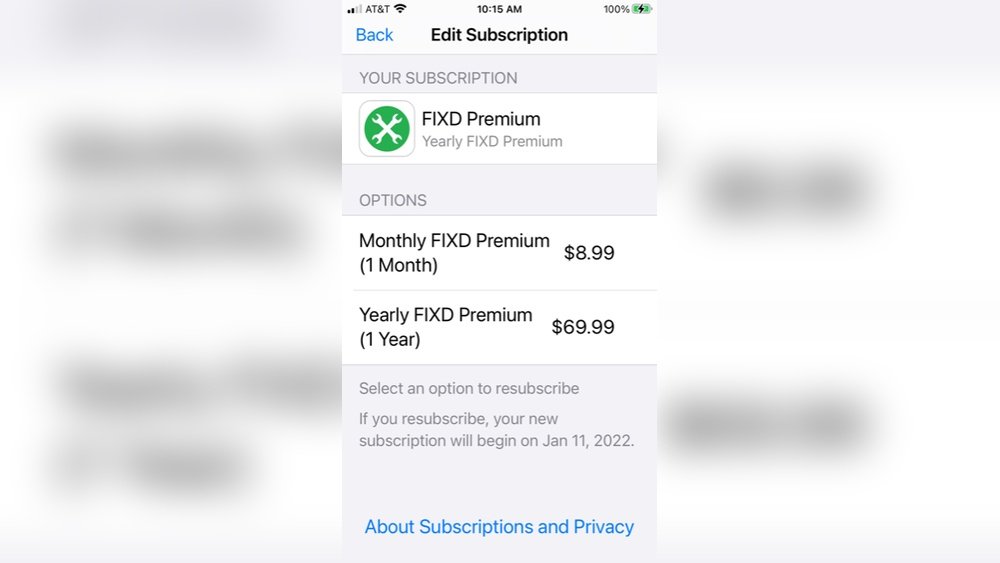
Cancelling your FIXD subscription through the Apple App Store is a simple process. This method applies if you subscribed using your iPhone or iPad. Managing subscriptions directly in your device settings saves time and ensures you avoid unexpected charges.
Follow a few clear steps to find and cancel your FIXD subscription quickly. You do not need to open the FIXD app for this. Instead, use the iPhone settings to access your subscription details.
Open Iphone Settings
Start by unlocking your iPhone and opening the Settings app. The icon looks like a gray gear. Scroll down to find your Apple ID section at the top of the screen. This area controls your account, payments, and subscriptions.
Access Apple Id Subscriptions
Tap your Apple ID name to enter the account menu. Then, select “Subscriptions” to view all active and expired plans. This list shows every app subscription linked to your Apple ID, including FIXD.
Select And Cancel Fixd Subscription
Look for the FIXD subscription in the list. Tap it to see details such as billing cycle and price. Choose “Cancel Subscription” and follow the prompts to confirm. Your subscription will remain active until the current period ends.

Credit: www.fixd.com
Canceling Through Google Play Store
Cancelling your FIXD subscription through the Google Play Store is simple and quick. This method applies if you subscribed using your Android device. The process stops future payments and keeps your subscription active until the current period ends. Follow these clear steps to avoid any confusion.
Open Google Play Subscriptions
Start by unlocking your Android phone or tablet. Open the Google Play Store app. Tap your profile picture in the top right corner. Select “Payments & subscriptions” from the menu. Tap on “Subscriptions” to see all your active subscriptions.
Choose Fixd Subscription
Scroll through your list to find the FIXD subscription. Tap on FIXD to open the subscription details. Here, you can check the next billing date and plan type. Confirm you have selected the correct subscription before proceeding.
Confirm Cancellation
Tap the “Cancel subscription” button at the bottom of the screen. Google Play will ask you to confirm your choice. Follow the instructions on the screen to finalize the cancellation. You will receive an email confirming your subscription has been canceled.
What Happens After Cancellation
After canceling your FIXD subscription, it is important to understand what happens next. Knowing what to expect helps you manage your account and avoid surprises. This section explains the changes in your account and billing after cancellation.
Access To Features Post-cancellation
Once you cancel, you keep access to premium features until the current billing period ends. After that, your account reverts to the free version. The free version offers basic vehicle diagnostics but lacks advanced reports and alerts. You will no longer receive premium updates or priority support. Data saved during your subscription remains accessible, but some features may be limited.
Billing And Refund Policies
FIXD does not offer refunds for partial billing periods. You pay only for the current subscription cycle, even if you cancel early. Future payments stop immediately after cancellation. If you subscribed through Google Play or Apple, check their refund rules. Any charges made before cancellation remain your responsibility. Keep your cancellation confirmation for reference in case of billing issues.

Credit: fixd.zendesk.com
Troubleshooting Cancellation Issues
Troubleshooting cancellation issues can save time and reduce frustration. Many users face common problems when trying to cancel their FIXD subscription. Understanding these problems helps resolve them quickly. This section covers typical issues and clear steps to fix them.
Common Problems Faced
One common problem is not finding the cancel option in the app or website. Some users subscribe through third-party stores like Google Play or Apple App Store. This requires canceling through those platforms, which can confuse users. Another issue is technical glitches that prevent the cancellation page from loading. Sometimes, users receive error messages or the cancellation does not process immediately. Lack of confirmation email also causes uncertainty about successful cancellation.
Step-by-step Solutions
First, check if you subscribed directly on FIXD or through a third party. For direct subscriptions, log in to the FIXD app or website. Go to your account or subscription settings. Click on “Cancel Subscription” and follow the prompts carefully. Wait for a confirmation message or email.
If you subscribed via Google Play, open the Google Play Store app. Tap the menu and select “Subscriptions.” Find FIXD subscription and tap “Cancel Subscription.” Follow the instructions on screen. For Apple App Store, open Settings on your device. Tap your name, then “Subscriptions.” Select FIXD and cancel it there.
In case of error messages or issues, try restarting the app or device. Clear the app cache or update to the latest version. If problems persist, contact FIXD customer support. Provide your device ID and purchase information for faster help.
Contacting Fixd Support
Contacting FIXD support is an important step when canceling your subscription. Support agents can guide you through the cancellation process and resolve any issues. They help ensure your subscription ends smoothly without unexpected charges.
Knowing when to reach out and what information to provide can speed up the process. FIXD offers several support channels to fit your needs and preferences. Choose the best way to contact them for quick assistance.
When To Reach Out
Reach out to FIXD support if you cannot cancel your subscription yourself. Contact them if you see unexpected charges or errors during cancellation. Also, contact support if you need confirmation that your subscription is canceled.
Information To Provide
Provide your FIXD account email or username to verify your identity. Include your device ID if you use the FIXD sensor with your account. Share the date of your subscription purchase and the payment method used. Have your purchase receipt or confirmation handy to speed up support.
Support Channels Available
FIXD offers support through their official website contact form. You can also use the FIXD app to send a message to customer service. Email support is available for detailed inquiries. Some users may find phone support helpful if available. Choose the channel that works best for your situation and time.
Tips To Save Money On Fixd
Saving money on FIXD does not require skipping useful features. Understanding the tools available can lower your costs. Smart choices in subscription plans also prevent overspending. This section offers simple tips to help you save money while using FIXD.
Using Free Features Effectively
FIXD offers free features that help monitor your vehicle’s health. Use these features regularly to catch issues early. Basic diagnostics and alerts are available without extra charges. This can reduce the need for costly repairs later. Take full advantage of these free tools before upgrading your plan.
Choosing The Right Subscription Plan
FIXD has several subscription options to fit different needs. Pick a plan based on how often you use the app. Monthly plans suit short-term users, while annual plans save money for regular users. Avoid paying for features you do not need. Review your usage and adjust your plan to avoid unnecessary expenses.
Frequently Asked Questions
How Do I Cancel My Subscription Subscription?
Log in to your FIXD account on the app or website. Go to subscription settings, select “Cancel Subscription,” and confirm. For third-party subscriptions, cancel via Google Play or Apple App Store. Contact FIXD support if you need help.
How Much Is The Fixd Premium Subscription?
The FIXD Premium subscription costs $7. 99 weekly, $12. 99 monthly, or $99. 99 annually. Choose the plan that fits you best.
Can You Use Fixd Without Premium?
Yes, you can use FIXD without the premium subscription. The free version offers basic vehicle diagnostics and alerts. Premium unlocks advanced features like detailed reports and repair cost estimates.
Is Fixd Really Worth It?
FIXD offers affordable vehicle health monitoring and quick issue detection. It’s useful but not all-encompassing. Many find it worth the cost.
How Do I Cancel My Fixd Subscription On The App?
Open the FIXD app, go to Account or Subscription settings, then select Cancel Subscription.
Can I Cancel Fixd Subscription Through Google Play?
Yes, open Google Play, go to Subscriptions, select FIXD, and tap Cancel Subscription.
How To Cancel Fixd Subscription On Iphone?
Open the Settings app, tap your Apple ID, select Subscriptions, find FIXD, and cancel it.
Will I Lose Data After Canceling Fixd Subscription?
You keep basic app data, but premium features will no longer be available.
Can I Cancel Fixd Subscription Anytime?
Yes, you can cancel your FIXD subscription at any time without penalties.
Do I Get A Refund After Canceling Fixd?
Refunds depend on the store’s policy; FIXD itself typically does not refund.
Conclusion
Canceling your FIXD subscription is simple and quick. Access your account on the app or website. Choose the subscription settings and follow the cancellation steps. For subscriptions through Apple or Google, use their platforms to cancel. Keep your device ID and receipt handy if you need support.
Contact FIXD customer service for any cancellation help. Taking these steps ensures you avoid unwanted charges. Stay in control of your FIXD membership easily.





